How to Cite BioRender: Figures and Publication Licenses
Copy a BioRender credit template, find your figure's publication license, and check free-plan, trial, and open-access rules. Sources checked October 2026.
For a journal figure containing BioRender library content, copy the citation and unique figure URL generated with your publication license. For a permitted non-publication use, the standard credit is “Created with BioRender.com.” These are different situations: writing a credit line does not turn a free-plan figure into a licensed journal figure. BioRender's free plan and free trial do not include journal publication rights.
This guide walks through the caption, license download, and checks to make before submission. BioRender's own help articles and pricing page are the sources below, checked October 10, 2026. Its citation article was updated on October 8, so use the current figure-specific citation instead of copying an old example from another paper. Official citation instructions, checked 2026-10.
AI Scientific Image Generator
Need a new custom illustration rather than a library-based figure? Draft one from a description, then review the science and your journal's AI policy.
Draft a scientific illustration →First decide which kind of use you have
| Situation | Credit or license to check | Official source, checked 2026-10 |
|---|---|---|
| Journal figure with BioRender content | Eligible active Premium plan, publication license, generated citation and figure URL | Citation guide |
| Free Basic account | No journal publication or commercial rights; credit alone does not add either | Pricing and free-plan FAQ |
| Free trial | Publication remains restricted until an eligible paid plan starts | Trial restrictions |
| Thesis, poster, presentation, or other permitted non-journal use | Standard BioRender credit or the unique figure URL; check that your plan permits the intended use | Non-published figure guidance |
| Open-access journal using CC BY | Generate the appropriate publication license and include the figure URL and attribution | CC BY publishing |
| Figure made solely from your own uploaded content | BioRender says no publication license or BioRender citation is needed if no BioRender icons, templates, or public community content is used | Own-content exception |
The last row is a narrow exception. A figure is not “solely your own content” just because you arranged the layout or added your own experimental results. Check whether any library icon, template, or community figure remains. Permission for images uploaded from another source is a separate question.
Copyable caption templates
A journal figure with a publication license
Use this as a layout, replacing every bracketed item. The second line should be the actual citation BioRender generates for your exported figure, including its unique URL. Do not invent a short URL, reuse another author's link, or treat this placeholder as evidence of permission.
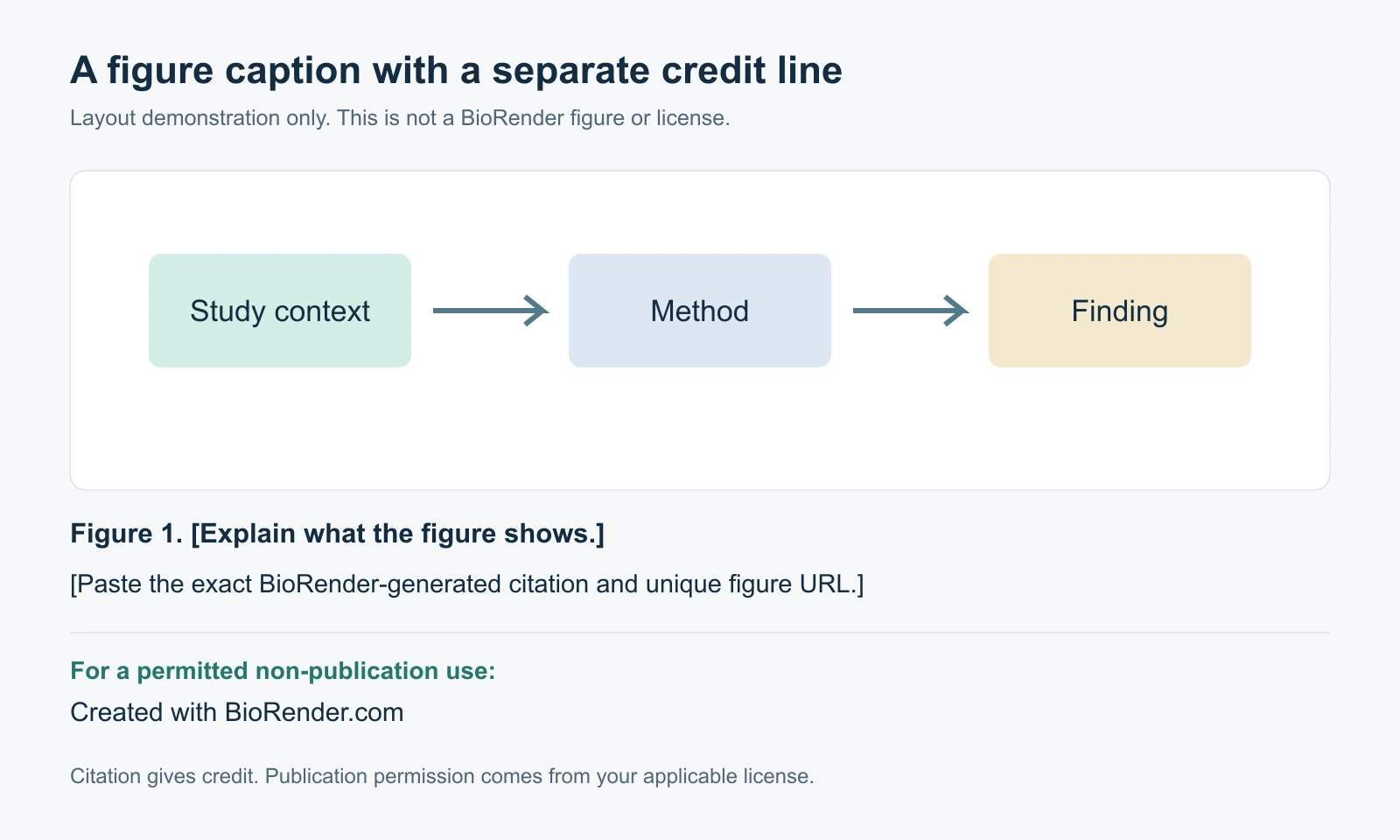
Figure 1. [Explain the experiment, mechanism, or result shown.]
[Paste the exact BioRender-generated citation and unique figure URL.]
The official guide says the generated citation can go in the figure caption, references, or acknowledgments. It also describes a Preview Link that opens the image preview page, where you can copy the in-text citation or an APA-style bibliographic reference. If the journal specifies a location or reference style, follow that instruction while keeping the figure identifiable. BioRender citation guide, checked 2026-10.
Our own precisely rendered layout demonstration, not a BioRender export and not a publication license. The diagram separates the scientific explanation from the credit. Replace placeholders with your own caption and the citation from your license.
A permitted poster, presentation, or thesis use
Created with BioRender.comYou can place that line beneath the visual or in the credit area requested by your institution. BioRender's guide lists posters, presentations, theses, social media, and websites under its non-journal citation examples, with the standard credit or a unique figure URL. That list explains citation wording; it does not give every account unrestricted rights for every website or commercial use. Check the use against your account's license. Official non-published figure guidance, checked 2026-10.
For classroom-focused alternatives, see free BioRender alternatives for teachers. A later journal paper based on a thesis is a new publication use to check, even if the thesis already contains a credit.
An adapted third-party image
[Required attribution and permission statement for the original source.]
[BioRender citation applicable to this figure and use.]
BioRender's current guidance specifically discusses AI-edited or restyled images based on third-party references. A BioRender credit does not replace the original source's attribution or copyright requirements. Record which elements came from that source and check permission for the adaptation before submitting it. The source's required wording takes precedence over this generic layout. Third-party attribution guidance, checked 2026-10.
How to download the publication license
For an open-access resource, the official instructions give the following sequence. This is a summary of BioRender's documented workflow, not a claim that we purchased a subscription or tested a paid export.
- Open the figure on the canvas and select Export. Alternatively, use the figure's three-dot menu in the gallery and choose Export.
- Choose your export settings and enable I would like a publication license with this export.
- Fill in the required figure information. For an open-access publication, select Yes for the open-access question.
- Set when the figure should become publicly accessible. If the publication date is unknown, BioRender allows a future date that you can adjust later.
- Select Download License and save it with your manuscript files.
- Copy the associated citation and unique figure URL. Check that they refer to the final exported version.
Eligibility matters: the article says an active eligible Premium plan is required, and explicitly excludes free-trial accounts and Undergraduate subscriptions from this publication-license feature. Do not infer publication rights from a paid-looking plan name alone. Official open-access license download guide, checked 2026-10.
For a closed-access journal, use BioRender's closed-access guidance linked from its publishing help center and select the actual publication type. Do not answer “Yes” to open access simply to obtain a download. If the applicable terms or required fields are unclear, ask BioRender and the journal before finalizing the license. The articles cited here do not specify one universal permission-letter format accepted by all publishers: not stated.
Keep three files together: the final figure, the downloaded license, and a text copy of its citation. Record which manuscript figure number uses them. This is a practical filing recommendation, not an additional BioRender requirement. It prevents a common administrative mix-up: sending a revised image with the citation for an earlier version.
Can you publish a figure from BioRender's free plan?
Not under the standard free-plan publication terms. The current pricing page lists up to three figures, one Graphing file, free AI credits, templates, and uploads, but explicitly excludes publication and commercial use. A separate free trial lets you explore Premium features, yet its help article still excludes publication rights during the trial. Pricing and trial restrictions, checked 2026-10.
If you already made the figure for a lab meeting, do not assume its availability as a download means it is cleared for a paper. Check the plan and generate the appropriate license through BioRender. Its trial article explains how to start the paid plan early; that action begins a paid subscription, so review the account and billing details yourself before choosing it.
For budgeting, our BioRender pricing guide compares academic and industry plans. If a subscription does not suit your project, our free BioRender alternatives for scientific illustration distinguishes genuinely free editors from free trials and restricted plans. A free editor can still contain icons that require attribution.
Open access, reuse, and figure visibility
For a CC BY open-access figure, BioRender's guide describes attribution to the original author and BioRender, the unique figure URL, a license reference, and identification of modifications when someone adapts the figure. It distinguishes reuse of the completed graphic from extracting individual proprietary BioRender icons for separate redistribution. Official CC BY guide, checked 2026-10.
Do not paste a CC BY statement under a figure until that statement matches its actual license. A paper being open access does not by itself establish the permissions for every third-party element you put into it. Check both the BioRender export and any independently supplied images.
The help center also distinguishes the published image from its editable version. A reader's ability to view a figure URL is not necessarily permission to open your working file for editing. Check the public-page settings, intended access, and publication date before sharing a link with a journal.
There is an ambiguity worth preserving: the CC BY article says the CC BY license cannot be revoked, but a later troubleshooting answer says disabling public access revokes the publication license. These statements refer to different rights or settings without fully explaining the distinction. The effect of disabling access on an already published figure is not clearly stated. Do not rely on disabling access to withdraw an existing CC BY grant; ask BioRender for clarification if this affects your paper. Same official CC BY guide, checked 2026-10.
Revisions and subscription changes
BioRender's open-access export guide says the figure URL is not a live view of every canvas edit: after changing the figure, generate a new publication license to capture the update. Recheck the citation and final image together when a reviewer requests revisions. Export and visibility instructions, checked 2026-10.
The same article says licenses generated under an eligible Premium plan remain valid after a downgrade. This does not establish permission to make and publish new unlicensed figures after cancelling. Keep the license generated for the actual figure and verify the requirements again before exporting a revised or new work.
Checks that prevent permission-related submission queries
These checks follow the official restrictions above; they are not a measured ranking of journal rejection reasons.
| Check | What can go wrong | What to prepare |
|---|---|---|
| Correct account rights | Free plan, trial, or excluded Undergraduate subscription mistaken for publication coverage | An eligible plan and the actual downloaded license |
| Correct figure credit | Generic credit used where a figure-specific citation is required | Generated citation and unique URL |
| Final version | License or preview shows the pre-revision figure | License generated for the revised export |
| Third-party elements | BioRender credit treated as permission for an external source image | Source-specific attribution and any required permission |
| Open-access selection | License type or visibility does not match the journal | Correct publication type and checked access settings |
| File quality | Attribution is correct but dimensions or labels fail the author guide | Separate technical review of the figure |
The first five checks derive from the citation, trial, and license-export guidance, checked 2026-10. For technical delivery, use the target journal's instructions; our TOC graphic requirements table links to those sources.
If you choose ConceptViz for a new figure
ConceptViz creates an illustration draft from a description. It does not provide BioRender assets or a BioRender publication license. Paid-account commercial rights are described in the ConceptViz license, and paid users can download an AI Use & Commercial License Statement documenting their figure. That statement does not guarantee scientific accuracy or journal acceptance.
Free ConceptViz accounts have restricted, watermarked use, so do not describe free signup credits as unrestricted publication rights. Review any generated figure yourself, retain the relevant rights statement, and disclose AI assistance as your journal requires. A statement from a tool cannot override a publisher's prohibition on AI-generated images.
AI Scientific Image Generator
Describe the visual you need, inspect the resulting draft, and check the license and journal policy before using it in a manuscript.
Create a figure draft →Frequently asked questions
How do I cite BioRender in a figure caption?
Copy the citation and unique figure URL generated with the publication license for that figure. Paste it alongside your scientific caption, or in the location required by your journal. The credit does not replace the license.
Is Created with BioRender.com enough?
It is the standard credit BioRender gives for permitted non-publication uses. For a journal figure containing BioRender content, use the generated citation and figure URL associated with the appropriate publication license.
Can I publish a figure made on BioRender Basic?
BioRender Basic does not include publication or commercial rights. The official citation guide separately exempts figures consisting solely of your own content, without any BioRender icons, templates, or public community content.
Does the free trial include publication rights?
No. The trial help article says you cannot publish while on the trial. An eligible paid plan must be active to access publication licensing; the open-access guide also excludes Undergraduate subscriptions.
Where do I download my BioRender publication license?
The open-access guide says to start Export, enable the publication-license option, enter figure and publication details, set the availability date, and select Download License. Use the appropriate instructions for your publication type.
Do I need a reference-list entry?
BioRender says its generated citation can appear in the figure caption, references, or acknowledgments. The preview page provides an in-text citation and APA-style reference. Your journal determines the required location and style.
What if I change the figure after exporting?
The public figure URL does not update with every canvas edit. The official export guide says to generate a new publication license for an updated figure, then check that the exported image and citation match.
Does a ConceptViz license guarantee journal acceptance?
No. The AI Use & Commercial License Statement documents the figure and applicable rights. Authors still have to check scientific accuracy, third-party rights, and the target journal’s AI and artwork policies.
Categories
More Posts
PhD Poster Design Guide: How to Create a Winning Conference Poster (2026)
Complete guide to designing PhD conference posters that stand out. Learn layout, typography, and color schemes, and use free AI tools to build research posters.
Canva Venn Diagram Maker: Complete Guide + Free Alternatives (2026)
Learn how to make a Venn diagram in Canva step by step, see its limitations, and explore the best free alternatives, including AI-powered tools.
Eye Anatomy: The Parts of the Human Eye Explained
A clear guide to eye anatomy: the cornea, iris, pupil, lens, retina, and optic nerve, what each part does, how vision works, and how to read an eye diagram.