AgentExamplesFree ToolsPricingBlogAPI
Start creating

Turn complex ideas into clear visuals.

contact@conceptviz.app
Ask AI about ConceptViz
Product
  • Agent
  • Pricing
  • API
  • Blog
  • FAQ
  • Examples
Use cases
  • Research papers
  • Talks and defenses
  • Medical education
Company
  • About
  • Contact
  • Friends
Legal
  • License
  • Terms
  • Privacy
  • Content Policy
  • Cookies
  • Refund
Community
  • Education Program
Free Tools
  • Animal Cell Diagram
  • Plant Cell Diagram
  • Animal vs Plant Cell
  • Water Cycle Diagram
  • Free Body Diagram
  • More Tools →

Friends links

  • AI PICKS 掲載認定 2026 AUTUMN|ConceptViz
  • LaunchClash
  • Featured on ShowMeBest
  • Launched on StartupBase
  • Featured on Toolfio
  • Featured on ToolPilot
© 2026 ConceptViz. All rights reserved.
Use case · Lab meetings, defenses and conference talks

Figures for lab meetings, defenses and conference talks

A talk lives or dies on a few figures an audience can read from the back of the room. Describe the mechanism, the timeline or the study design and get a slide-ready figure, then ask for changes until it says one thing clearly.

Open AgentTry the research roadmap maker
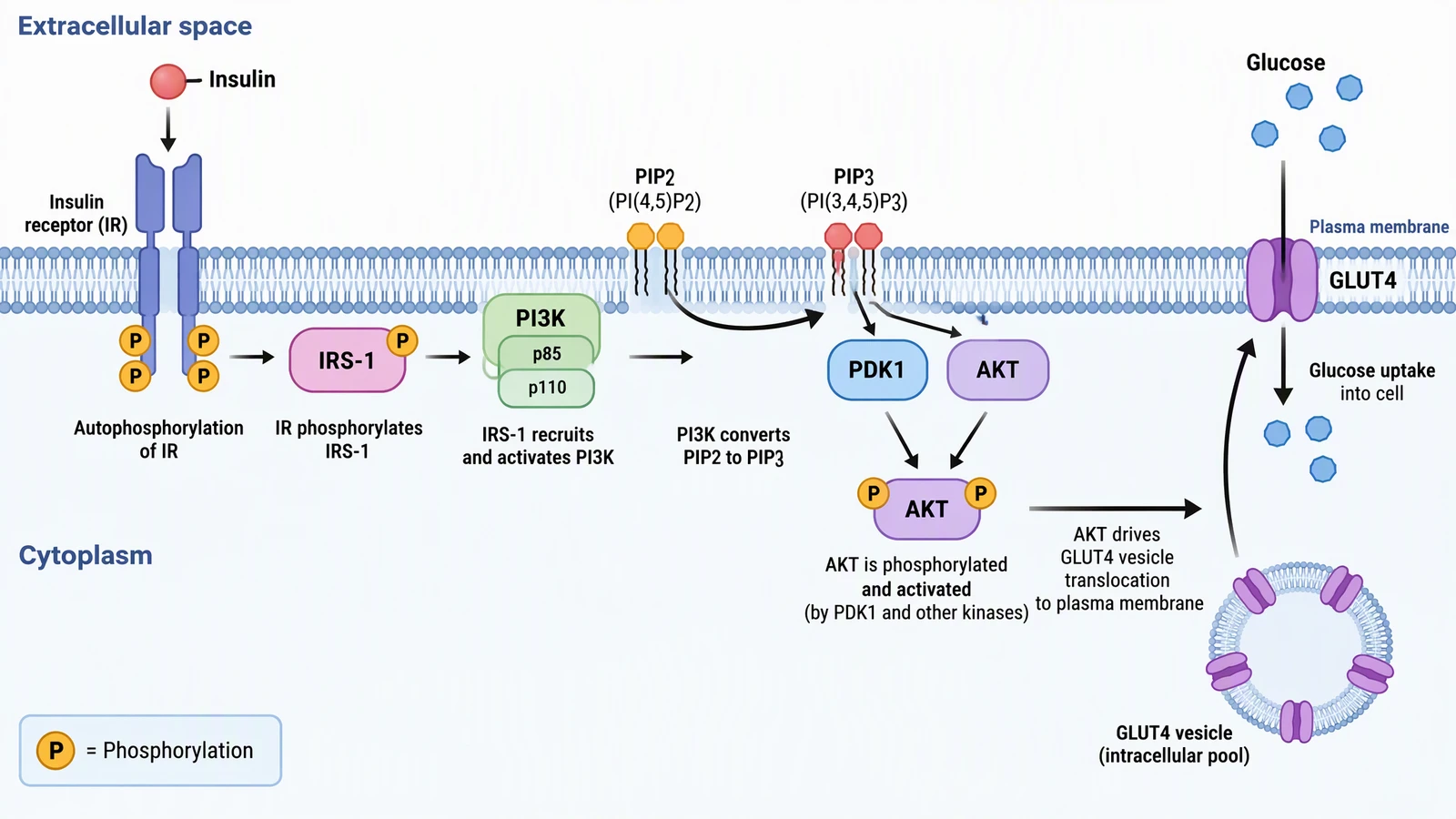
Insulin signaling pathway from the insulin receptor through IRS-1, PI3K and AKT to GLUT4 vesicle translocation and glucose uptake
Example made with ConceptViz · Mechanism slide
Worked examples

Three slides most talks need

Each example comes from the ConceptViz gallery. The prompt shows how you might ask, and the notes say what to adjust before it goes on screen.

Insulin signaling pathway from the insulin receptor through IRS-1, PI3K and AKT to GLUT4 vesicle translocation and glucose uptake
01 · Mechanism slide

The one mechanism slide for a conference talk

How you might ask

Insulin signaling pathway for a 16:9 conference slide. Insulin binds the insulin receptor, IRS-1 recruits PI3K, PIP2 becomes PIP3, PDK1 activates AKT, and GLUT4 vesicles move to the membrane for glucose uptake. Large labels, a phosphorylation legend, white background.

What you get

A 16:9 figure with the membrane in the middle, readable labels and a small legend. Ask for fewer proteins if the room is not specialist.

Check before you use it

Cut the pathway to the steps your result depends on, and confirm names and arrow direction. Increase label size until it passes the back-of-the-room test.
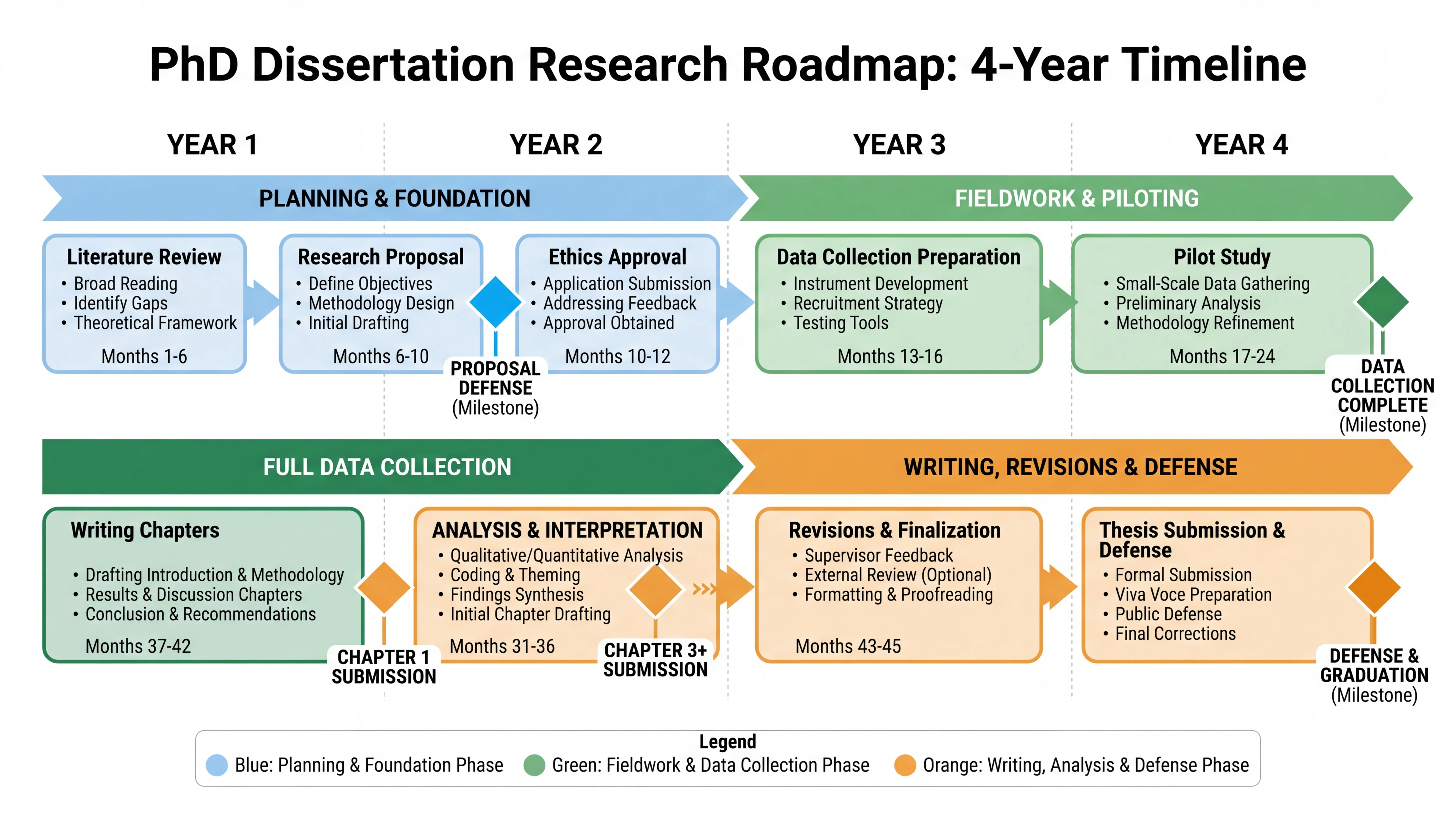
Four-year PhD dissertation roadmap with phases for planning, fieldwork, full data collection and writing, with milestone markers
02 · Timeline

A thesis roadmap for a committee meeting or defense

How you might ask

Four-year PhD roadmap: literature review, proposal defense, ethics approval, data collection preparation, pilot study, full data collection, analysis, writing chapters, revisions, thesis defense. Colour by phase, milestones as diamonds, a legend at the bottom.

What you get

A phased timeline with milestones that shows a committee where you are and what is next.

Check before you use it

Replace the months with your own dates and remove phases that do not apply. An invented timeline in front of a committee does more harm than none.

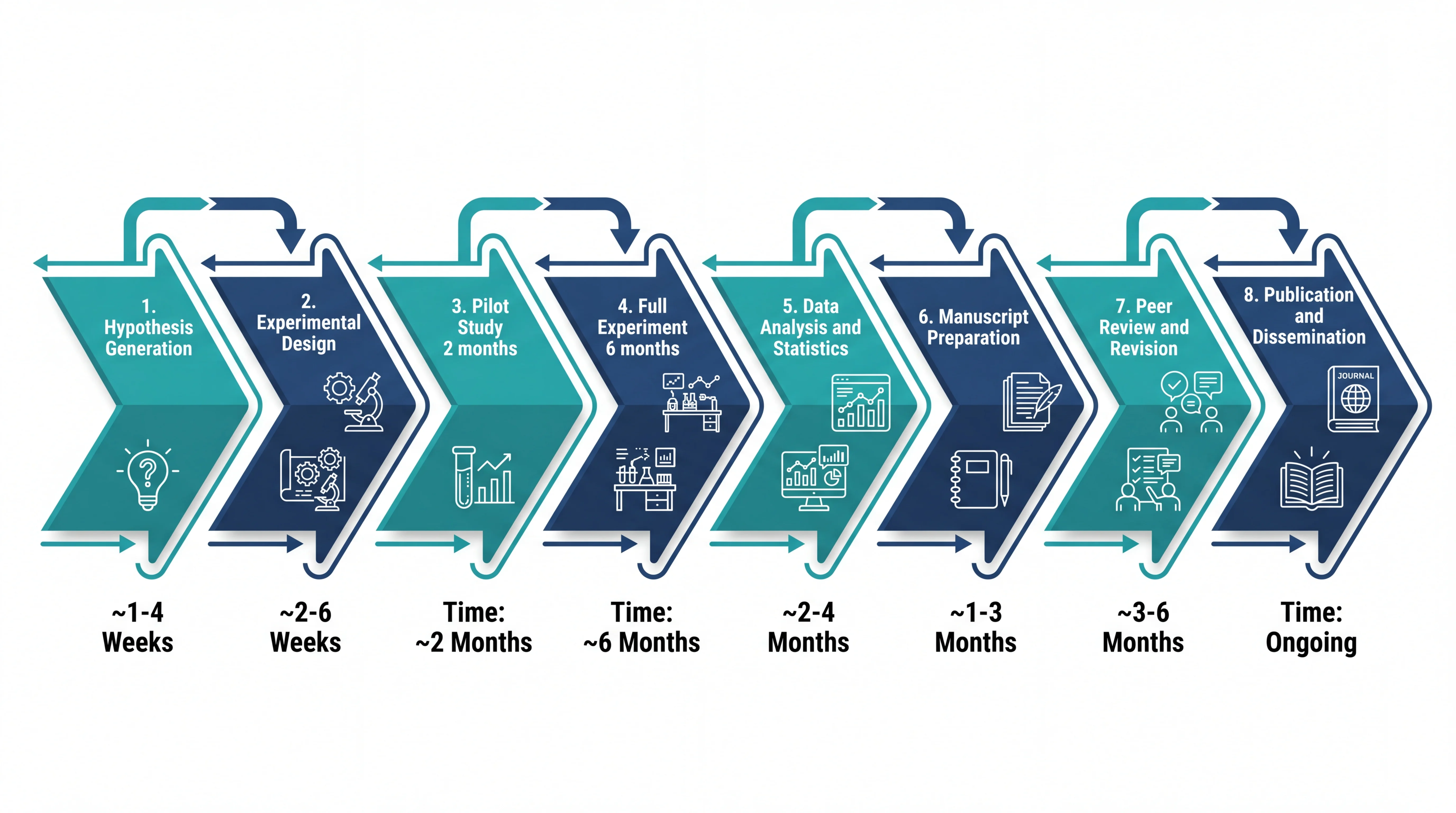
Eight-step research pipeline from hypothesis generation to publication, drawn as chevrons with icons and estimated durations
03 · Study overview

A pipeline overview for lab meeting or a three-minute pitch

How you might ask

Eight-step research pipeline as chevrons with a small icon each: hypothesis, experimental design, pilot study, full experiment, analysis, manuscript, peer review, publication. Estimated duration under each step.

What you get

A single-row overview that explains the whole project in seconds, suited to the opening or closing slide.

Check before you use it

Fix the durations and wording to match your project. Keep one idea per slide and let your voice carry the detail.

Workflow

From speaker notes to slides

Step 01

Write the point of each slide

Start with the sentence you want the audience to remember, not with the picture. Paste your outline or notes into Agent and say which slides need a figure.

Step 02

Match the figure to the room

Ask for 16:9, large labels and fewer elements. A talk figure needs a fraction of the detail of a paper figure, and a clean background makes it easy to place on a slide.

Step 03

Keep one visual style

Name the same palette and label style in every request. Revise in plain words and Agent keeps every version, so you can compare and step back.

Step 04

Export to your slides

Download PNG for slides, export SVG to adjust colours and text, or export PowerPoint to keep editing in your own deck.

Exports: PNG is free; SVG export costs 2 credits and PowerPoint export 4 credits (PowerPoint is limited to some paid plans). Figures made with free registration credits carry a watermark; paid plans are watermark-free. Check the pricing page for current details.

Before you publish or present

Talks have their own rules and risks

A few checks save you from awkward moments at the podium.

  • Three Minute Thesis competitions generally allow a single static slide with no animation, so the figure has to carry the story alone. Check your institution’s rules, and see our guide for layouts that work. Read the 3MT presentation guide.
  • Unpublished data should not go into any tool you are not allowed to share it with. Describe the structure of the figure rather than pasting confidential results, and check your lab’s and funder’s rules.
  • Some conferences and institutions ask presenters to disclose AI-generated visuals, and a few restrict them. Where it is required, a short note in the slide footer or acknowledgements is usually enough.
  • AI-generated text inside images can contain typos, so read every label aloud before the talk. For critical text, ask for blank label boxes and type the text in your slide software.

A good fit

  • Lab meetings, journal clubs, thesis committee updates and defenses.
  • Conference talks and seminars where one clear mechanism or timeline slide matters.
  • Three Minute Thesis slides, grant pitch decks and project overviews.
  • Turning a paper figure into a simpler version for a general audience.

Not the right tool

  • Slides that show your real data, such as plots, gels and micrographs. Use your analysis software or original images.
  • Full slide layout and templates. Agent makes the figure, and you assemble the deck in PowerPoint, Keynote or Google Slides.
  • Animations and builds. Export the pieces and animate them in your slide software.
  • Anything you cannot verify yourself in front of an expert audience.
Go deeper

Tools and guides for this work

Tools

  • Research roadmap maker

    Timelines, phases and milestones.

  • Graphical abstract maker

    One-image summaries of a study.

  • Scientific poster generator

    When the venue is a poster session.

Guides

  • 3-minute thesis presentation guide

    One slide, 180 seconds.

  • Science animations for PowerPoint

    Bring a figure to life on slides.

  • Graphical abstract examples by discipline

    Layouts to borrow for summary slides.

Other use cases

  • Figures for research papers and theses

    Journal figures and AI disclosure.

  • Illustrations for medical education

    Teaching slides and patient materials.

FAQ

Common questions

What size and ratio should a slide figure be?

Ask for 16:9 so it fills a standard slide, and ask for large labels. A useful test is to view the slide at a quarter of its size: if you cannot read it, the audience at the back cannot either.

Can I get a transparent background?

Agent can remove a background, which uses credits, or you can export SVG and delete the background in your editor. A white background also sits cleanly on a white slide without extra steps.

Can I edit the figure in PowerPoint?

Yes. Export PowerPoint (4 credits, limited to some paid plans) to get editable shapes, or export SVG (2 credits) and insert it into PowerPoint. You can also ask Agent for a new version in plain words.

How do I keep a consistent style across a deck?

Describe the palette, label style and level of detail once, and repeat it in each request. Agent keeps every version, so you can compare a new figure with the earlier ones before you use it.

Is it fine to use AI figures in a defense or conference talk?

Usually yes, but rules differ. Check the venue’s and your institution’s policy, disclose where it is required, and be ready to explain what the figure shows. You are responsible for its accuracy.

How is this different from the poster and graphical abstract tools?

Those tools are tuned to one format, a poster or a graphical abstract. This page is about the individual figures in a talk. You can build them in Agent, and the tools above are good starting points when your venue is a poster session or your journal wants a graphical abstract.

Build your talk’s key figures in Agent

Paste your outline, say which slides need a figure, and revise each one in plain words. Export PNG, SVG or PowerPoint when you are happy.

Open AgentSee pricing