AgentExamplesFree ToolsPricingBlogAPI
Start creating

Turn complex ideas into clear visuals.

contact@conceptviz.app
Ask AI about ConceptViz
Product
  • Agent
  • Pricing
  • API
  • Blog
  • FAQ
  • Examples
Use cases
  • Research papers
  • Talks and defenses
  • Medical education
Company
  • About
  • Contact
  • Friends
Legal
  • License
  • Terms
  • Privacy
  • Content Policy
  • Cookies
  • Refund
Community
  • Education Program
Free Tools
  • Animal Cell Diagram
  • Plant Cell Diagram
  • Animal vs Plant Cell
  • Water Cycle Diagram
  • Free Body Diagram
  • More Tools →

Friends links

  • AI PICKS 掲載認定 2026 AUTUMN|ConceptViz
  • LaunchClash
  • Featured on ShowMeBest
  • Launched on StartupBase
  • Featured on Toolfio
  • Featured on ToolPilot
© 2026 ConceptViz. All rights reserved.
Use case · Research papers and theses

Draft research paper figures you can check, edit and disclose

Describe a mechanism, a methods workflow or a study design and get a clean first draft in minutes. Review every label, edit it, and check your target journal’s AI image policy before it goes anywhere near a submission.

Open AgentTry the scientific image generator
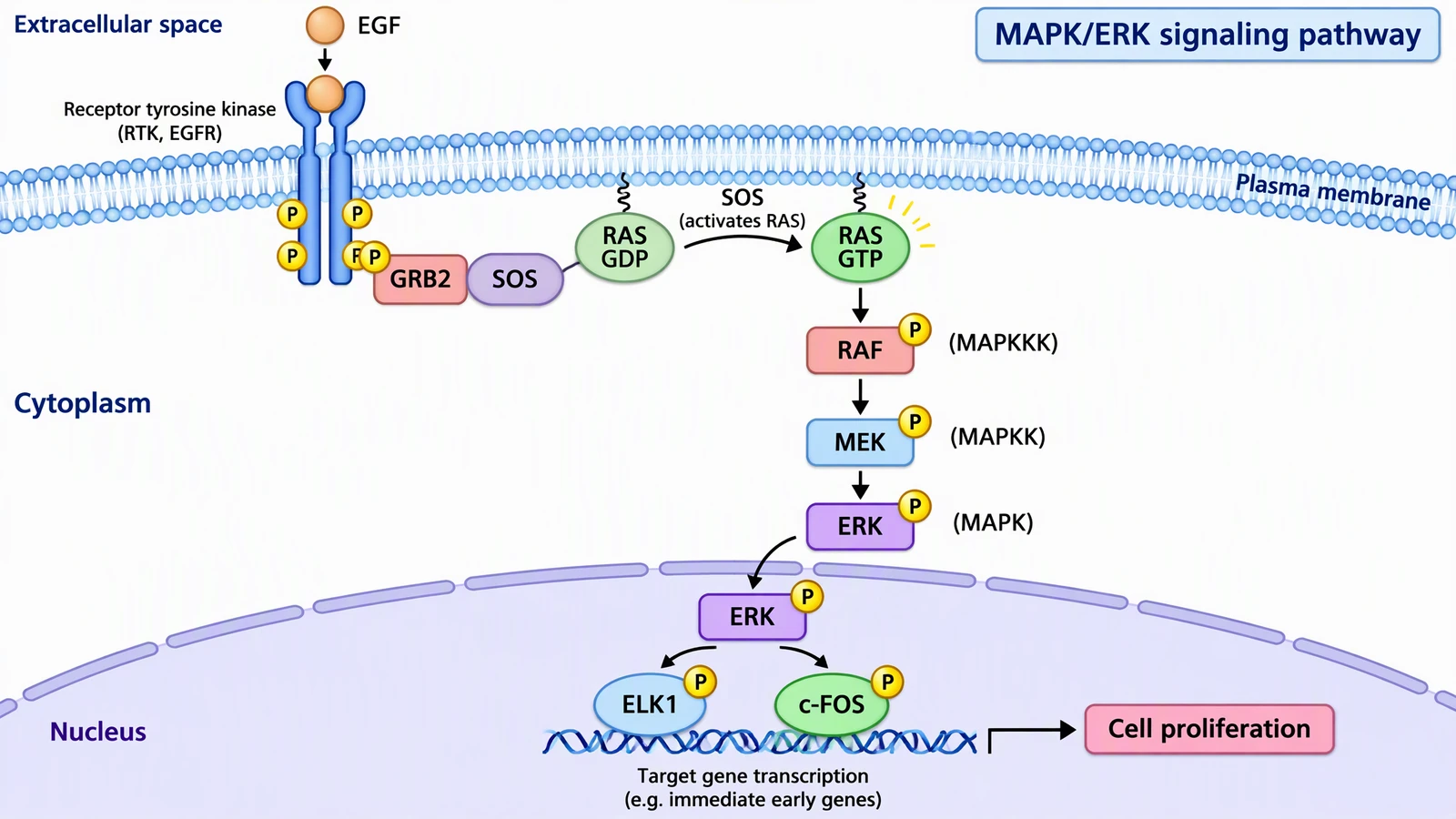
MAPK/ERK signaling pathway schematic from EGF receptor at the plasma membrane through RAS, RAF, MEK and ERK to ELK1 and c-FOS in the nucleus
Example made with ConceptViz · Mechanism schematic
Worked examples

Three figures a paper usually needs

These come from the ConceptViz gallery. Each one is a draft: the prompts below show how you might ask, and the notes say what a careful author still has to verify.

MAPK/ERK signaling pathway schematic from EGF receptor at the plasma membrane through RAS, RAF, MEK and ERK to ELK1 and c-FOS in the nucleus
01 · Mechanism schematic

A signaling pathway for your introduction or discussion

How you might ask

MAPK/ERK signaling pathway as a left-to-right cascade. EGF binds the receptor tyrosine kinase, GRB2 and SOS activate RAS, then RAF, MEK and ERK are phosphorylated in turn, and phosphorylated ERK enters the nucleus to activate ELK1 and c-FOS. Label the membrane, cytoplasm and nucleus.

What you get

A layered pathway with compartments, phosphorylation markers and a labelled outcome, ready to be trimmed to the proteins your paper actually discusses.

Check before you use it

Confirm every protein name, the order of the cascade and the direction of each arrow against your sources. Remove steps your study does not address so the figure supports one claim.

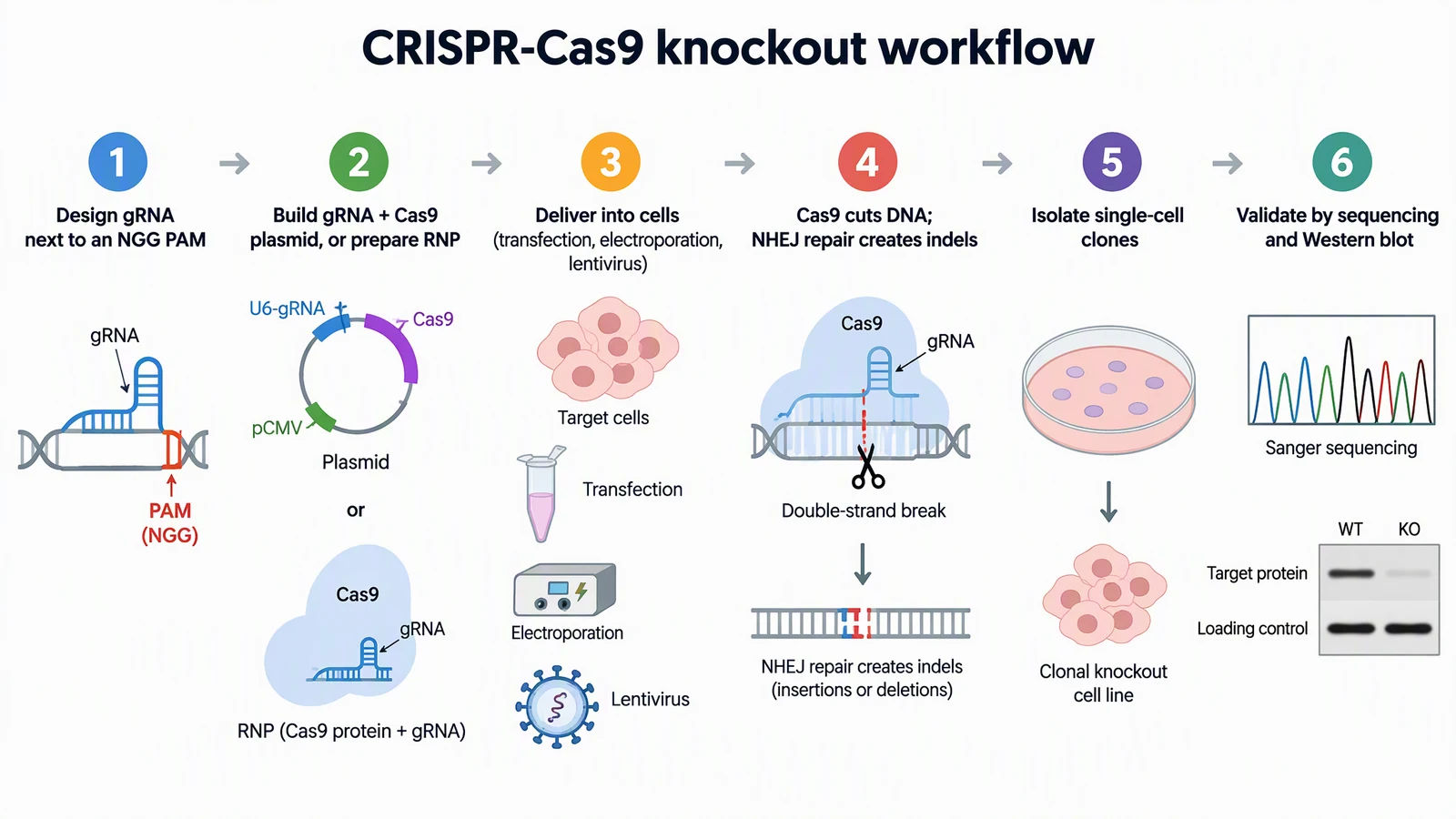
Six-step CRISPR-Cas9 knockout workflow from gRNA design to sequencing and Western blot validation
02 · Methods workflow

A methods overview reviewers can follow at a glance

How you might ask

Six-step CRISPR-Cas9 knockout workflow: design gRNA next to an NGG PAM, build plasmid or RNP, deliver into cells, Cas9 cuts and NHEJ creates indels, isolate single-cell clones, validate by sequencing and Western blot. Numbered steps, short labels, white background.

What you get

A numbered strip with an icon for each step, so a reader sees the whole protocol before reading the Methods text.

Check before you use it

Match the steps to what you actually did. Decorative gels and traces are illustrations, never data, and must not look like your results.

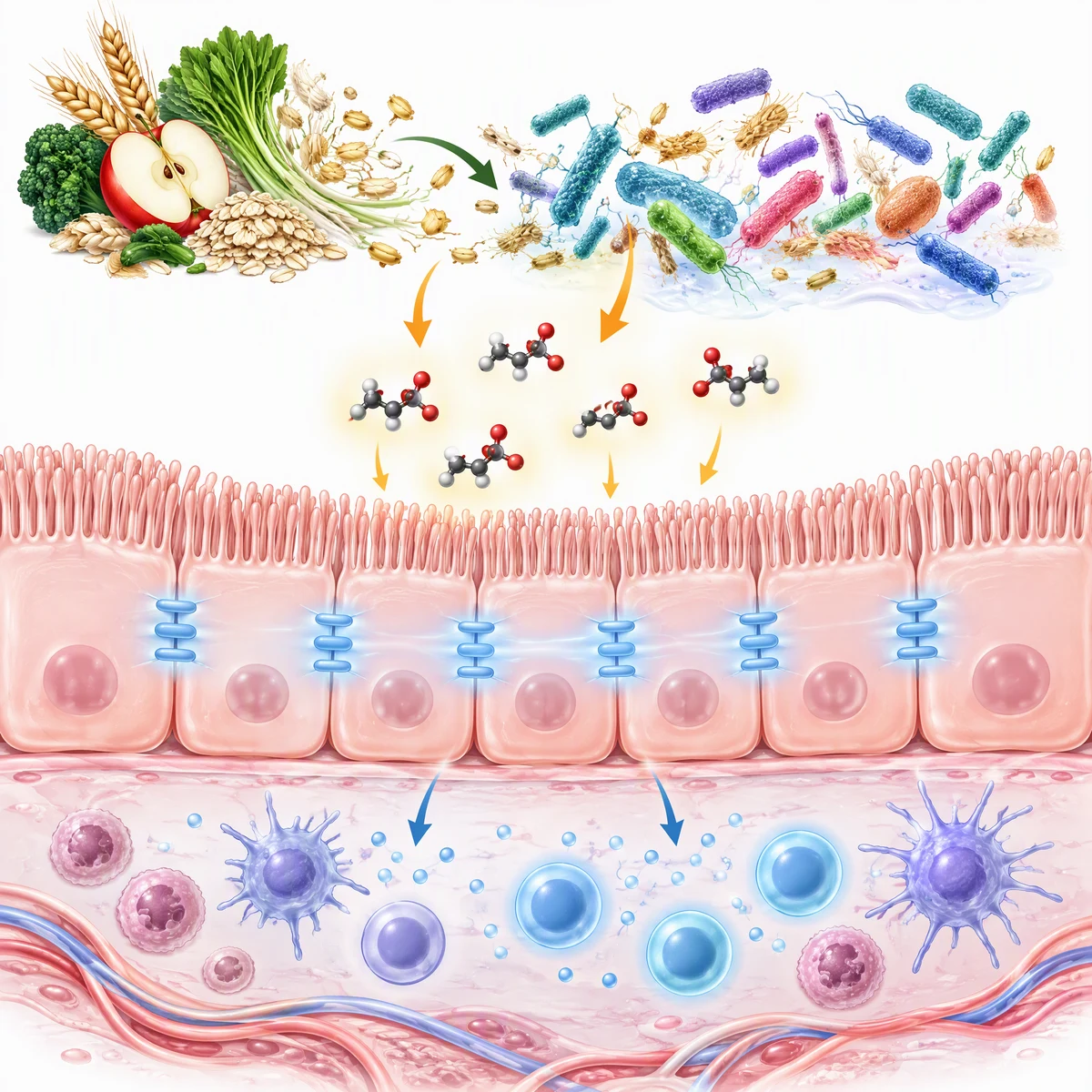
Concept graphical abstract showing dietary fiber, gut bacteria, short-chain fatty acids acting on the intestinal epithelium and immune cells
03 · Graphical abstract

A concept graphical abstract, where the journal allows it

How you might ask

Square graphical abstract, no text: dietary fiber feeding gut bacteria, short-chain fatty acids reaching the intestinal epithelium, tight junctions reinforced, immune cells in the tissue below responding.

What you get

One square image that tells the story top to bottom. You add the title and labels in your own layout so they match the journal template.

Check before you use it

Some publishers do not accept AI-generated graphical abstracts at all, so read the policy first. Use this kind of draft for preprints, theses, grant applications and lab communication.

Workflow

From notes to a figure you can defend

Step 01

Start from what you have

Paste an abstract or methods paragraph, type one line, or describe a sketch. Agent asks a short question if the request could go several ways and shows its plan before anything is generated.

Step 02

Choose the right kind of figure

Agent picks how to draw each figure: an illustration, an editable SVG diagram, or an exact chart drawn from the numbers you give it. Charts from data belong in statistical software or in Agent’s exact charts, not in a painted image.

Step 03

Revise in plain words

Ask for changes such as “remove the nuclear envelope and enlarge the receptor”. Agent makes a new version and keeps the old one, so you can step back.

Step 04

Export and finish

Download PNG, or export SVG to finish labels in Illustrator, Inkscape or Figma. Check your journal’s size, resolution and font requirements before you submit.

Exports: PNG is free; SVG export costs 2 credits and PowerPoint export 4 credits (PowerPoint is limited to some paid plans). Figures made with free registration credits carry a watermark; paid plans are watermark-free and include commercial use. See pricing for current plan details.

Before you publish or present

Journal policy decides whether AI figures can be submitted

Policies differ by publisher and change often. Read your journal’s author guidelines before you plan a figure around AI, and keep a record of how it was made.

  • Elsevier states that it does not permit generative AI or AI-assisted tools to create or alter images in submitted manuscripts, and it names graphical abstracts as not permitted. The only exception is when the use is part of the research methods and is described reproducibly. Elsevier generative AI policy.
  • Springer Nature, including Nature Portfolio journals, uses a risk-based policy: authors stay accountable, AI use should be disclosed, and creating photorealistic images is not permitted. Individual journals can be stricter, so read the current wording. Springer Nature AI policy.
  • ICMJE recommends that authors disclose AI-assisted technologies, including image creators, at submission. AI tools cannot be listed as authors, and humans remain responsible for the accuracy and originality of anything submitted. ICMJE guidance on AI use by authors.
  • If a journal does allow AI-assisted figures, state the tool, the date and what you changed in the figure legend or the AI disclosure section, and keep the prompts and versions. If it does not, use the draft to plan the figure and redraw it yourself in vector software.

A good fit

  • Theses, dissertations and grant applications, where your institution or funder allows AI-assisted figures.
  • Preprints and internal reports that need a clear schematic fast.
  • First drafts of mechanism and workflow figures that you then redraw or edit in SVG.
  • Planning a figure layout before you commission or draw the final version.

Not the right tool

  • Data plots, statistics and anything that must be reproducible from a dataset. Use R, Python, GraphPad or Origin.
  • Gels, blots, micrographs and any image that is evidence. Never generate these.
  • Submissions to journals that prohibit AI-generated images, unless the figure is itself part of your AI research methods.
  • Anatomically or chemically exact structures that a reviewer will inspect line by line, without expert review.
Go deeper

Tools and guides for this work

Tools

  • Scientific image generator

    Free to try for single schematics.

  • Signaling pathway diagram generator

    Cascades and receptor diagrams.

  • CONSORT diagram generator

    Participant flow for trials.

Guides

  • How to make scientific diagrams for research papers

    Layout, labels and tools.

  • Figures for Nature and Science journals

    Sizes, panels and AI policy.

  • Figure legend examples

    Write the legend and disclosure.

Other use cases

  • Figures for academic talks and defenses

    Slides for lab meetings and defenses.

  • Illustrations for medical education

    Teaching and patient materials.

FAQ

Common questions

Can I put an AI-generated figure in a journal paper?

Only if the journal allows it. Some publishers, such as Elsevier, do not permit generative AI to create or alter images in submitted manuscripts, while Springer Nature, including Nature Portfolio, asks authors to disclose AI use and does not permit photorealistic AI images. Read the author guidelines for your target journal before you build a figure around AI, and ask the editor if the policy is unclear.

How do I disclose AI use for a figure?

Follow the journal’s format. A typical disclosure names the tool, the date, what it produced and what you edited, and confirms that you reviewed the result. ICMJE recommends disclosing AI-assisted technologies, including image creators, at submission. Keep the prompt and version history so you can answer a reviewer.

Are the figures scientifically accurate?

Not automatically. Illustrations are AI-generated, so protein names, arrow directions, counts and spelling must be checked by you or a domain expert. Exact charts drawn in Agent use the numbers you give them, but your statistical analysis should still come from your own analysis software.

What resolution and file formats can I get?

You can export PNG for free and SVG for 2 credits, and output goes up to 4K on paid credits. Journals often ask for vector or high-dpi TIFF at a set column width, so plan to finish in vector software and check the journal’s specifications.

Who owns the figures, and can I publish them?

Paid plans are watermark-free and include commercial use, so you can use figures in theses, slides and published material within the terms. Figures made with free registration credits carry a watermark. Publisher policy is a separate question from licensing, so check both.

Is this a replacement for BioRender or GraphPad?

No. ConceptViz drafts schematics from a description, which is faster than building from icons when you need a new figure. BioRender suits assembling from a fixed icon library, and GraphPad, R and Python are the right place for data plots. Many authors use two or three of them for one paper.
Draft your next figure in Agent

Describe the figure, review the plan, revise in plain words, and export what you need. Check your journal’s policy before you submit.

Open AgentSee pricing