AgentExamplesFree ToolsPricingBlogAPI
Start creating

Turn complex ideas into clear visuals.

contact@conceptviz.app
Ask AI about ConceptViz
Product
  • Agent
  • Pricing
  • API
  • Blog
  • FAQ
  • Examples
Use cases
  • Research papers
  • Talks and defenses
  • Medical education
Company
  • About
  • Contact
  • Friends
Legal
  • License
  • Terms
  • Privacy
  • Content Policy
  • Cookies
  • Refund
Community
  • Education Program
Free Tools
  • Animal Cell Diagram
  • Plant Cell Diagram
  • Animal vs Plant Cell
  • Water Cycle Diagram
  • Free Body Diagram
  • More Tools →

Friends links

  • AI PICKS 掲載認定 2026 AUTUMN|ConceptViz
  • LaunchClash
  • Featured on ShowMeBest
  • Launched on StartupBase
  • Featured on Toolfio
  • Featured on ToolPilot
© 2026 ConceptViz. All rights reserved.
Use case · Medical and clinical education

Illustrations and flowcharts for medical teaching and patient education

Describe the condition, the structure or the care pathway and get a clean first draft for a lecture slide, a handout or a teaching file. A clinician reviews it, you edit it, and nothing reaches a patient or a student unchecked.

Open AgentTry the medical illustration generator
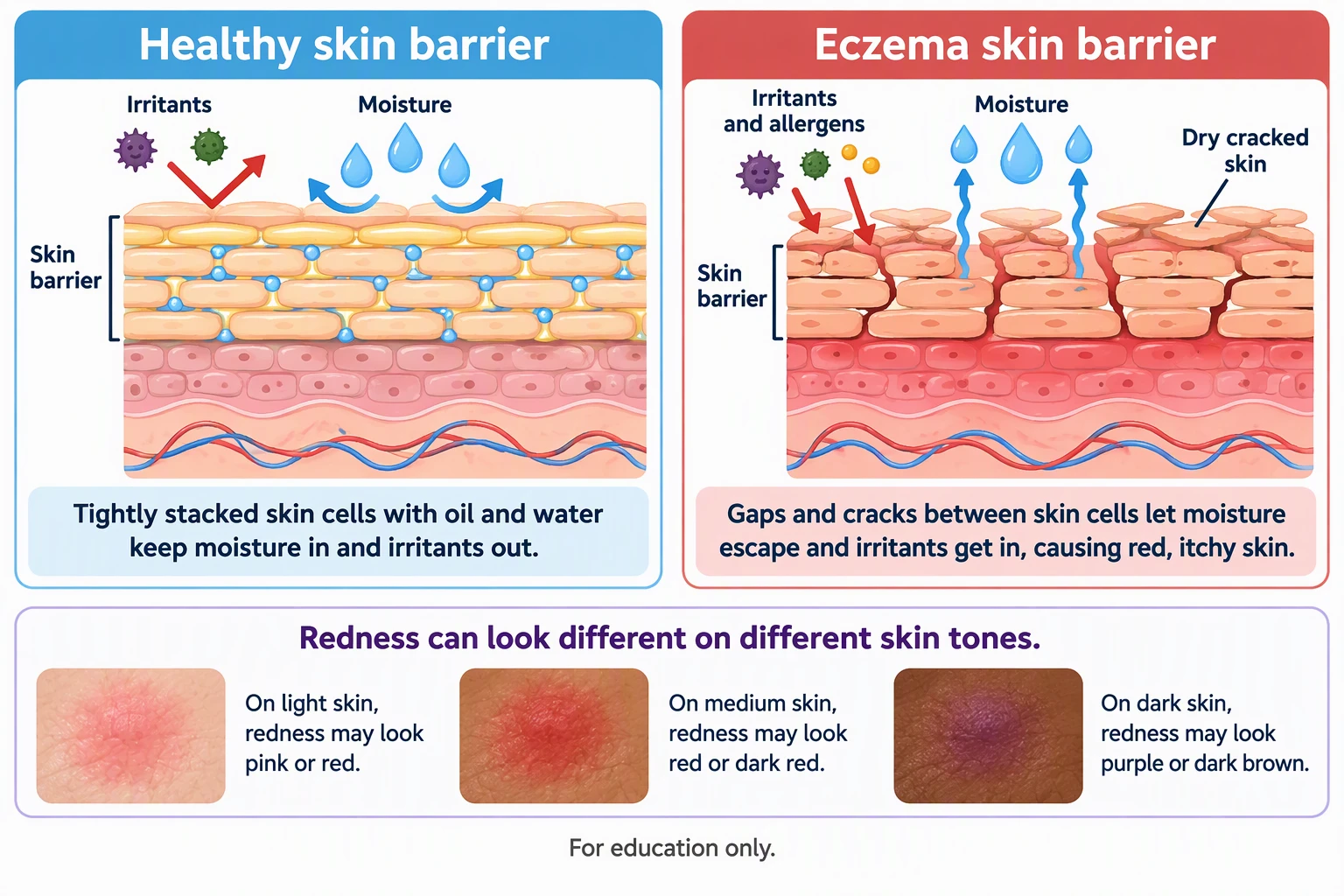
Patient education illustration comparing a healthy skin barrier with an eczema skin barrier, with redness shown on light, medium and dark skin
Example made with ConceptViz · Patient education
Worked examples

Three figures clinical teachers ask for most

These examples come from the ConceptViz gallery. The prompts show how you might ask, and the notes list what a clinical reviewer has to confirm.

Patient education illustration comparing a healthy skin barrier with an eczema skin barrier, with redness shown on light, medium and dark skin
01 · Patient education

A plain-language handout figure for patients

How you might ask

Patient handout illustration: healthy skin barrier next to an eczema skin barrier. Show how gaps in the skin let moisture out and irritants in. Add a strip showing how redness looks on light, medium and dark skin. Plain language, large text, “For education only”.

What you get

A two-panel comparison with short captions and a skin-tone strip, written for a patient reader rather than a clinician.

Check before you use it

A clinician should confirm every statement and the skin-tone examples. Check reading level, local guidance and your service’s patient information standards before it is handed out.
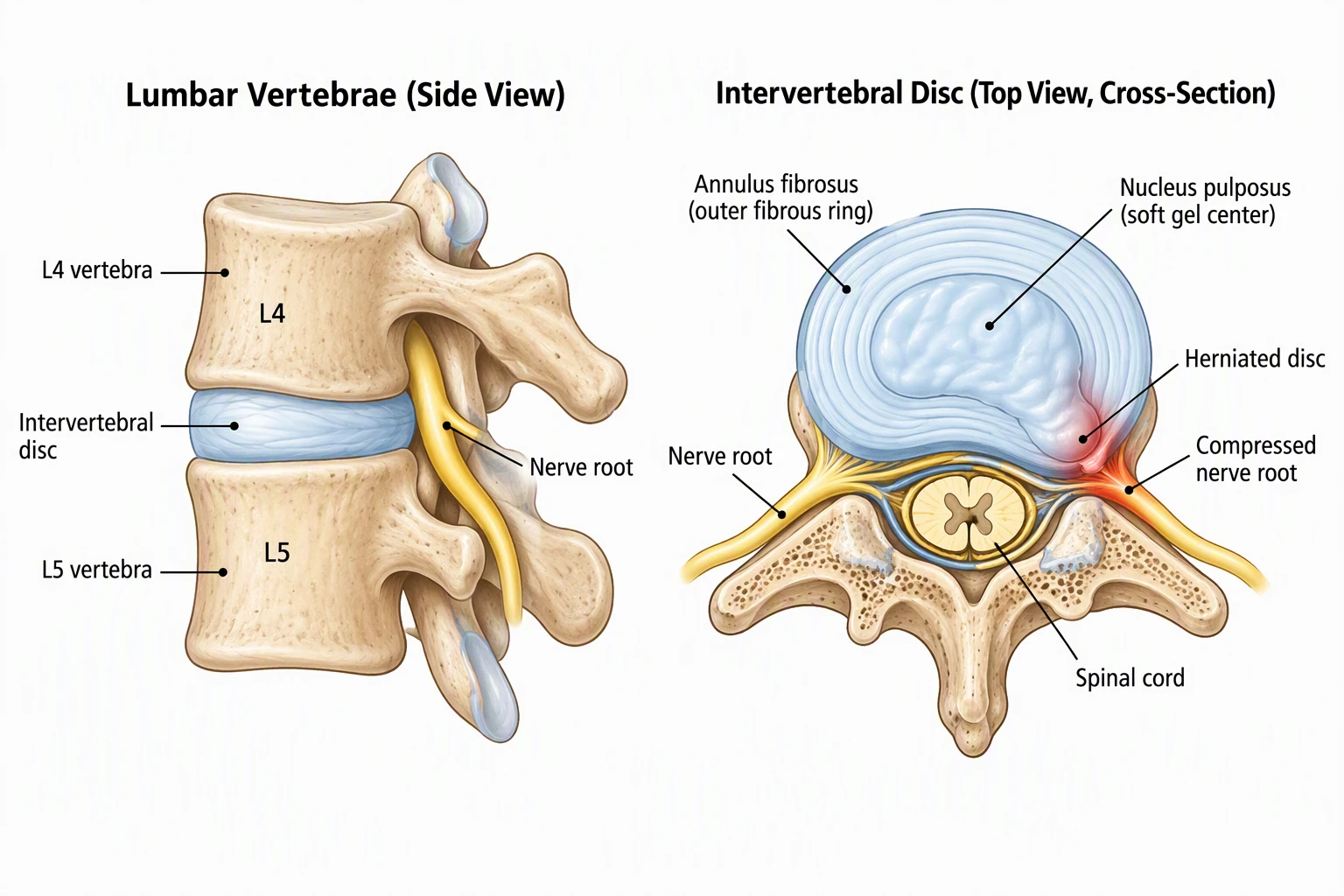
Labelled lumbar vertebrae in side view and an intervertebral disc cross-section showing a herniated disc compressing a nerve root
02 · Anatomy and pathology

An anatomy and pathology figure for a teaching slide

How you might ask

Two-panel teaching figure for a lecture slide: lumbar vertebrae L4 and L5 in side view with disc and nerve root, and an axial cross-section of an intervertebral disc showing annulus fibrosus, nucleus pulposus, a herniated disc and a compressed nerve root. Clear leader lines, minimal colour.

What you get

A labelled side view and cross-section pair that a student can follow, with the pathology highlighted.

Check before you use it

Check each label and its leader line, the side shown and the spinal level against an anatomy atlas. Generated anatomy can look right and be wrong, so treat it as a draft for an expert to approve.

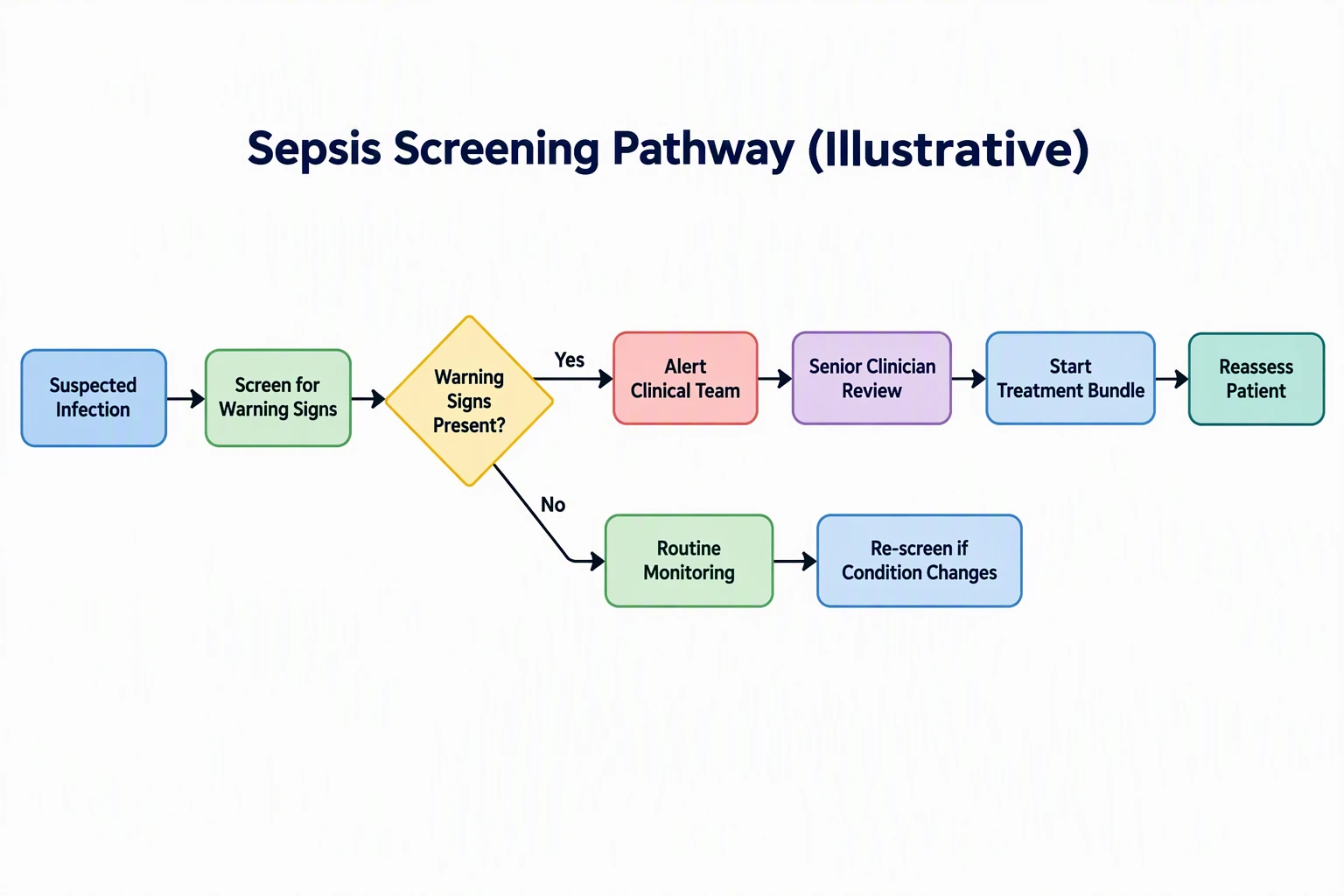
Illustrative sepsis screening pathway flowchart from suspected infection through screening, a warning sign decision, alert and treatment bundle, or routine monitoring
03 · Clinical flowchart

A decision flowchart for teaching clinical reasoning

How you might ask

Illustrative sepsis screening pathway as a flowchart: suspected infection, screen for warning signs, decision diamond “Warning signs present?”. Yes leads to alert the clinical team, senior clinician review, start treatment bundle, reassess. No leads to routine monitoring and re-screen if the condition changes. Title it “Illustrative”.

What you get

A clean branching flowchart with a decision diamond and colour-coded steps, labelled as illustrative so no one mistakes it for a protocol.

Check before you use it

Replace the content with your local protocol and thresholds before teaching it as practice. Keep the “illustrative” label unless your clinical governance approves the figure as guidance.

Workflow

From a learning objective to a reviewed figure

Step 01

State the learning objective

Say who the figure is for (first-year students, nurses, patients) and what they should be able to do afterwards. This sets the level of detail and the reading level.

Step 02

Describe the content, not just the topic

List the structures, steps or decisions to include and the labels you want. Ask for “For education only” and for a neutral, non-graphic style.

Step 03

Review with a clinician

Check labels, anatomy, doses, thresholds and wording against your textbook, guideline or protocol. Ask Agent for changes in plain words; every version is kept.

Step 04

Export for slides and handouts

Download PNG for slides and handouts, or export SVG to correct labels in your own editor. PowerPoint export is available on some paid plans.

Exports: PNG is free; SVG export costs 2 credits and PowerPoint export 4 credits (PowerPoint is limited to some paid plans). Figures made with free registration credits carry a watermark; paid plans are watermark-free and include commercial use. See pricing for current details.

Before you publish or present

AI illustrations are drafts, not clinical authority

ConceptViz does not guarantee medical accuracy. These habits keep teaching materials safe.

  • A qualified clinician or subject expert must review every figure before it is used to teach, assess or inform patients. Treat generated labels, anatomy and numbers as unverified until you have checked them against a source.
  • Never use a generated figure as a protocol, dosing guide or diagnostic aid. Flowcharts for teaching should be marked as illustrative and replaced with your local guidance when you teach practice.
  • Do not enter patient identifiers or real case details into any prompt. Describe a fictional or de-identified case, as the nursing care plan example in our gallery does.
  • Check your institution’s and any publisher’s rules on AI-generated images. Textbook and journal policies often differ from classroom use, and some prohibit AI illustrations.

A good fit

  • Patient education drafts that a clinician will review, simplify and approve.
  • Lecture slides, revision sheets and teaching files that need a clear anatomy or physiology figure.
  • Clinical reasoning flowcharts and concept maps for students and trainees.
  • Getting a first draft quickly before you brief a medical illustrator or edit it yourself.

Not the right tool

  • Surgical planning, operative guides and anything used to make real clinical decisions.
  • Publication-grade anatomical art where exact structure matters. Commission a medical illustrator.
  • Radiology images, pathology slides and photographs. Never generate evidence of real findings.
  • Dosing tables and protocols that must be exact. Use your approved source documents.
Go deeper

Tools and guides for this work

Tools

  • Medical illustration generator

    Teaching and explanatory medical figures.

  • Clinical pathway diagram generator

    Care pathways and decision flows.

  • Patient education illustrations (dermatology)

    Plain-language skin conditions.

Guides

  • Best medical illustration software

    When to use AI, icons or an illustrator.

  • Anatomical illustration for research papers

    Journal rules for anatomy figures.

  • Nursing concept map generator

    Care plans with fictional patients.

Other use cases

  • Figures for research papers and theses

    Journal figures and AI disclosure.

  • Figures for academic talks and defenses

    Slides for lectures and defenses.

FAQ

Common questions

Are the medical illustrations accurate?

Not guaranteed. The illustrations are AI-generated and can contain wrong labels, misplaced structures or spelling errors. A clinician or subject expert must review each figure against a reliable source before it is used for teaching or patient information.

Can I give patients figures made with ConceptViz?

Only after clinical review and approval under your organisation’s patient information process. Check the reading level, cultural fit and local guidance. Mark the material as educational and avoid including identifiable patient details.

Can I use the figures in lecture slides and exams?

Yes, for teaching. Paid plans include commercial use and are watermark-free. Figures made with free registration credits carry a watermark. Review each one for accuracy first, and check your institution’s policy on AI-generated material.

Is it safe to enter patient information in a prompt?

No. Do not include names, dates of birth, record numbers or real case details. Describe a fictional or de-identified case instead and follow your organisation’s data protection rules.

When should I hire a medical illustrator instead?

For publication-grade anatomy, surgical or procedural illustration, regulated patient materials and any figure where a small error has consequences. AI drafts help you brief an illustrator faster, but they do not replace one.

Can I edit labels and colours afterwards?

Yes. Ask Agent for changes in plain words, such as “label the L5 root and remove the colour from the cord”, and each change makes a new version. You can also export SVG (2 credits) and correct text in Illustrator, Inkscape or Figma.

Draft your teaching figures in Agent

Describe the learning objective and the content, review the plan, and revise in plain words. Have a clinician review every figure before it is used.

Open AgentSee pricing