Outlet Wiring Diagram Generator End of Run, Middle of Run, With a Switch
Exact outlet wiring diagrams: end of run, middle of run with pigtails, switch-controlled and split receptacles. Brass hot, silver neutral. Planning drawings.
Outlet Wiring Diagrams
Exact diagrams drawn in code from reviewed scenes. Each shows the panel, the receptacle, the cables and the screw each conductor lands on. Click a diagram to open it full size.
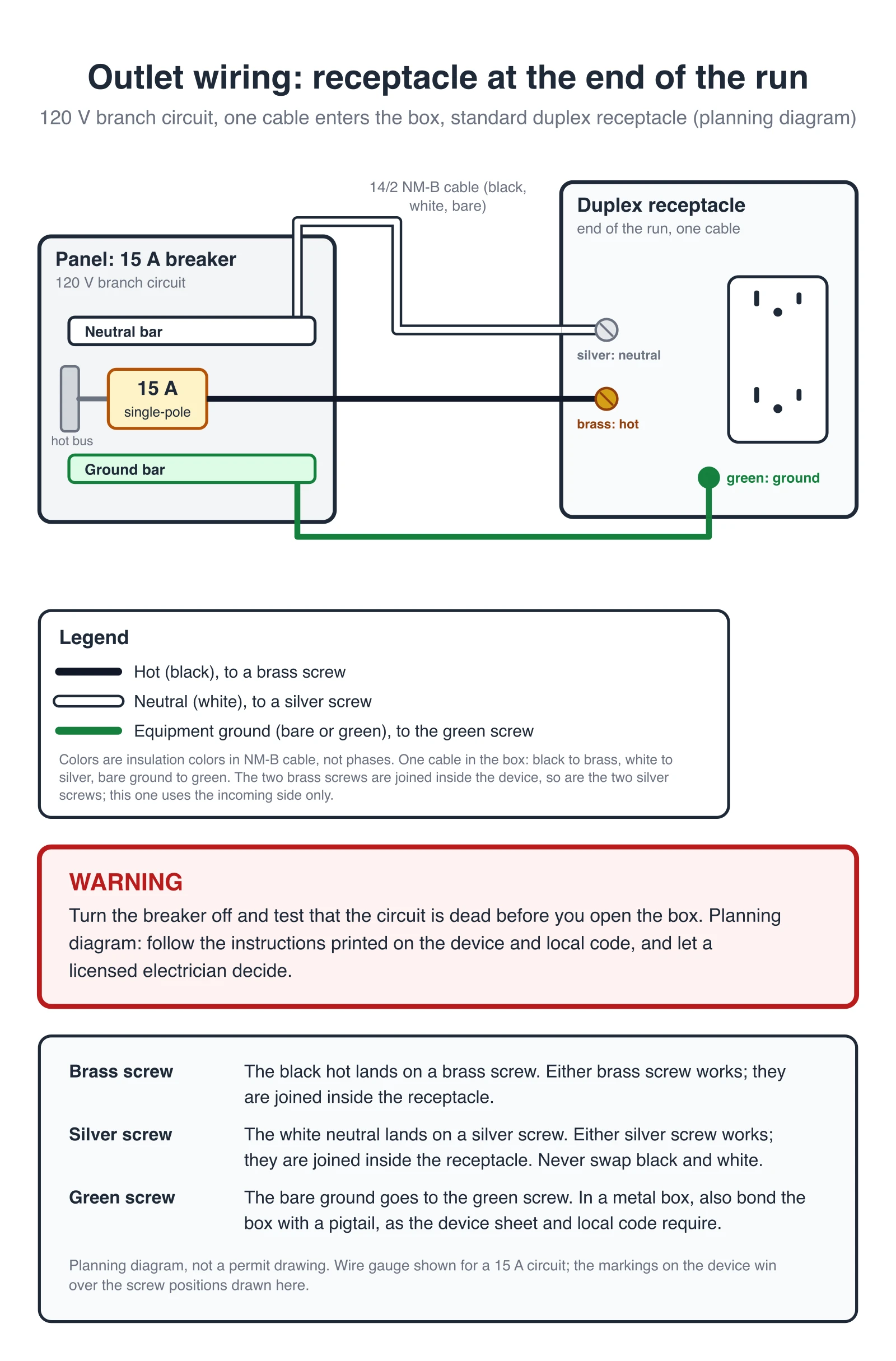
Receptacle at the end of the run: one cable in the box
The simplest case, and the answer to "outlet wiring 2 wires": one cable enters the box. The black hot goes to a brass screw, the white neutral to a silver screw, and the bare ground to the green screw. Nothing leaves the box, so only one pair of screws is used.
Cables: 14/2 NM-B from the panel (black, white, bare).
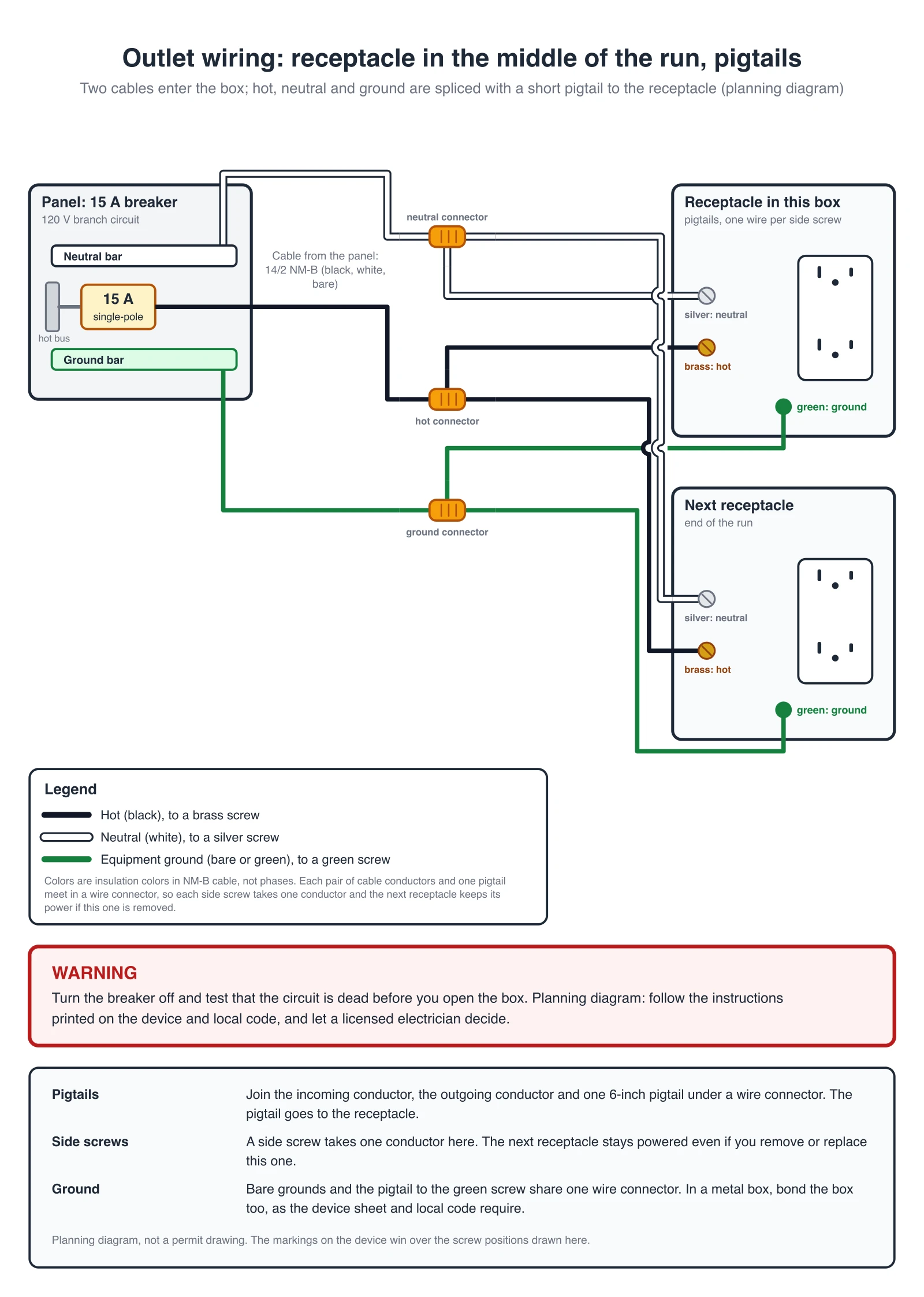
Receptacle in the middle of the run: pigtails
Two cables enter the box: one from the panel and one that continues to the next receptacle. Join the incoming conductor, the outgoing conductor and one short pigtail under a wire connector for the hot, again for the neutral and again for the ground. Each pigtail lands on one screw, so each side screw carries one conductor and the receptacles downstream keep their power if this one is removed or replaced.
Cables: 14/2 NM-B from the panel and 14/2 NM-B on to the next receptacle.
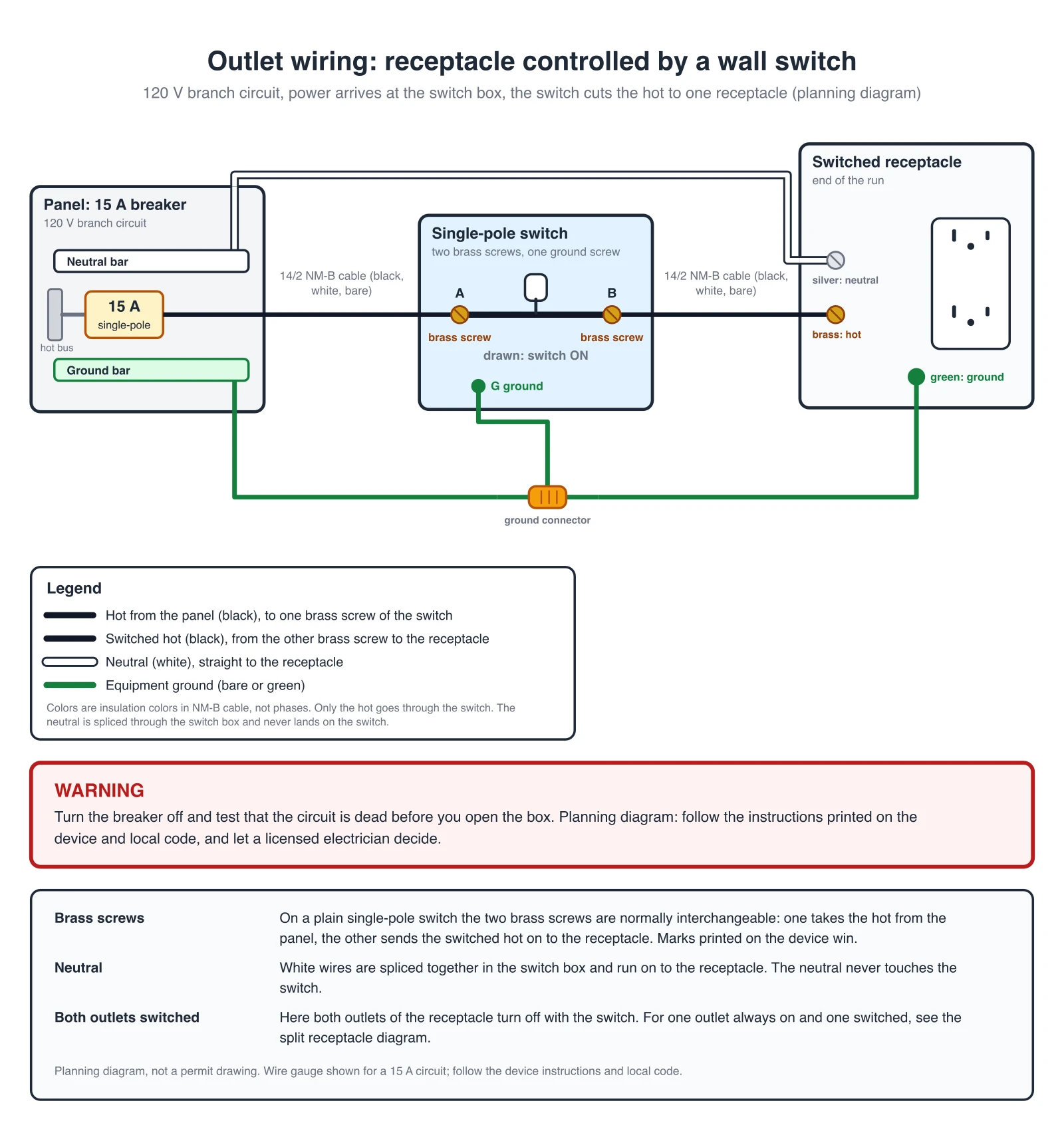
Switch-controlled outlet: power at the switch box
The light switch with outlet wiring diagram: the supply cable enters the switch box. The black hot goes to one brass screw of the single pole switch and the other brass screw sends the switched hot to the receptacle in a second cable. The neutral goes straight to the receptacle and never touches the switch. Both outlets of the receptacle turn off with the switch.
Cables: 14/2 NM-B from the panel to the switch box, 14/2 NM-B from the switch box to the receptacle.
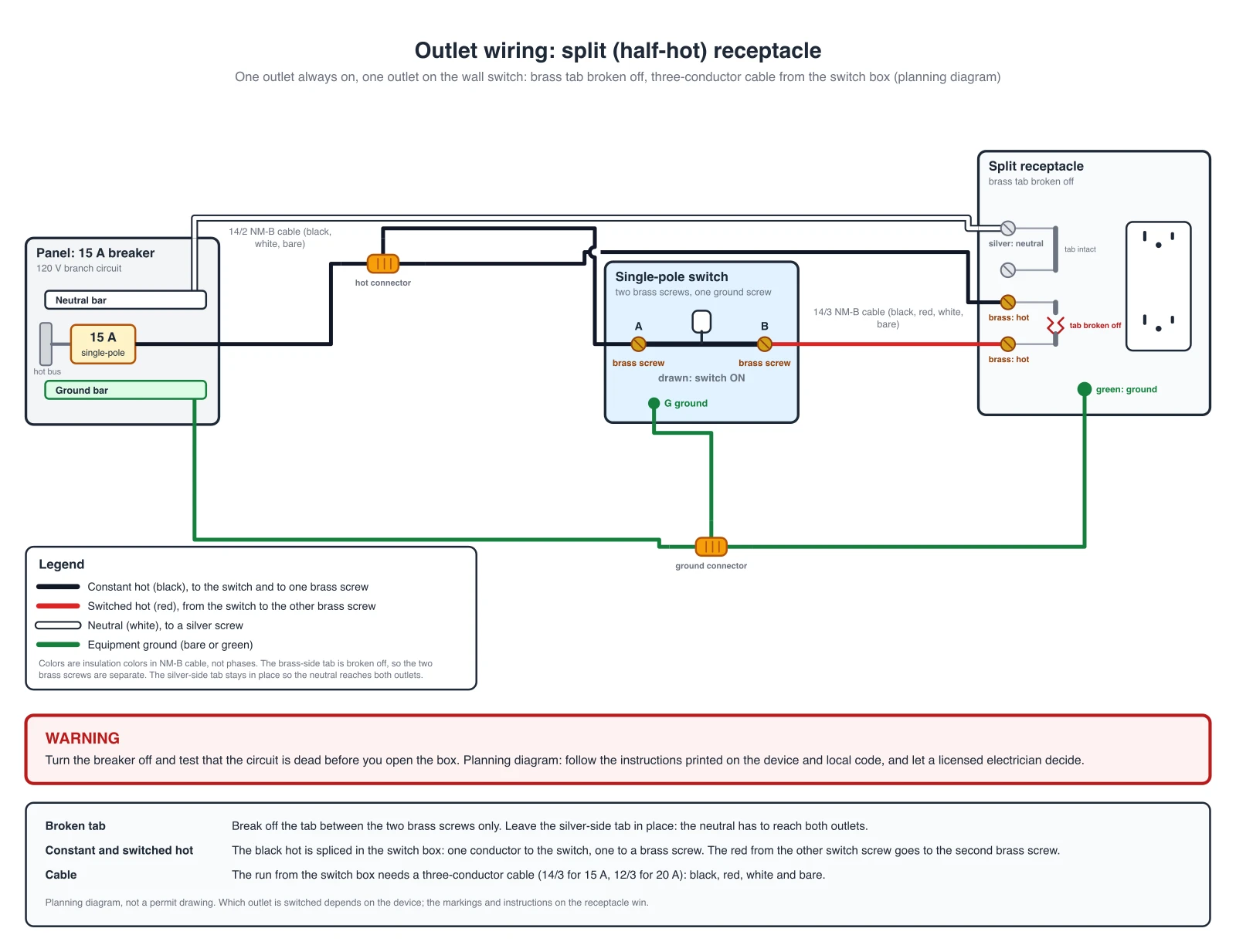
Split receptacle: one outlet always on, one on the switch
For one outlet that is always on and one that follows the switch, break off the tab between the two brass screws only. The constant hot goes to one brass screw and the switched hot from the switch goes to the other. The silver-side tab stays in place, so one neutral serves both outlets. The run from the switch box needs a three-conductor cable: black, red, white and bare.
Cables: 14/2 NM-B from the panel, 14/3 NM-B (black, red, white, bare) from the switch box to the receptacle.
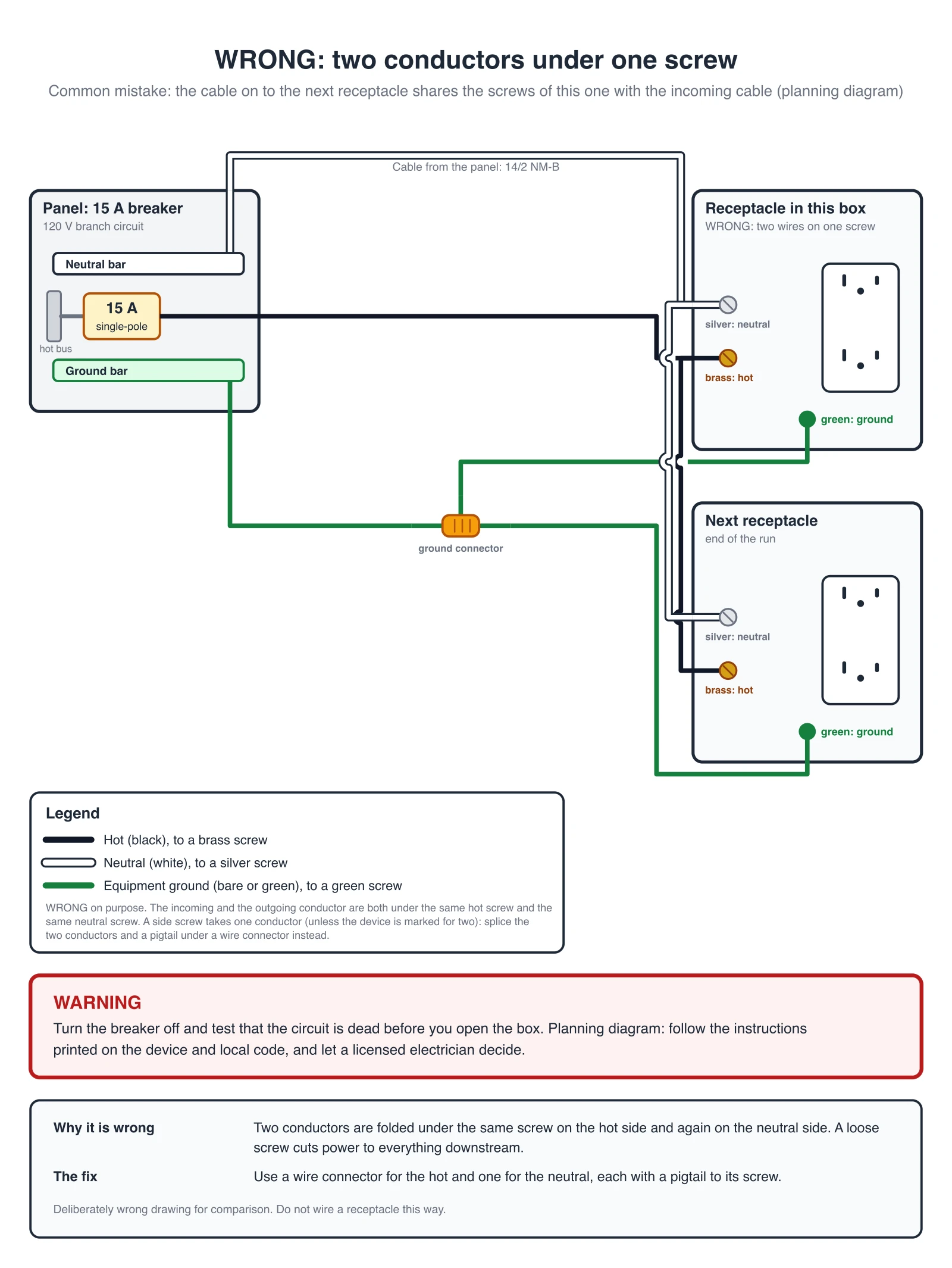
Wrong Example: Two Wires Under One Screw
A deliberately wrong drawing for comparison. The checker rejects it.
Receptacle Terminal Table: What Goes Where
| Screw | Conductor | Note |
|---|---|---|
| Brass | Hot (black) | The two brass screws are joined by the brass-side tab. Break it off only for a split receptacle. |
| Silver | Neutral (white) | Never through a switch. Leave the silver-side tab in place. |
| Green | Ground (bare or green) | Joined with the other grounds by a wire connector and a pigtail when more than one ground is in the box. |
One conductor per side screw unless the device is marked for two. Screw positions differ between makers, so the markings on the device win over the drawn positions.
Need GFCI protection? See the GFCI outlet wiring diagram generator. For a light on a single pole switch, use the light switch wiring diagram generator. For other circuits, use the Wiring Diagram Maker.
AI illustration of your outlet wiring
Describe an outlet hookup to get a quick picture. AI images can put two wires on one screw or swap the brass and silver screws, so use the exact diagrams and the table above for the real connections and check every screw of an AI picture.
Generate an AI Outlet Wiring Illustration
Example: Exact reference for this connection (drawn in code, not the AI output)View full sizeFree preview on this page · Clean file download needs a
Your outlet wiring diagram will appear here
AI diagrams are drafts. Check every screw color, every ground and the one-conductor-per-side-screw rule against the device markings.
Source (checked October 2026): the screw colors (brass hot, silver neutral, green ground), the pigtail ground and the break-off tab rules follow manufacturer receptacle instruction sheets. Other makers use the same ideas, but screw positions and methods differ, so read the sheet packed with your device. Which wiring methods are allowed depends on the electrical code in your area.
What an outlet wiring diagram shows
An outlet wiring diagram shows which conductor lands on which screw of a receptacle. A standard duplex receptacle has two brass screws for the hot (black) conductor, two silver screws for the neutral (white) conductor and one green screw for the ground. The two brass screws are joined inside the device by a metal strap, and so are the two silver screws. That is why a receptacle can pass power on to the next one, and why only one pair of screws is used when the receptacle is the last on the run. The diagrams above are drawn in code from reviewed scenes, so each screw carries the conductor the device instructions name for it.
Wire colors: black, white, bare, and red
- In standard NM-B cable the black conductor is the hot, the white is the neutral and the bare (or green) conductor is the ground. A 14/2 cable holds black, white and ground. A 14/3 cable adds a red conductor. That is the usual answer to "outlet wiring diagram 4 wires": black, white, red and bare, used when a switched hot is carried to a receptacle.
- Insulation color is not phase. A white wire can be re-marked as a hot in a switch loop, and a black wire in a different circuit can be a different hot. The screw colors on the device are the guide: brass is hot, silver is neutral, green is ground.
- The wire size follows the breaker. The sample diagrams use 14/2 on a 15 A circuit; use the cable size that matches your breaker.
End of the run or middle of the run
- Count the cables in the box. With one cable, the receptacle is at the end of the run. Land the black on a brass screw, the white on a silver screw and the bare ground on the green screw, as in the first diagram.
- With two cables, the receptacle is in the middle of the run. One cable comes from the panel side and one continues to the next receptacle. The diagram with pigtails joins the incoming and outgoing conductors with a short pigtail under a wire connector for each of the hot, the neutral and the ground, so every screw carries one conductor.
- Many receptacles also have push-in (back-wire) holes and a strap that carries power through the device. The diagrams on this page use the side screws and pigtails. If you use a different method, follow the instruction sheet that came with your device.
Why one conductor per side screw
Two conductors folded under one screw can loosen and overheat, and when one of them works loose everything downstream loses power. With a pigtail, the receptacle takes one conductor at each screw, and the other conductors stay connected even if the receptacle is removed for replacement. Some devices have clamp terminals marked for two conductors; follow the device instructions. The checker behind these diagrams has a rule for the side screws shown here: it rejects a drawing with more than one conductor on a screw terminal of a receptacle or a switch. The wrong diagram above is rejected by that rule.
Light switch with outlet wiring diagram
- To control an outlet from a wall switch, bring power to the switch box first. The hot goes through the single pole switch and on to the receptacle. The neutral is spliced through the switch box and goes straight to the receptacle: only the hot is switched, and the neutral never lands on the switch.
- A plain receptacle wired this way switches both outlets. For one outlet that is always on and one that follows the switch, use the split receptacle diagram: break off the tab between the two brass screws only, feed one brass screw with the constant hot and the other with the switched hot, and keep the silver-side tab so the neutral reaches both outlets. That needs a three-conductor cable from the switch box.
- For a light on a single pole switch, with no receptacle involved, see the light switch wiring diagram generator.
Outlets in series: how several receptacles are wired
Several outlets on one circuit are wired in a chain, often called in series, although the receptacles are in parallel electrically: each receptacle is fed from the same hot and neutral. Each box in the middle of the chain is the middle of the run diagram. The first box takes the cable from the panel, every middle box has a cable in and a cable out with pigtails, and the last box has one cable and uses the end of the run diagram. If you want some of the outlets protected by a ground-fault interrupter, see the GFCI outlet wiring diagram generator.
Common outlet wiring mistakes
- Two conductors under one screw. This is the mistake the wrong diagram shows. Use a wire connector and a pigtail.
- Hot on the silver screw or neutral on the brass screw. The silver screw is for white conductors and the brass screw for hot conductors. Reversed polarity is a shock hazard even when the outlet seems to work.
- The neutral run through a switch. In a switch-controlled outlet only the hot goes through the switch.
- A missing ground. Connect the bare ground to the green screw. In a metal box, the box needs a bond too, as the device sheet and local code require.
- Both brass screws used when you wanted a split receptacle. If the brass-side tab is still in place, the two brass screws are one node and both outlets get the same hot.
- Working with the power on. Turn the breaker off and test the wires before you touch them.
Exact diagrams vs AI drafts
The four diagrams above are exact diagrams. They are drawn in code from reviewed netlists, and a checker compares every drawing with a reference table: brass takes the hot, silver takes the neutral, green takes the ground, the switch carries only the hot, and no side screw carries two conductors. The checker also rejects the deliberately wrong diagram. We do not show AI-generated wiring images as examples, because image models often put two wires on one screw or swap the brass and silver screws. The generator on this page still produces an AI illustration from your prompt. Treat it as a rough picture, compare it with the exact diagrams and with the markings on your device, and let a licensed electrician decide what is installed. A diagram from this page is a planning picture. It is not a permit drawing and it does not replace the device instructions or the electrical code in your area.
Frequently Asked Questions
Related Engineering Tools
 Engineering
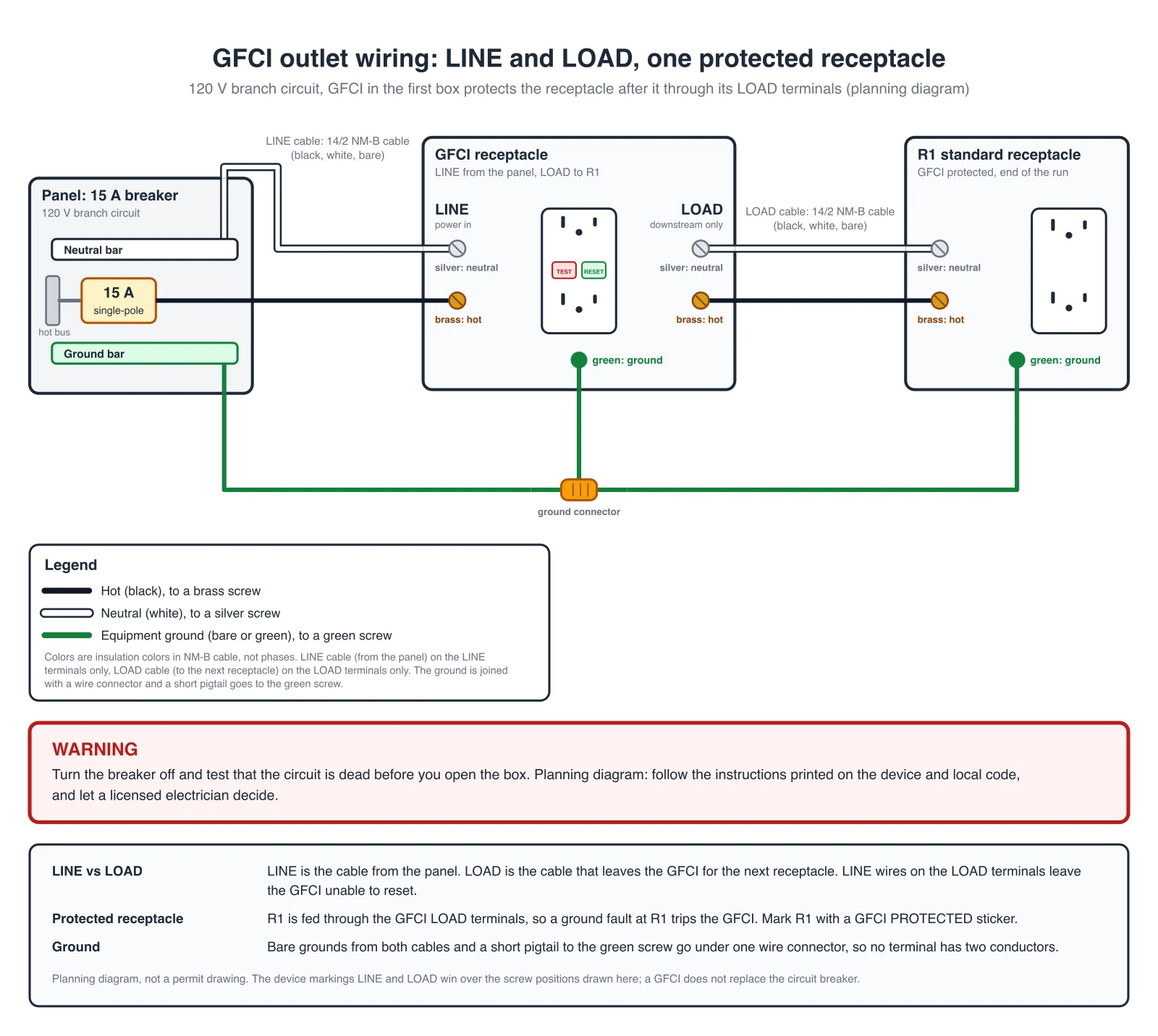
GFCI Outlet Wiring Diagram Generator
Exact GFCI outlet wiring diagrams: LINE only, LINE and LOAD with protected receptacles.
 Engineering
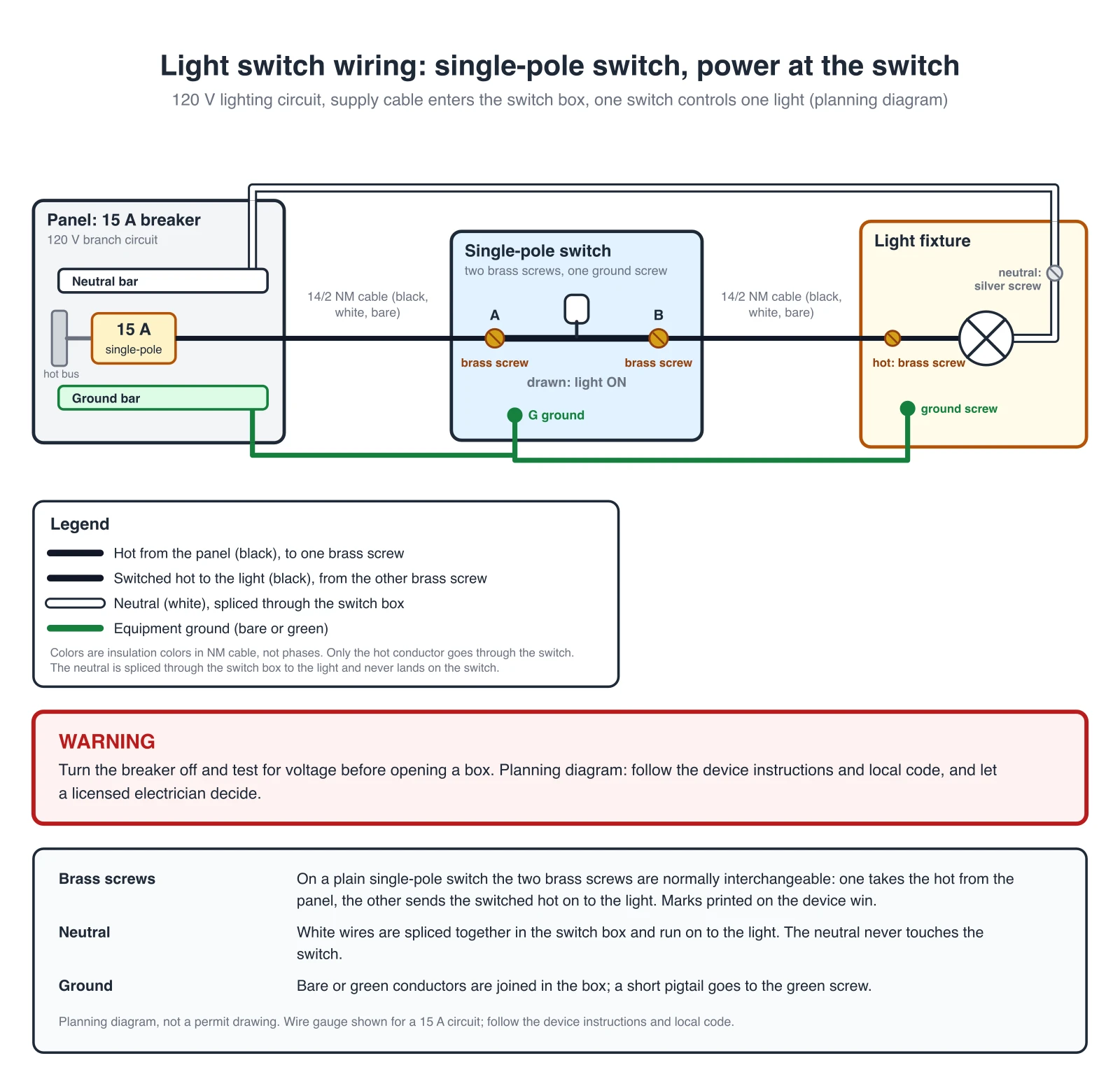
Light Switch Wiring Diagram Generator
Exact single pole switch diagrams: power at the switch or at the light, with a connection table.
 Engineering
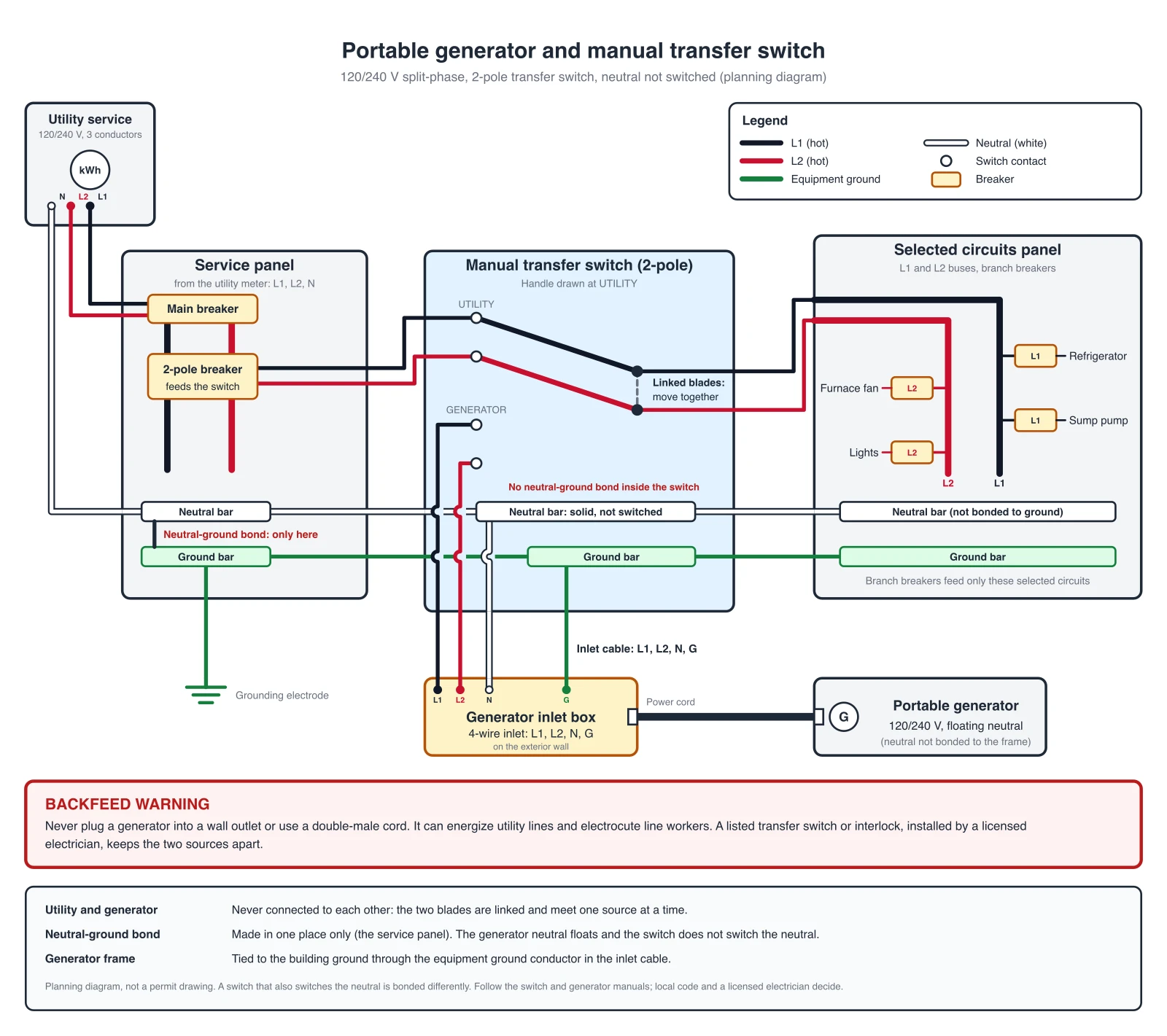
Wiring Diagram Maker
Wiring diagrams for home, automotive, appliance, and industrial systems from a plain-English description.
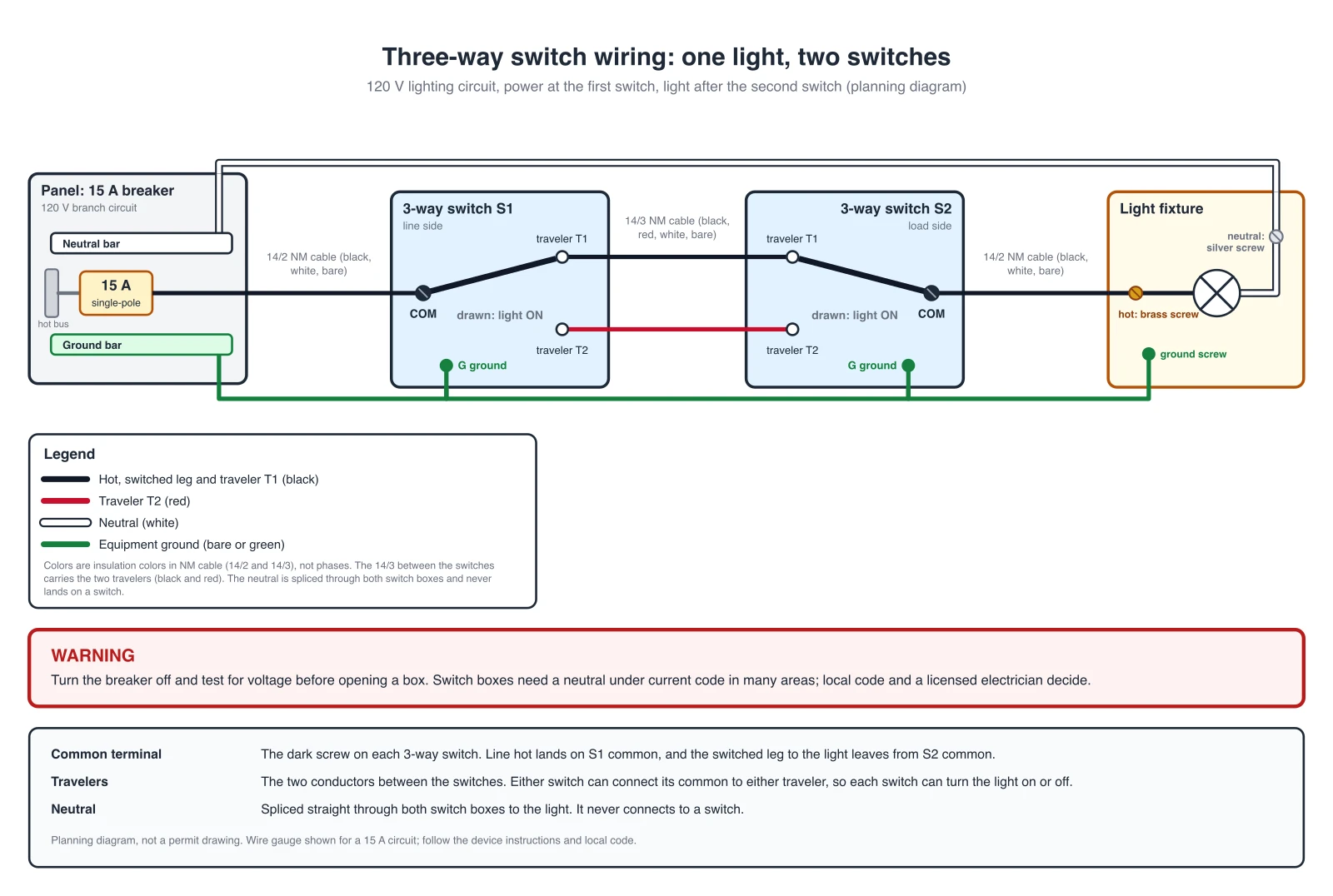 Engineering
3-Way Switch Wiring Diagram Generator
Two switch locations: exact 3-way diagrams with power at the switch or at the light.