Ceiling Fan Wiring Diagram Generator with a Light Kit
Exact ceiling fan wiring diagrams with a light kit: one switch for fan and light, or two switches on 14/3 cable. Planning drawings only.
Wiring a plain switch for a light? See the Light Switch Wiring Diagram Generator. For 14/3 cable between two switches, see the Three Way Switch Wiring Diagram Generator.
Ceiling Fan Wiring Diagrams
Exact diagrams drawn in code from a connection list checked against the fan maker instructions. Each shows the supply, the switch or switches, the wire nuts in the fan box, the four fan leads, the neutral, the ground and the cable runs. One fan with a light kit, 120 V.
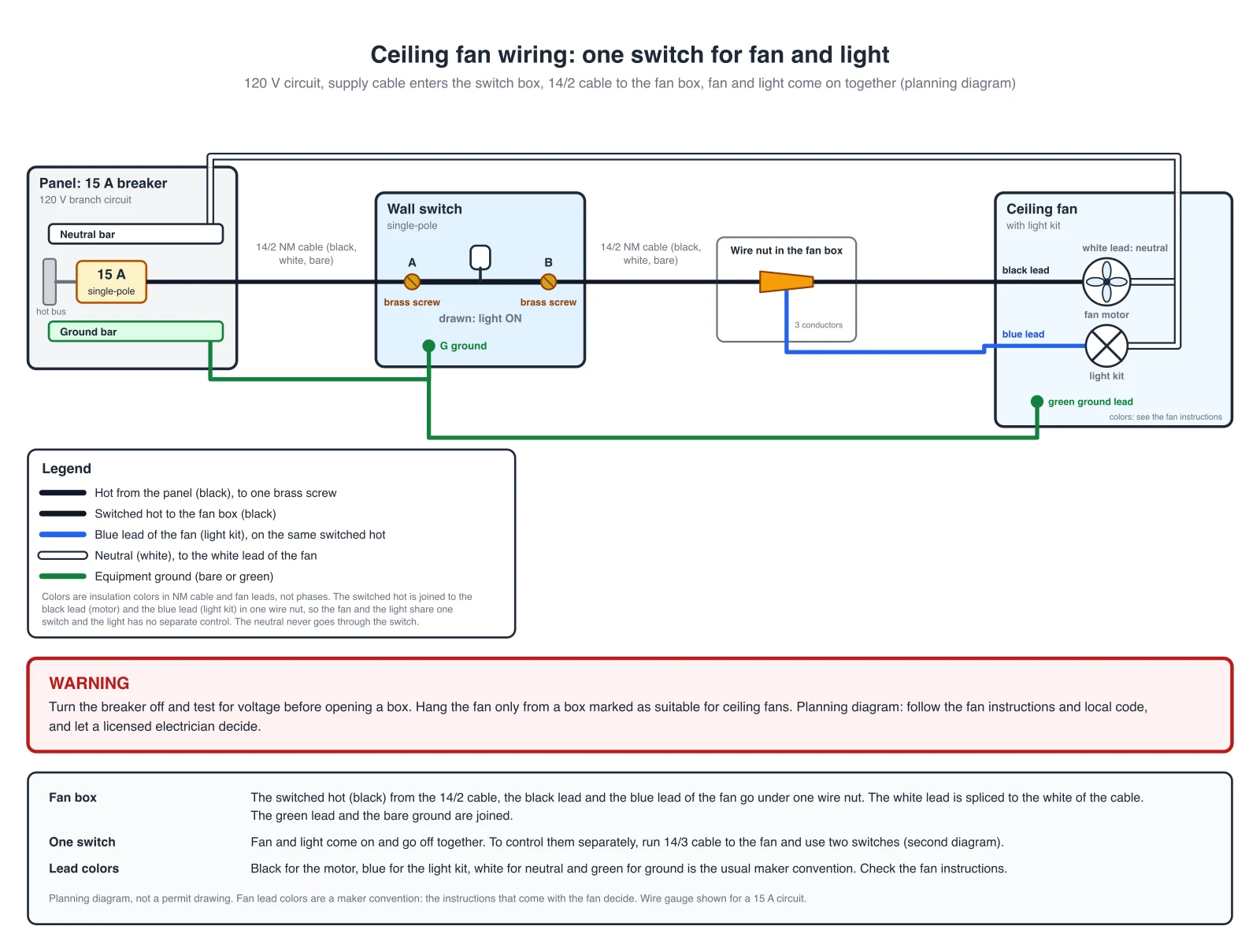
One switch for the fan and the light
The supply hot goes through the wall switch. In the fan box the switched hot, the black lead (motor) and the blue lead (light kit) go under one wire nut, so the fan and the light come on and go off together. The white lead takes the neutral, which never goes through the switch. The green lead joins the grounds.
Cable runs: 14/2 from the panel to the switch box, 14/2 from the switch box to the fan box.
The light has no separate control in this layout. Known simplification: the neutral is drawn as one wire from the panel to the fan. In the boxes it is spliced with wire nuts, and the grounds are joined with a pigtail rather than chained through device screws. Fan lead colors are a maker convention: the fan instructions decide.
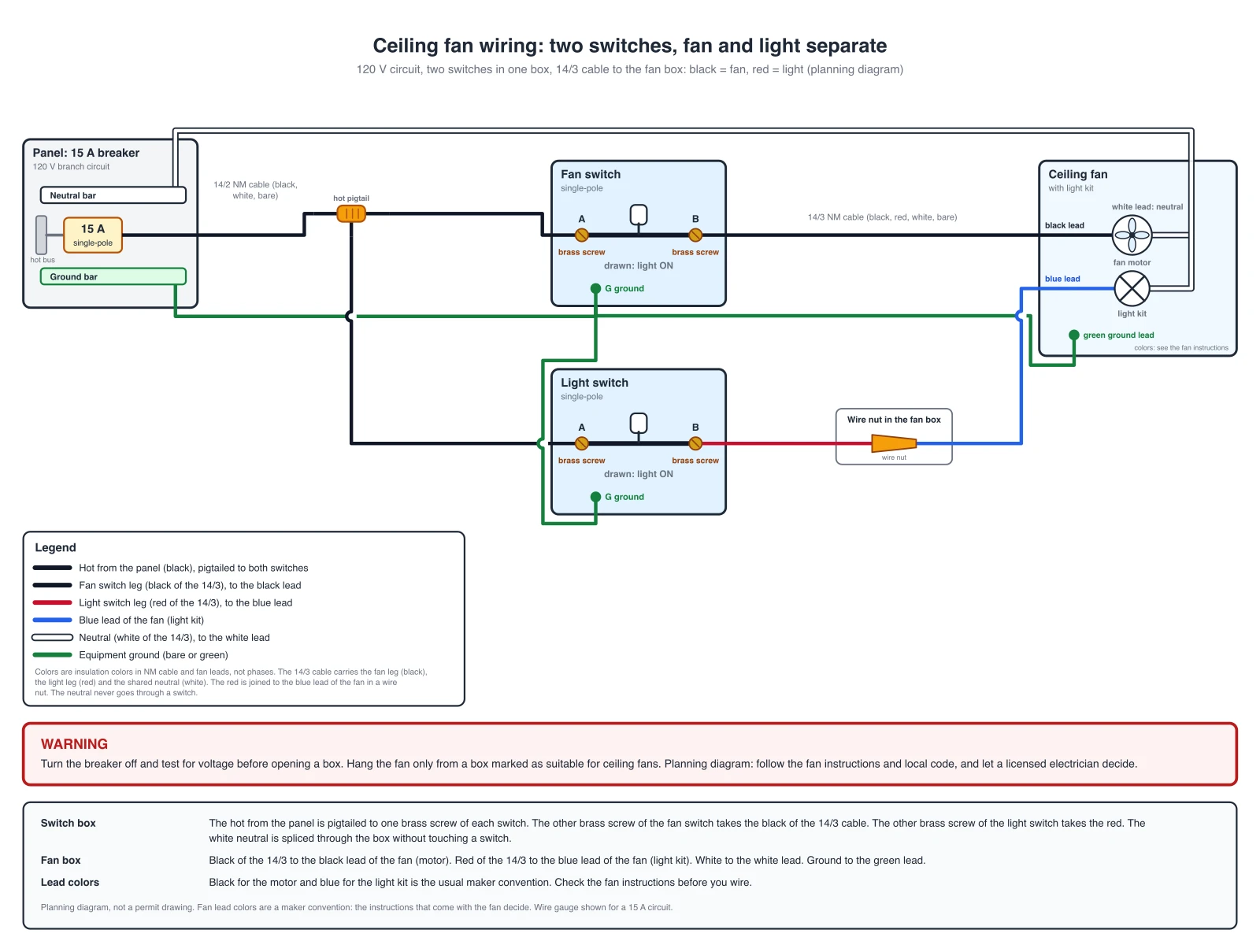
Two switches: fan and light controlled separately
Two switches sit in one box and both take the supply hot through a pigtail. The fan switch feeds the black conductor of the 14/3 cable, which goes to the black lead of the fan (motor). The light switch feeds the red conductor, which goes to the blue lead (light kit) in a wire nut. The white conductor is the neutral for both and never goes through a switch.
Cable runs: 14/2 from the panel to the switch box, 14/3 from the switch box to the fan box (black, red, white, bare).
Known simplification: the neutral is drawn as one wire from the panel to the fan. In the boxes it is spliced with wire nuts, and the grounds are joined with a pigtail rather than chained through device screws. All grounds are one bonded node. Black for the fan and red for the light is the usual convention for the cable; the fan instructions and the markings on the fan decide which of its leads is which.
Connection Table: Fan Leads, Switch Legs, Neutral, Ground
The same connections as the diagrams. Every terminal appears once. On a plain single pole switch the two brass screws can be swapped with each other.
| Layout | Connected together |
|---|---|
| one switch for fan and light |
|
| two switches (14/3 to the fan): black lead = fan, blue lead = light |
|
Colors are insulation colors in NM cable and fan leads, not phases. The red conductor of the 14/3 cable is spliced to the blue lead of the fan in a wire nut. Your fan may use other colors: its instructions win.
This page covers one fan with a light kit. For a light on a plain switch, see the Light Switch Wiring Diagram Generator. For other wiring, such as home, automotive, or appliance systems, use the Wiring Diagram Maker.
AI illustration of your ceiling fan circuit
Describe a circuit to get a quick picture. AI images can draw wrong connections, so use the exact diagrams and the table above for the real connections and check every fan lead, the neutral and the ground of an AI picture.
Generate an AI Ceiling Fan Illustration
Example: Exact reference for this layout (drawn in code, not the AI output)View full sizeFree preview on this page · Clean file download needs a
Your ceiling fan wiring diagram will appear here
AI diagrams are drafts. Check every fan lead, the neutral and the ground against the exact diagrams.
Sources (checked October 2026): Hunter Fan, Wiring Your Fan on a Single or Dual Wall Switch, EC&M Code Q&A, Boxes at Ceiling-Suspended Fan Outlets (NEC 314.27(C), 2017 edition), and Mike Holt, Switches, based on the 2020 NEC (404.2).
What a ceiling fan wiring diagram shows
A ceiling fan wiring diagram shows which conductor in the ceiling box goes to which lead of the fan. A fan with a light kit has four leads: a black one for the motor, a blue one for the light kit, a white one for the neutral and a green one for the ground. The two things that decide the wiring are how many hot wires reach the ceiling box and how many switches you have. This page draws the two common layouts as exact diagrams from a documented connection list checked against the fan maker instructions and puts the same connections in a table.
One switch or two?
- With one switch, the fan and the light share it. The switched hot goes to the black lead and the blue lead together (Hunter describes it as joining the ceiling black wire to the fan black and blue wires), so the fan and the light come on and go off together and the light has no separate control. Then set fan speed and light as the fan instructions describe.
- With two switches you need a 14/3 cable between the switch box and the fan box. Its black conductor goes to the black lead of the fan, and its red conductor to the blue lead (Hunter describes the second black or red wire going to the blue lead). The white conductor is the shared neutral.
- Not sure how a 14/3 cable is used in a switch circuit? The Three Way Switch Wiring Diagram Generator linked below shows 14/3 between two switches, and the Light Switch Wiring Diagram Generator shows a single switch.
Fan lead colors are a maker convention
- Black for the motor, blue for the light kit, white for the neutral and green for the ground is what most fans use, and the diagrams on this page follow it. It is a convention of the fan makers, not a standard, so the instructions that come with your fan decide. A fan with a remote receiver or a wall control has extra leads and different wiring that this page does not draw.
- If the ceiling box has only one black wire and your fan has a blue lead you do not need, the blue lead is capped on its own or joined with the black, as the fan instructions say.
The ceiling box must be rated for a fan
- A fan moves and vibrates, so a plain light box is not enough. NEC 314.27(C) (as summarized by EC&M for the 2017 edition) requires an outlet box that is the sole support of a ceiling-suspended fan to be listed and marked by its maker as suitable for that purpose, and it must not support a fan heavier than 70 lb; for fans over 35 lb the marking must include the maximum weight, and a fan over 35 lb is supported independently of the box when the marking does not give a maximum weight. Later editions changed the wording, so check the edition your area has adopted.
- In practice: look for the marking on the box, and hang the fan from the box or the bracket the fan instructions allow.
The neutral never goes through the switch
The switches interrupt the hot conductors. The white conductor carries the neutral from the panel to the white lead of the fan and is never connected to a switch. This is why the checker rejects a drawing with the neutral on a switch. Check what applies where you live: the code asks for a neutral at many lighting switch locations (NEC 404.2(C), with exceptions), and smart switches and fan controls often need one. Ask your local inspector or a licensed electrician.
Troubleshooting a ceiling fan
- The fan runs but the light never comes on (two switches): the blue lead is not on the light switch leg, or the red conductor of the 14/3 is not spliced to it.
- The light comes on with the fan and cannot be switched alone: the blue lead is on the same hot as the black lead. That is the one-switch wiring.
- Nothing works: check the neutral first. The white lead must reach the neutral of the supply. If it does, have an electrician trace the switch legs.
- The fan wobbles or hums: check the box and the mounting first. This is not a wiring diagram problem.
Before you open a box
- Turn the breaker off and test every wire for voltage. A ceiling box can hold wires from another circuit.
- Check how the boxes are wired before you copy a diagram. Many existing circuits do not match a textbook layout.
- The diagrams show 14 AWG cable on a 15 A breaker. Use 12 AWG cable on a 20 A circuit, and match the cable, breaker and switch rating together.
- Not drawn: pull-chain speed switches, capacitors, wall controls and remote receivers. Use the fan instructions for those.
Exact diagrams vs AI drafts
The two diagrams above are exact reference diagrams. They are drawn in code from a documented connection list, and a checker compares each drawing with a reference table. We do not show AI-generated wiring images as examples, because image models often draw wrong connections, such as a neutral on a switch or the blue lead on the wrong leg. The generator on this page still produces an AI illustration from your prompt. Treat it as a rough picture, compare it with the exact diagrams, and let a licensed electrician decide what gets installed. A diagram from this page is a planning picture, not a permit drawing, and it does not replace the fan instructions or the electrical code that applies in your area.
Frequently Asked Questions
Related Engineering Tools
 Engineering
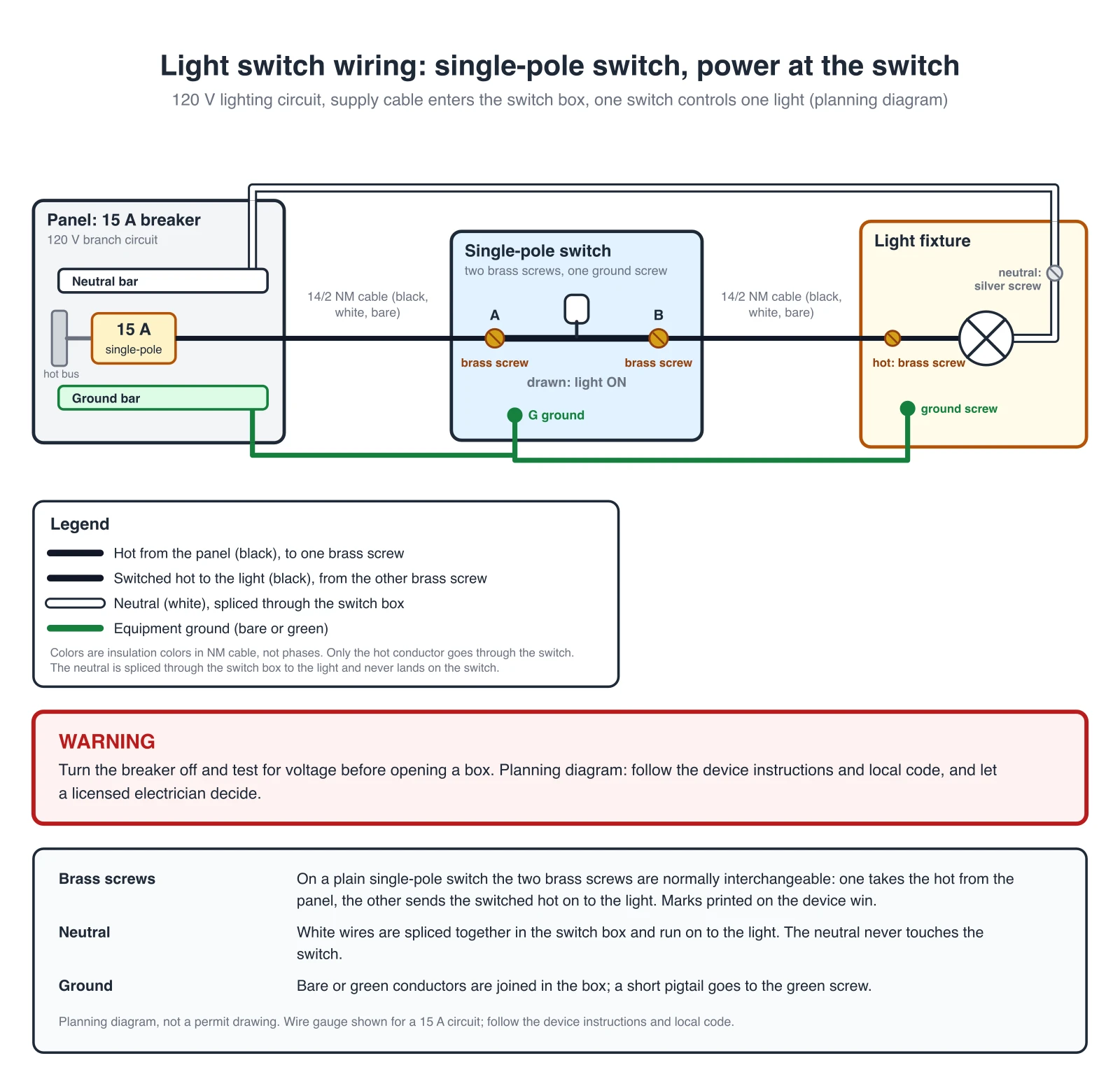
Light Switch Wiring Diagram Generator
Exact single pole switch diagrams: power at the switch and a switch loop.
 Engineering
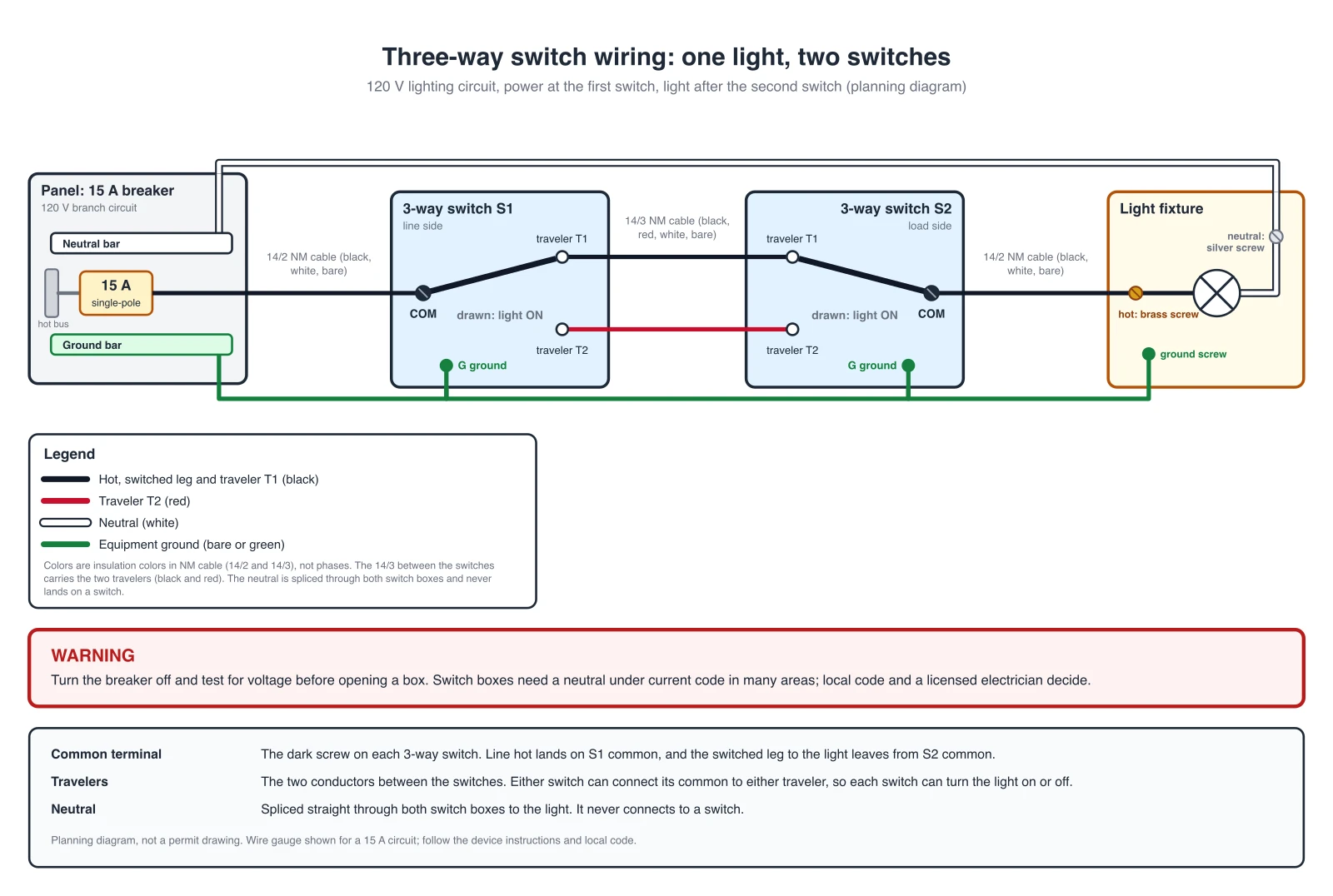
3-Way Switch Wiring Diagram Generator
Two switch locations: exact 3-way diagrams with power at the switch or at the light.
 Engineering
Wiring Diagram Maker
Wiring diagrams for home, automotive, appliance, and industrial systems from a plain-English description.