Best Patent Drawing Software: 10 Tools Compared
Compare 10 patent drawing tools and services, with prices checked in October 2026, the USPTO rules that matter, real test figures, and when to hire a drafter.
Patent drawings are one of the few places where a great invention can still get an objection. The USPTO does not care how impressive your 3D model is; it cares whether the printed sheet follows 37 CFR 1.84: black ink on white, numbered views, reference numerals with lead lines, and margins it can scan.
This guide compares the software people actually use to make those sheets: engineering CAD, vector editors, diagram tools, and AI generators, plus the drafting services that redraw everything for you. Every price shown below was checked on the vendor's own site in October 2026 (where a vendor page could not be read, we show no figure), and the three test figures in the ConceptViz section are real, unedited outputs from this site's own generator, with their flaws pointed out.
Prices and promotions change. Confirm on the vendor's page before you buy, and talk to a registered patent attorney or agent before you file. Nothing here is legal advice.
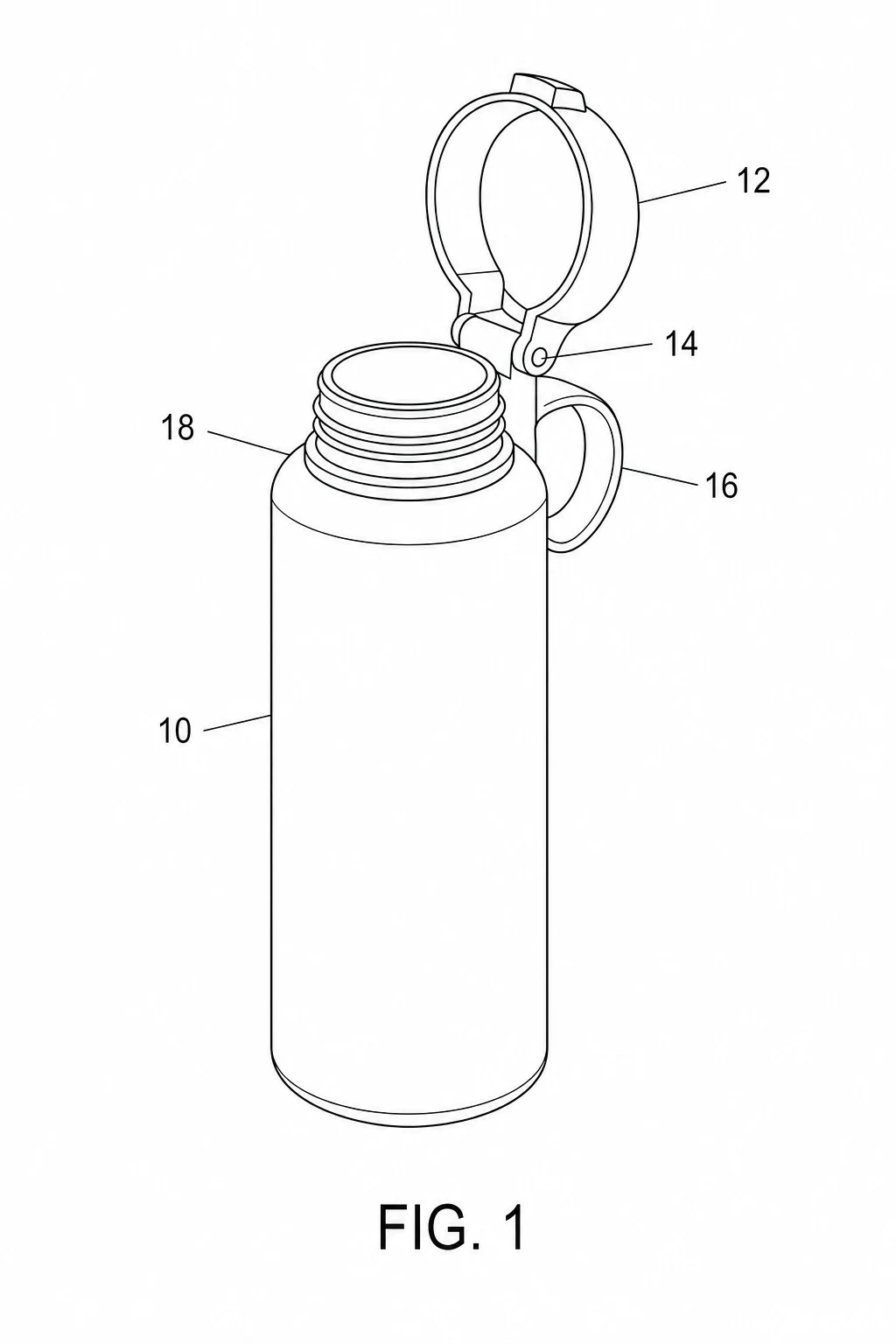
Patent Drawing Generator
Describe your invention in plain language and get a black-and-white first-pass figure with reference numerals and lead lines. Hand it to a drafter or attorney for the filing version.
Draft a patent figure →Quick comparison
| Tool | Type | Price (checked October 2026) | B&W line art | Numerals + lead lines | Learning curve | Best for |
|---|---|---|---|---|---|---|
| ConceptViz | AI generator | 2 free trial credits; plans from $20.83/mo billed yearly; packs from $4.99 | Native, prompt-controlled | Automatic, needs review | None | Fast first drafts of figures |
| AutoCAD / LT | CAD | Subscription; see Autodesk for current price | Yes | Manual | Steep | Precision utility figures, existing DWG |
| Fusion | CAD | Subscription; free for qualifying personal use | Via drawing workspace | Manual | Moderate | Inventors already modeling in 3D |
| SOLIDWORKS Design | CAD | Subscription; see SOLIDWORKS for current price | Via drawing mode | Manual | Steep | Products already designed in SOLIDWORKS |
| Adobe Illustrator | Vector | $22.99/mo (annual, billed monthly) | Full control | Manual, clean | Moderate | Polishing any figure to final |
| Microsoft Visio | Diagram | Plan 1 $5/user/mo; Plan 2 $15/user/mo | Yes | Manual, connectors help | Gentle | Flowcharts and block diagrams |
| SmartDraw | Diagram | Paid subscription; see SmartDraw for current price | Yes | Manual, connectors help | Gentle | Office-style method figures |
| Inkscape | Vector | Free, open source | Full control | Manual | Moderate | Free alternative to Illustrator |
| FreeCAD | CAD | Free, open source | TechDraw workbench | Manual | Steep | Free parametric 3D to 2D views |
| PatentFig AI | AI generator | Free daily credits; Basic listed at $20/mo, struck through from $50 | Native | Automatic, needs review | None | AI drafts aimed at patent style |
Official sources: ConceptViz pricing, AutoCAD and AutoCAD LT, Fusion and Fusion personal use, SOLIDWORKS Design, Adobe Illustrator, Microsoft Visio, SmartDraw, Inkscape, FreeCAD, PatentFig AI pricing, Pinch, Ascadex, PatDraw, and Patent Drawing Experts. Prices for Autodesk, SOLIDWORKS, and SmartDraw were not readable from the vendor pages when we checked in October 2026, so we show no figure for them; confirm on the linked page.
What the USPTO actually requires
Before comparing tools, it helps to know the target. The drawing rules live in 37 CFR 1.84, and the points that decide your software choice are:
- Black and white. Black and white drawings are normally required, with solid black lines (1.84(a)(1)). Color is allowed in design applications and only on petition in utility applications (1.84(a)(2)). Lines must be clean, dark, and well-defined, and different line weights are fine when the weight carries meaning (1.84(l)). Thin spaced lines may shade a surface, but solid black areas are not allowed (1.84(m)), which is why pure vector line art is the safe default.
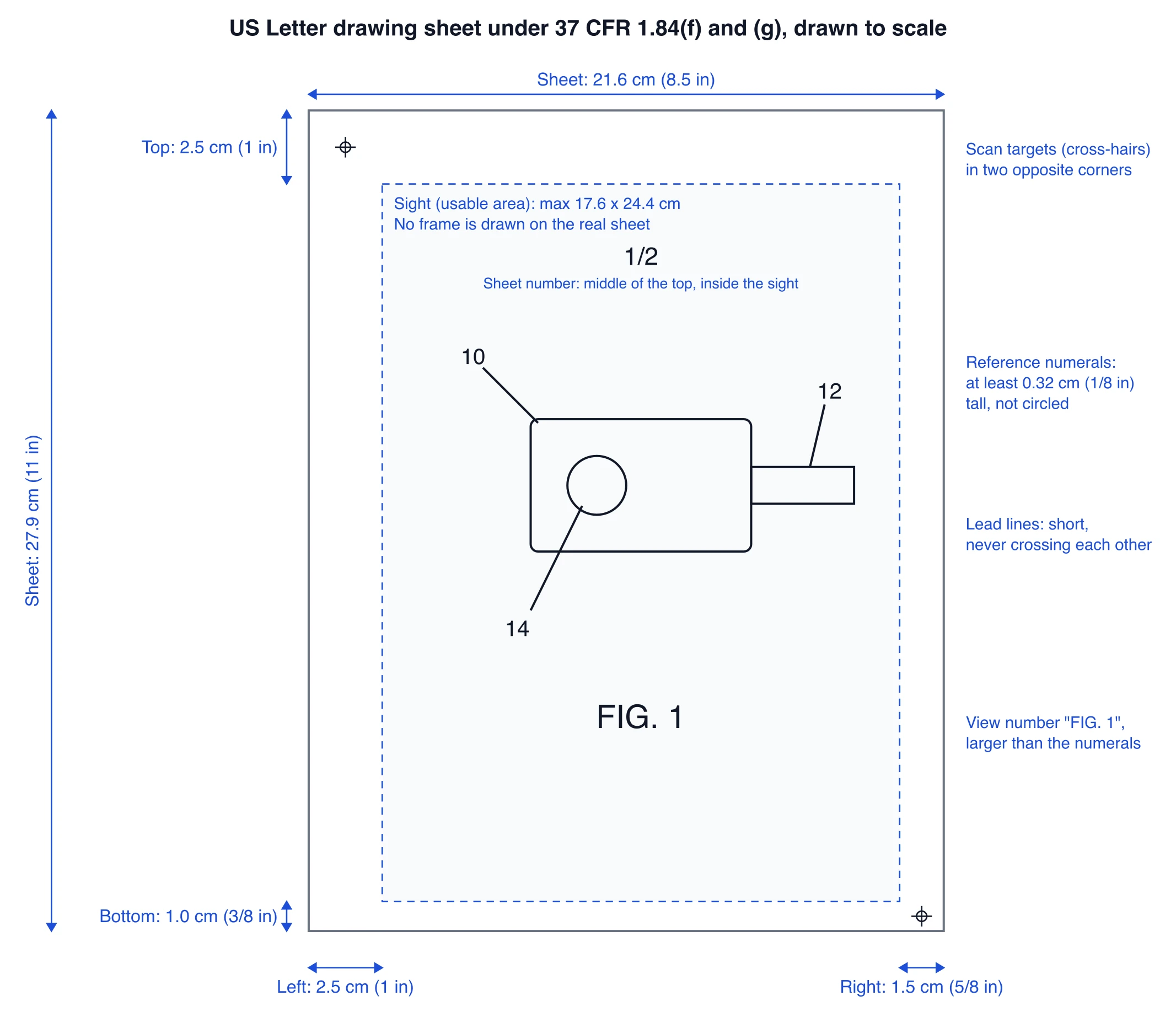
- Sheet size and margins. A4 or US Letter (21.6 x 27.9 cm). Margins are at least 2.5 cm on top and left, 1.5 cm on the right, and 1.0 cm on the bottom, with no frame around the usable area. Scan cross-hairs should appear in two catercorner margin corners. The usable "sight" is at most 17.6 x 24.4 cm on Letter (1.84(g)).
- Views and labels. Show as many views as needed to show the invention, each numbered "FIG. 1", "FIG. 2", and so on (1.84(u)). Exploded views are allowed with the separated parts embraced by a bracket. Views must not be connected by projection lines and must not contain center lines (1.84(h)).
- Reference numerals and lead lines. Numerals must be plain, not circled or bracketed, and at least 0.32 cm (1/8 inch) tall (1.84(p)). Lead lines should be as short as possible, run from the numeral to the feature, and must not cross each other (1.84(q)). Arrows are allowed only for the uses listed in 1.84(r).
- Scale for reduction. The drawing must stay uncrowded and readable when reduced to two-thirds, so tiny text is an objection waiting to happen (1.84(k)).
Two more rules shape your workflow. Under 35 USC 132(a), you cannot add new matter after filing, so a figure redrawn late in prosecution must not introduce anything the original disclosure lacked; corrected sheets are submitted as replacement sheets under 37 CFR 1.121(d). And design patents follow 37 CFR 1.152, which is stricter about shading because the drawing itself is the claim. Our patent drawing generator page keeps a rule checklist next to the prompt box for exactly this reason.
CAD software: precision you already own
AutoCAD (subscription; see the Autodesk page for current pricing and trial terms) is a common choice for utility figures. If your invention already exists as DWG geometry, AutoCAD gives exact control over line weight, hatching, and sheet layout. AutoCAD LT is the 2D-only edition at a lower subscription price and is enough for most flat patent figures.
Fusion (subscription) makes sense when the invention was designed in Fusion: the drawing workspace projects 2D views straight from your 3D model, and you delete hidden lines and annotations until only clean outlines remain. Autodesk also offers a free personal-use license for qualifying non-commercial projects; read its terms before using it for anything tied to a commercial filing.
SOLIDWORKS Design (subscription tiers; check the vendor page for current prices) is the same story for the SOLIDWORKS ecosystem: drawing mode generates orthographic and isometric views from parts you already modeled. Nobody buys SOLIDWORKS just for patent figures; you use it because the product lives there. For the electrical and wiring side of engineering drawing, see our wiring diagram software guide.
FreeCAD (free, open source) is the zero-budget CAD path. Its TechDraw workbench projects dimensioned 2D views from parametric 3D parts. Expect to fight the interface, and expect to finish the figure in a vector editor, but the price is unbeatable for hobbyists.
CAD gives you geometric truth, which matters when your attorney argues that the drawings support the claims. What it does not give you is speed: projecting views, cleaning hidden lines, placing numerals, and fixing sheet layout is hours of skilled work per figure.
Vector and office tools: the finisher's choice
Adobe Illustrator ($22.99/mo, annual billed monthly, 7-day trial) is where many patent figures get their final polish, whatever tool made the first draft. You set one stroke weight, place numerals at a legal size, route lead lines so they never cross, and export a clean PDF sheet. If you plan to draw every figure yourself and file several applications a year, Illustrator plus the USPTO checklist is a legitimate DIY stack.
Inkscape (free, open source) does the same job for nothing. The pen, stroke, and text tools are all there; the polish and tutorials are not as deep. For a first provisional on a budget, Inkscape is the sensible free pick.
Microsoft Visio (Plan 1 $5/user/mo, Plan 2 $15/user/mo, billed annually) and SmartDraw (paid subscription) are office diagram tools, not drafting tools, but they are genuinely good at the two figure types patents use most: method flowcharts and system block diagrams. Connectors keep arrows attached to boxes when you rearrange, which is most of the work in a method figure. For apparatus figures with real geometry, they run out of road quickly.
A note on diagram tools generally: our schematic diagram guide shows the same pattern in electronics, where a general diagram editor handles symbolic drawings well but cannot invent the underlying engineering.
AI generators: the first draft, not the filing
PatentFig AI is a specialist generator aimed at patent figures. Its pricing page lists a free tier (20 credits on day one plus 10 per day) and paid tiers that were displayed struck through, for example Basic $50 shown as $20/mo for roughly 50 figures; the billing toggle between monthly and yearly made the final price ambiguous when we checked, so read the checkout page carefully. The pitch is the same as every AI tool in this category: fast drafts in patent style that a human still has to check against the invention.
ConceptViz (this site) takes the same position. The patent drawing generator asks for a plain-language description of the view you need, then produces black-and-white line art with a FIG. label, reference numerals, and lead lines. Subscription plans include SVG export for 2 credits per image, so you can correct numerals or reroute a lead line in Inkscape or Illustrator before the figure goes to your drafter.
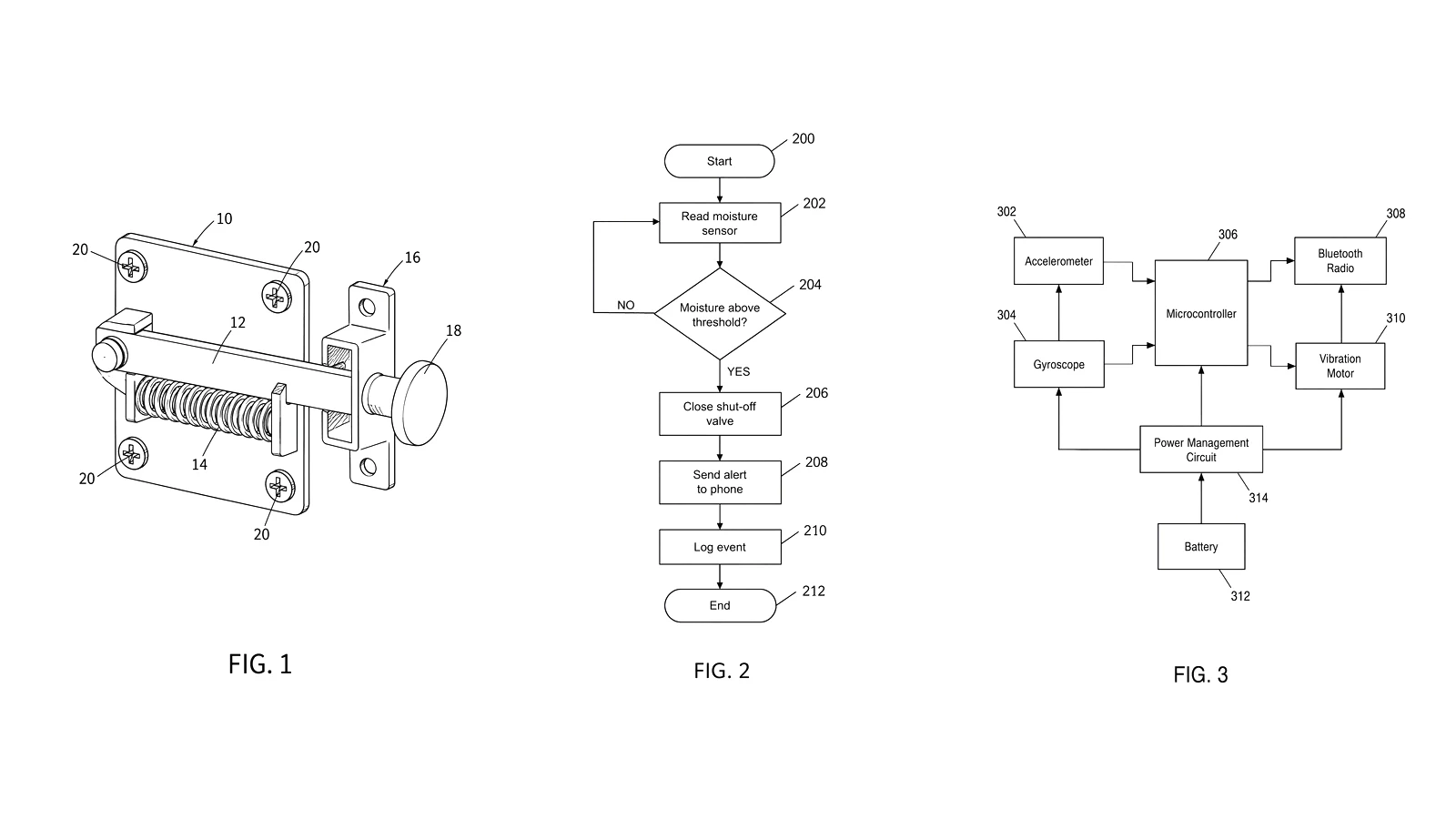
Rather than show marketing renders, here are three real, unedited outputs from the generator, made for this article with the same prompts a user would write.
Test 1, apparatus view. Prompt: a perspective view of a spring-loaded gate latch with mounting plate 10, pivoting latch bar 12, coil spring 14, strike catch 16, pull knob 18, and four mounting screws 20.
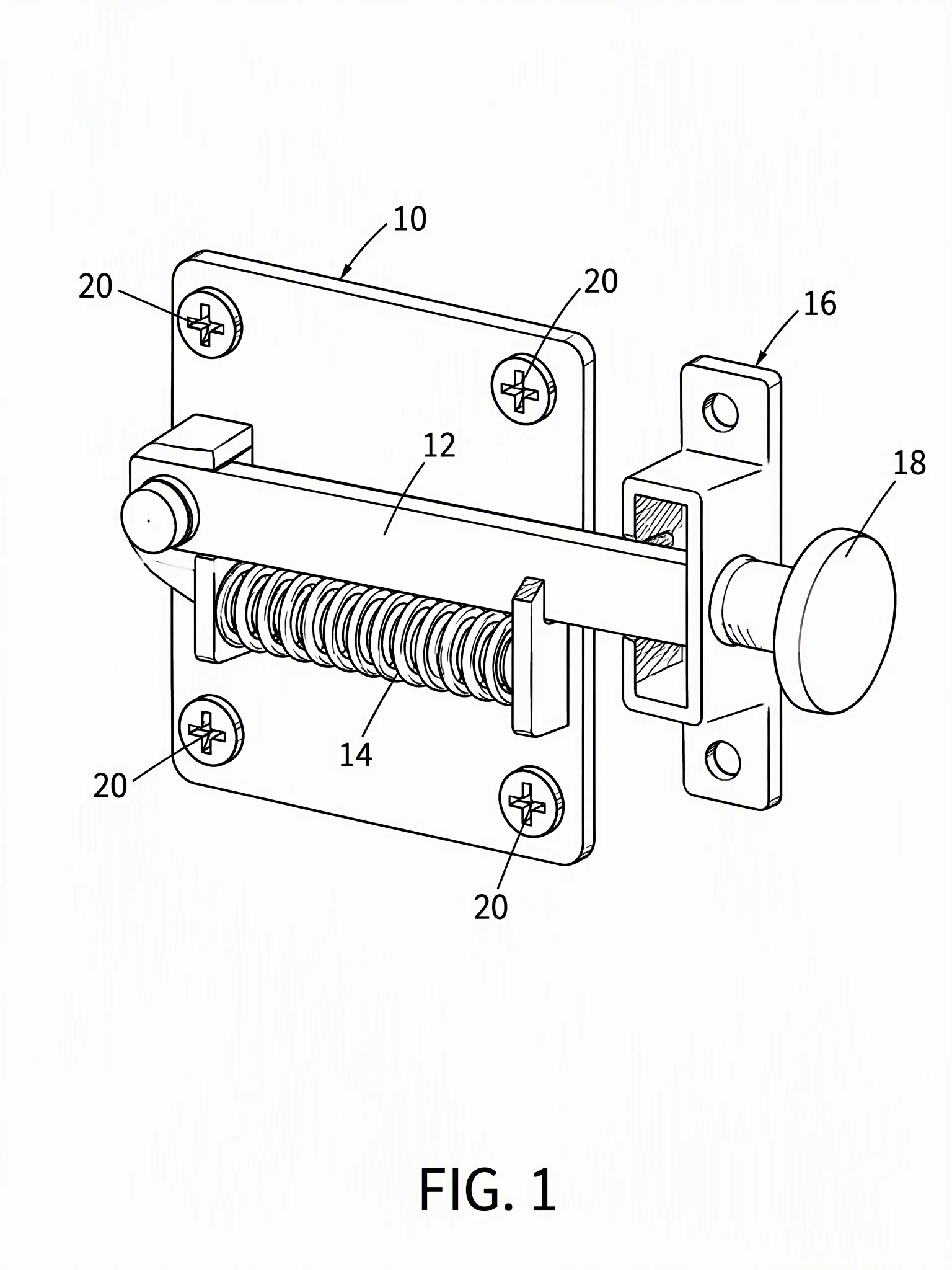
The format is close: black lines, no color fill, readable numerals with lead lines that touch their parts. Two cleanup points remain: the background has a faint gray speckle, and the screws and strike opening carry fine hatching, so clean it up to pure black and white before filing. The content needs a drafter's eye: the latch bar came out as a sliding barrel-bolt style part rather than the pivoting bar described, and the model added a small hatched section inside the strike opening that adds nothing. Both are fixable in one SVG pass, but you must compare the figure against the actual invention.
Test 2, method flowchart. Prompt: a method for detecting a water leak, from reading a moisture sensor through a threshold decision to closing a shut-off valve and sending an alert, steps 200 to 212.
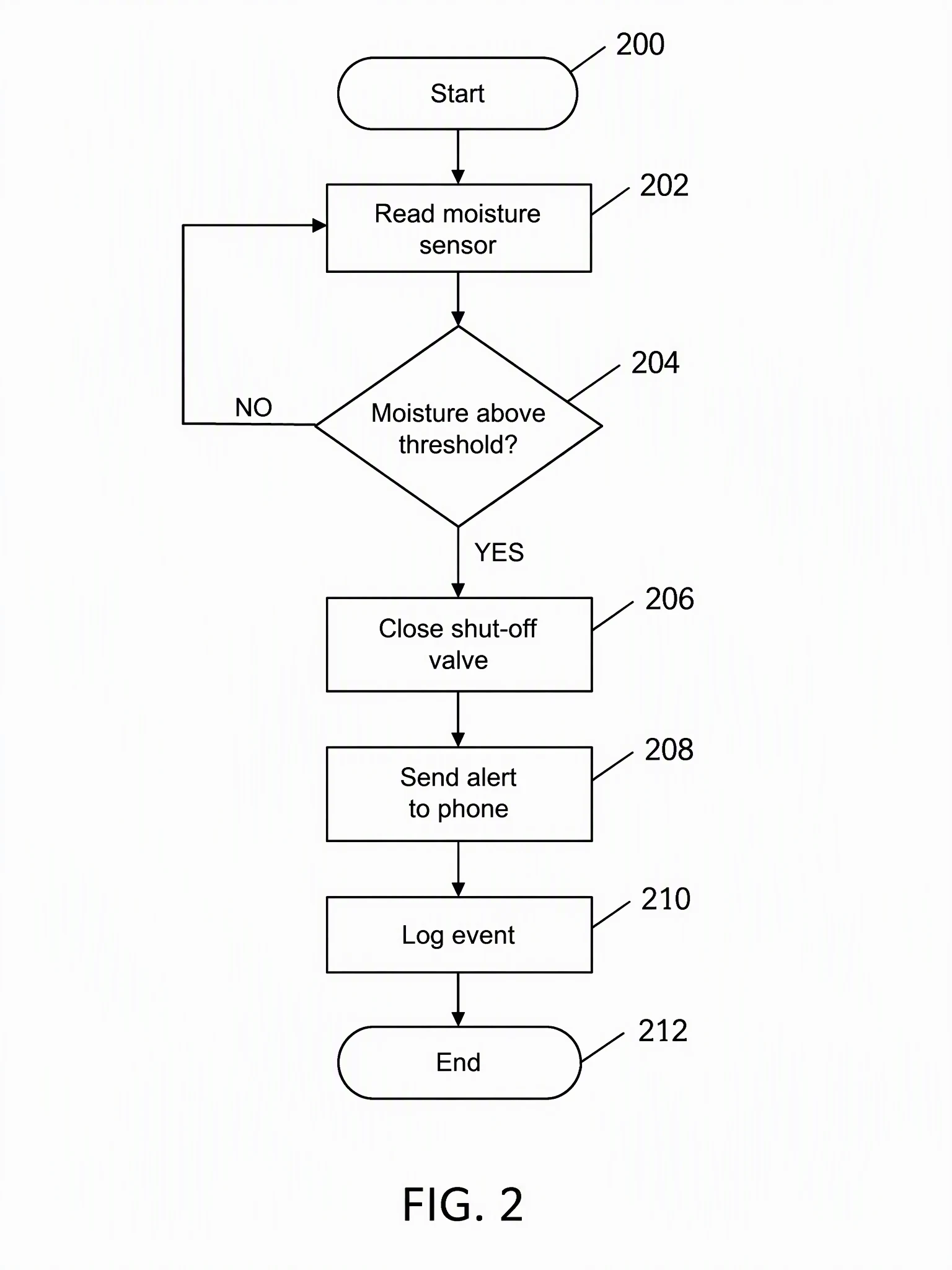
This is the strongest case for AI drafting: flowchart structure is exactly what these models do well, and the YES/NO branches and step numerals all landed where the prompt put them. A drafter would still re-set the text at a size that stays legible after two-thirds reduction. As in the other tests, the background carries a faint gray speckle, so export or clean the figure to pure black on white before filing.
Test 3, system block diagram. Prompt: a wearable fall detector with accelerometer 302, gyroscope 304, microcontroller 306, Bluetooth radio 308, vibration motor 310, battery 312, and power management 314, with arrows for signal and power flow.
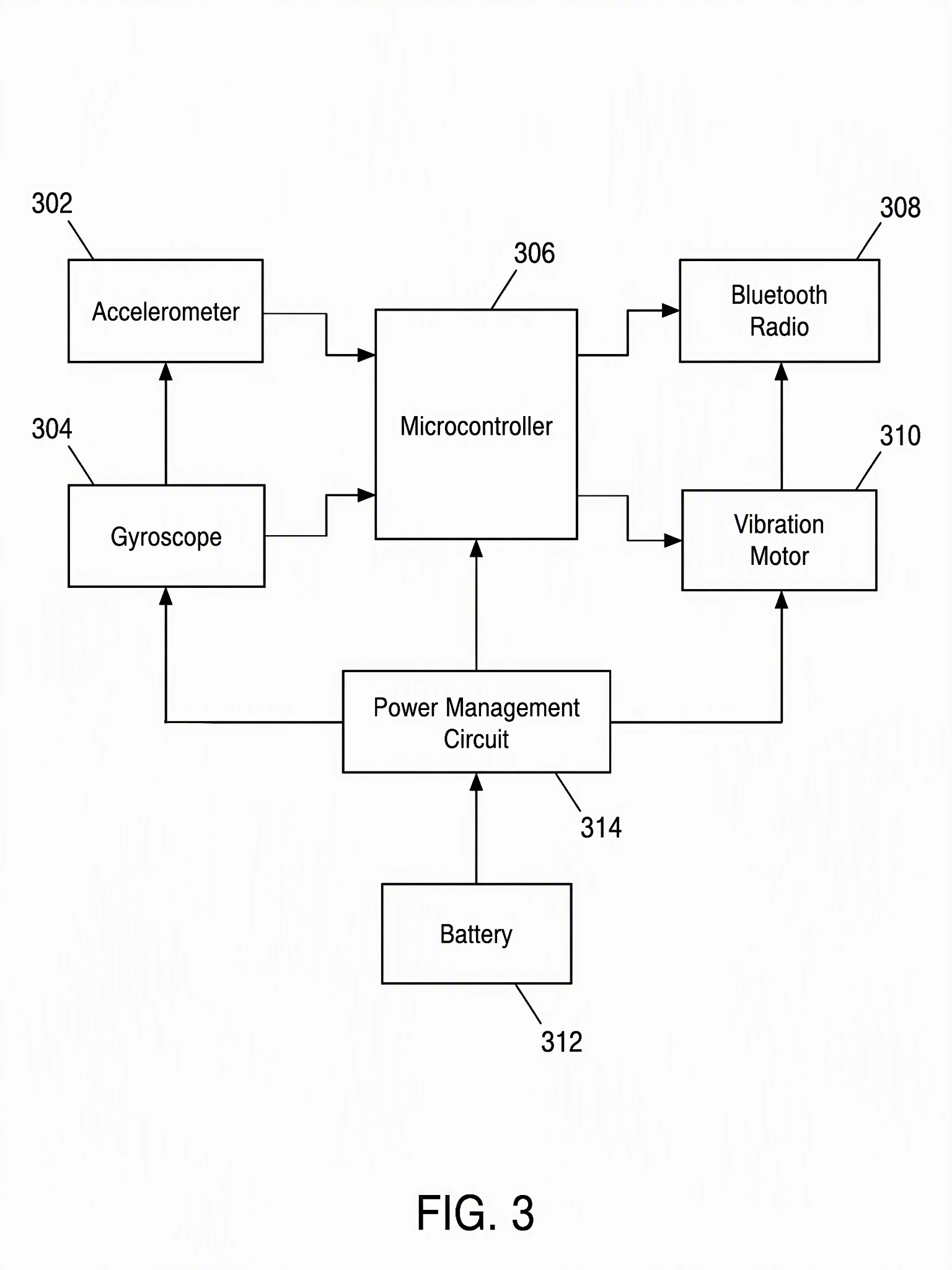
The blocks, numerals, and the arrow directions that were drawn are correct, but the connections are not. The generator added a gyroscope-to-accelerometer arrow and a vibration-motor-to-Bluetooth arrow that the prompt never asked for, and the power lines reach the gyroscope, microcontroller, and vibration motor while skipping the accelerometer and the Bluetooth radio. Which blocks connect, and which way, is a technical fact about your invention, and an AI draft will not defend it for you. Check every arrow and every connection before the figure leaves your desk.
That is the summary for the whole category. In these tests the generator produced black line art, FIG. labels, numerals, and lead lines in a form close to the 1.84 conventions, but it left a faint gray background and some hatching that need cleanup, and it got content wrong in two of three figures. It does not know your invention, so content review against the rules and against your claims is non-negotiable. Use it to get a structured draft in minutes, then fix it or hand it to a professional.
CAD conversion and drafting services
Pinch sits between software and service: you upload a 3D CAD file and get back a set of patent-style views. Pricing is per token, listed at $50 per token, with discounted packs for larger batches, and one token converts one model into 21 drawings. Two catches from the fine print: the output does not include reference numerals or lead lines by default, and US design patent shading still needs manual work, so budget finishing time either way.
Traditional patent drawing services price per figure or per sheet. Checked in October 2026: Ascadex lists utility drawings from $25 per figure and quotes complex figures individually, PatDraw lists $28 per sheet, and Patent Drawing Experts lists $29 per sheet (reduced from $49) regardless of how many figures sit on the sheet. Pinch's own comparison page claims traditional illustrators charge $40 to $60 per sheet with a 3 to 10 day turnaround. As a rough example, seven figures that fit on four sheets would cost about $112 to $116 at the per-sheet storefront rates, plus revisions and any complex-figure surcharge.
Software vs hiring a drafter
Here is how the options compare.
- DIY with free tools (FreeCAD or Inkscape): $0, plus your time. Realistic for a simple provisional with two or three figures if you are willing to learn the 1.84 checklist.
- DIY with paid software (Illustrator, Visio, SmartDraw, or an AI plan): $5 to $23/mo. The software is not the cost; the time learning it is.
- AI draft plus drafter finish: a few credits for drafts, then a service rate per sheet for the filing set. This can suit a solo inventor: the draft gives the drafter something concrete to react to, which can reduce back-and-forth and revision rounds. It will not lower a per-sheet price, since those services charge the same per sheet however the figure started.
- Full service: from about $25 per figure or $28 to $29 per sheet at the storefronts above, more for complex work. Expensive per page, cheap compared to an objection or a narrowing amendment because a figure failed to show a claimed feature.
Two situations should skip DIY entirely. Design patents, where the drawing is the claim and shading mistakes can narrow or sink protection. And any application where the figures must prove enablement, because under 35 USC 132(a) you cannot add the missing detail later without new-matter problems. In both cases, pay the drafter and have a registered attorney review the set.
Frequently Asked Questions
What is the best free patent drawing software?
For 2D figures, Inkscape gives you full control over line weight, numerals, and lead lines at no cost. For 3D parts, FreeCAD's TechDraw workbench projects patent-style views from your model. Both require you to learn the USPTO rules in 37 CFR 1.84 yourself, so budget time for the checklist.
Can I file a patent with drawings I made myself?
Yes. The USPTO accepts applicant-made drawings that comply with 37 CFR 1.84, and many provisional applications are filed with DIY figures. The risk is quality, not permission: unclear figures can trigger objections or fail to support a claim later. For design patents and anything complex, a professional drafter is worth the fee.
How much do patent drawings cost?
Software runs from free (Inkscape, FreeCAD) to about $5 to $23 per month for diagram and vector tools, and AI generators offer free credits or plans from about $20 per month. Drafting services charge per figure or sheet: current storefront prices start at roughly $25 to $29, and complex figures are quoted individually.
Are AI-generated patent drawings acceptable to the USPTO?
The USPTO judges the sheet, not the tool. An AI-generated figure that follows 37 CFR 1.84 (black lines, correct margins, proper numerals and lead lines) is as acceptable as a hand-drawn one. The real issue is accuracy: the drawing must show your actual invention, and you cannot add new matter after filing, so every AI draft needs human technical review before it goes into an application.
What is the difference between utility and design patent drawings?
Utility drawings illustrate how an invention works, using numbered views and reference numerals under 37 CFR 1.84. Design patent drawings define the legal claim itself, follow 37 CFR 1.152, and rely on precise surface shading to show what is protected. Design figures are far less forgiving, which is why most applicants hire a drafter for them.
Do patent drawings need reference numerals?
For utility applications, yes: every feature mentioned in the specification needs a numeral in at least one figure, at least 0.32 cm tall, connected by a lead line that touches the part and does not cross other lead lines. Design patents generally avoid numerals because the drawing speaks for itself.
What software do professional patent drafters use?
Drafters commonly use CAD tools such as AutoCAD for geometry-driven utility figures and a vector editor such as Adobe Illustrator for layout and finishing, sometimes starting from the inventor's CAD export or sketch. Ask your drafter which file format they prefer for revisions.
Summary
The right tool depends on the stage you are at. CAD (AutoCAD, Fusion, SOLIDWORKS, or free FreeCAD) gives you geometric truth for apparatus figures. Vector editors (Illustrator or free Inkscape) are where figures get their final, rule-compliant polish. Diagram tools (Visio, SmartDraw) handle method flowcharts and block diagrams quickly. AI generators like our patent drawing generator produce first drafts in minutes, as the three real test figures above show: close to the format conventions, but with gray background speckle, hatching to clean up, and content errors to catch, flaws included. And when the application matters more than the savings, drafting services starting around $25 to $29 per figure or sheet are inexpensive next to a rejected or narrowed filing. Pick the cheapest option that still ends with a sheet that follows 37 CFR 1.84 and shows your invention accurately, and have a registered patent attorney or agent review it.
Patent Drawing Generator
Turn a plain-language description into a black-and-white patent figure draft with numerals and lead lines, then export SVG for final cleanup.
Try it with free credits →Categories
More Posts
Best Scientific Color Palettes: Hex Codes & Examples
Compare Okabe-Ito, Viridis, Paul Tol and other scientific color palettes for research figures. Includes colorblind-safe hex codes, use cases and code snippets.
FigureLabs vs ConceptViz: AI Scientific Illustration Compared
Compare FigureLabs vs ConceptViz in 2026: credits, SVG and PPTX export, publication authorization, and when a custom brief beats an AI BioRender companion.
How to Abstractly Depict People in Research Videos: Complete Guide for Scientists
Learn techniques for representing people abstractly in scientific videos and animations, with design approaches, privacy considerations, and practical examples.