How to Diagram a Sentence: Complete Guide with Examples & Free Generator (2026)
Master sentence diagramming with our step-by-step Reed-Kellogg guide. See 15+ examples from simple to complex — or use our free AI sentence diagram generator.
Sentence diagramming is the practice of mapping out the grammatical structure of a sentence using a visual framework of horizontal, vertical, and diagonal lines. By breaking a sentence into its core components — subject, predicate, objects, modifiers, and clauses — a diagram reveals how each word functions and how the parts relate to one another. Students use it to internalize grammar rules, teachers rely on it to explain syntax visually, ESL learners find it invaluable for understanding English word order, and professional writers use it to untangle complex prose. Whether you are preparing for a standardized test or simply want to write clearer sentences, learning to diagram is one of the most effective ways to deepen your understanding of English grammar.
Sentence Diagram Generator
Diagram any sentence instantly with AI. Type your sentence and get a Reed-Kellogg diagram in seconds — perfect for students, teachers, and grammar enthusiasts.
Try it free →What Is Sentence Diagramming?
Sentence diagramming is a method of visually representing the grammatical structure of a sentence by placing each word on a specific position within a standardized diagram. The most widely used system is the Reed-Kellogg diagram, developed by Alonzo Reed and Brainerd Kellogg in their 1877 textbook Higher Lessons in English. Their system replaced pages of abstract grammar rules with a single picture that students could understand at a glance.
A Brief History of the Reed-Kellogg System
Before Reed and Kellogg, grammar instruction consisted largely of rote memorization of parsing rules. Students would list the part of speech, case, number, and function of every word in a sentence — a tedious process known as "parsing." Reed and Kellogg proposed that a visual diagram could communicate the same information more efficiently.
Their system uses a horizontal baseline divided by a vertical line to separate the subject from the predicate. Direct objects sit on the same baseline after a shorter vertical line. Modifiers hang on diagonal lines below the words they modify. Prepositional phrases branch downward from the word they modify, and subordinate clauses sit on their own baselines below the main clause, connected by a dotted line.
The Reed-Kellogg system dominated American grammar instruction from the late 1800s through the mid-1900s. While it fell out of fashion during the rise of descriptive linguistics in the 1960s and 1970s, it has experienced a resurgence in recent years. Homeschool curricula, classical education programs, and online grammar courses have brought diagramming back into the mainstream.
Why Diagram Sentences?
Sentence diagramming offers concrete benefits across multiple contexts:
- Visual learners grasp grammar faster when they can see how parts of speech relate to one another
- Writers identify awkward constructions, dangling modifiers, and unclear pronoun references
- ESL/EFL learners internalize English sentence patterns by mapping them out
- Test preparation — standardized tests like the SAT, ACT, and GRE test understanding of sentence structure, and diagramming builds that skill
- Critical thinking — the analytical process of breaking a sentence into its components develops systematic reasoning skills
Parts of Speech You Need to Know
Before you can diagram any sentence, you need to recognize the grammatical elements that appear in diagrams. Here is a quick reference:
| Grammatical Element | Definition | Example |
|---|---|---|
| Subject | The noun or pronoun performing the action | The dog runs. |
| Predicate (Verb) | The action or state of being | The dog runs. |
| Direct Object | The noun receiving the action of the verb | She reads books. |
| Indirect Object | The noun that receives the direct object | He gave her a gift. |
| Predicate Nominative | A noun that renames the subject after a linking verb | She is a teacher. |
| Predicate Adjective | An adjective that describes the subject after a linking verb | The sky looks blue. |
| Adjective | A word that modifies a noun | The tall man spoke. |
| Adverb | A word that modifies a verb, adjective, or other adverb | She runs quickly. |
| Preposition | A word showing the relationship between a noun and another element | The book is on the table. |
| Conjunction | A word connecting clauses, phrases, or words | Cats and dogs play. |
| Article | A determiner (a, an, the) that introduces a noun | The cat sat. |
| Interjection | A word expressing emotion, diagrammed separately | Wow, that is fast! |
Understanding these elements is the foundation for everything that follows. If you are new to grammar, spend a few minutes reviewing these definitions before proceeding to the diagramming steps.
How to Diagram a Sentence: Step-by-Step
This section walks you through the Reed-Kellogg diagramming process from the simplest sentence to complex structures with multiple clauses. Each step builds on the one before it.
Step 1: Draw the Baseline — Subject and Predicate
Every Reed-Kellogg diagram starts with a horizontal line (the baseline) divided by a vertical line that crosses through it. The subject goes on the left side and the predicate (verb) goes on the right side.
    Subject    |    Verb
───────────────┼───────────────
Example: Dogs bark.
    Dogs       |    bark
───────────────┼───────────────
This is the skeleton of every sentence diagram. No matter how complex the sentence becomes, you always start here.
Step 2: Add Direct Objects
When a sentence has a direct object (the noun receiving the action), place it on the baseline to the right of the verb. Separate the verb from the direct object with a short vertical line that sits on the baseline but does not cross through it.
    Subject    |    Verb    |    Direct Object
───────────────┼────────────┼────────────────────
Example: She reads books.
    She        |    reads   |    books
───────────────┼────────────┼────────────────────
Note the difference between the two vertical lines: the subject-verb divider crosses through the baseline, while the verb-object divider only touches the top of the baseline.
Step 3: Add Indirect Objects
An indirect object tells you to whom or for whom the action is performed. In a Reed-Kellogg diagram, the indirect object sits on a horizontal line below the verb, connected by a diagonal line.
    Subject    |    Verb    |    Direct Object
───────────────┼────────────┼────────────────────
                     \
                      \───────────
                       Indirect Obj
Example: He gave her a gift.
    He         |    gave    |    gift
───────────────┼────────────┼────────────────────
                     \            |
                      \           a
                       her
The article "a" modifies "gift" and sits on a diagonal line below it (we will cover modifiers in the next step).
Step 4: Add Modifiers — Adjectives and Adverbs
Modifiers sit on diagonal lines that slant downward from the word they modify. Adjectives slant below nouns; adverbs slant below verbs, adjectives, or other adverbs.
    Subject    |    Verb
───────────────┼───────────────
      /              \
  adjective         adverb
Example: The tall dog runs quickly.
      dog      |    runs
───────────────┼───────────────
    /   \              \
  The   tall          quickly
Every modifier gets its own diagonal line. If a noun has multiple adjectives, each one gets a separate line branching downward from that noun.
Step 5: Add Prepositional Phrases
A prepositional phrase modifies a noun or a verb. In the diagram, draw a diagonal line downward from the word being modified, write the preposition on that diagonal, and then draw a horizontal line at the bottom for the object of the preposition. Any modifiers of the object of the preposition get their own diagonals below that horizontal line.
    Subject    |    Verb
───────────────┼───────────────
                     \
                    prep
                      \────────────
                       Object of Prep
                         /
                      modifier
Example: The cat sat on the mat.
      cat      |    sat
───────────────┼───────────────
    /                \
  The               on
                      \──────────
                        mat
                        /
                      the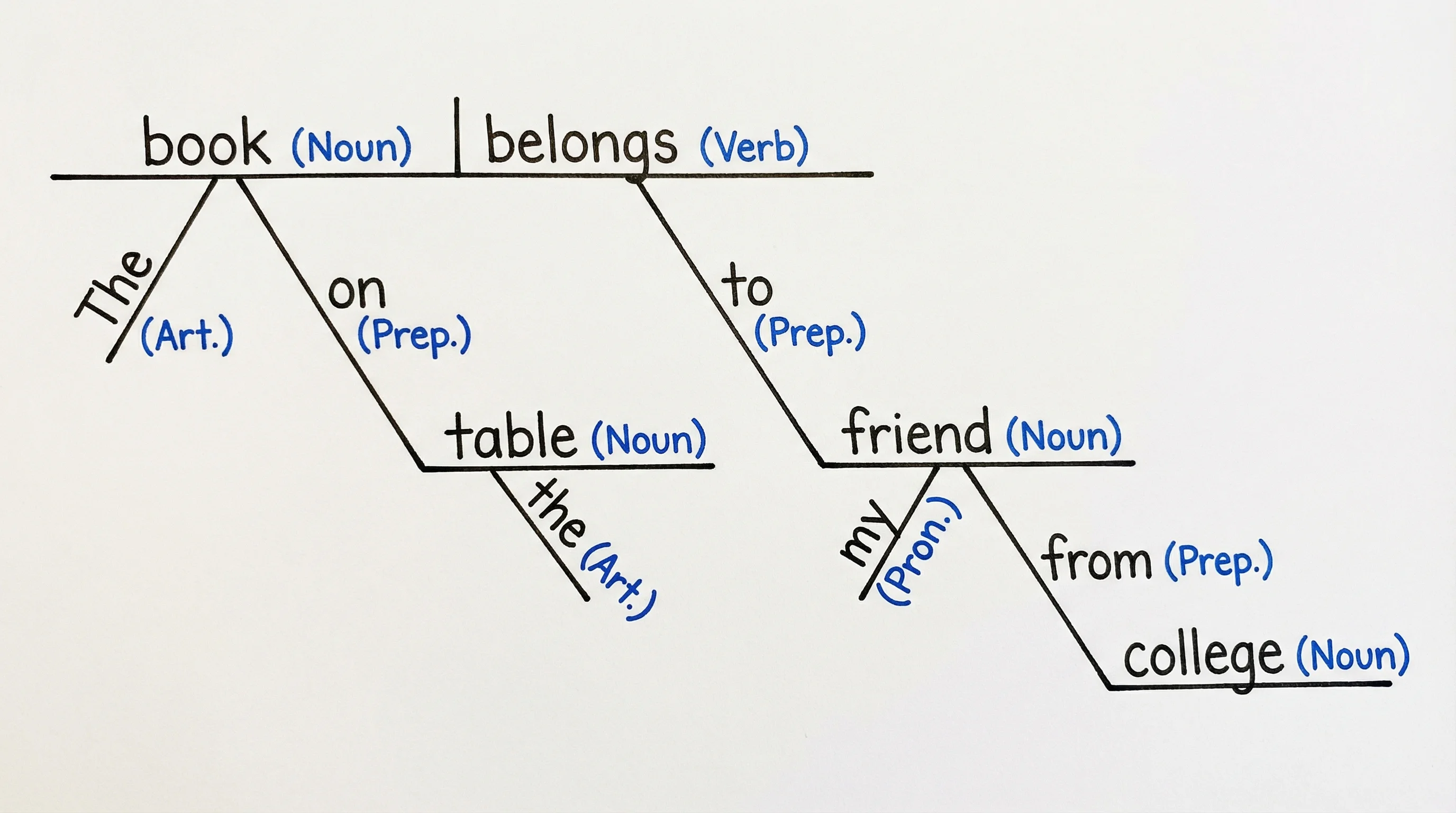
A prepositional phrase diagram: the preposition sits on a diagonal line connecting the modified word to the object of the preposition
Prepositional phrases can modify nouns as well. For example, in "The book on the shelf is old," the phrase "on the shelf" modifies "book" (a noun), so the diagonal line branches down from "book" rather than from the verb.
Step 6: Handle Compound Sentences
A compound sentence contains two or more independent clauses joined by a coordinating conjunction (and, but, or, so, yet, for, nor). In a Reed-Kellogg diagram, each independent clause gets its own baseline, and the conjunction sits on a dotted horizontal line connecting the two clauses.
    Subject₁   |    Verb₁
────────────────┼────────────────
        :
        : conjunction
        :
    Subject₂   |    Verb₂
────────────────┼────────────────
Example: The dog barked, and the cat hid.
      dog      |    barked
───────────────┼───────────────
    /       :
  The       :  and
            :
      cat      |    hid
───────────────┼───────────────
    /
  the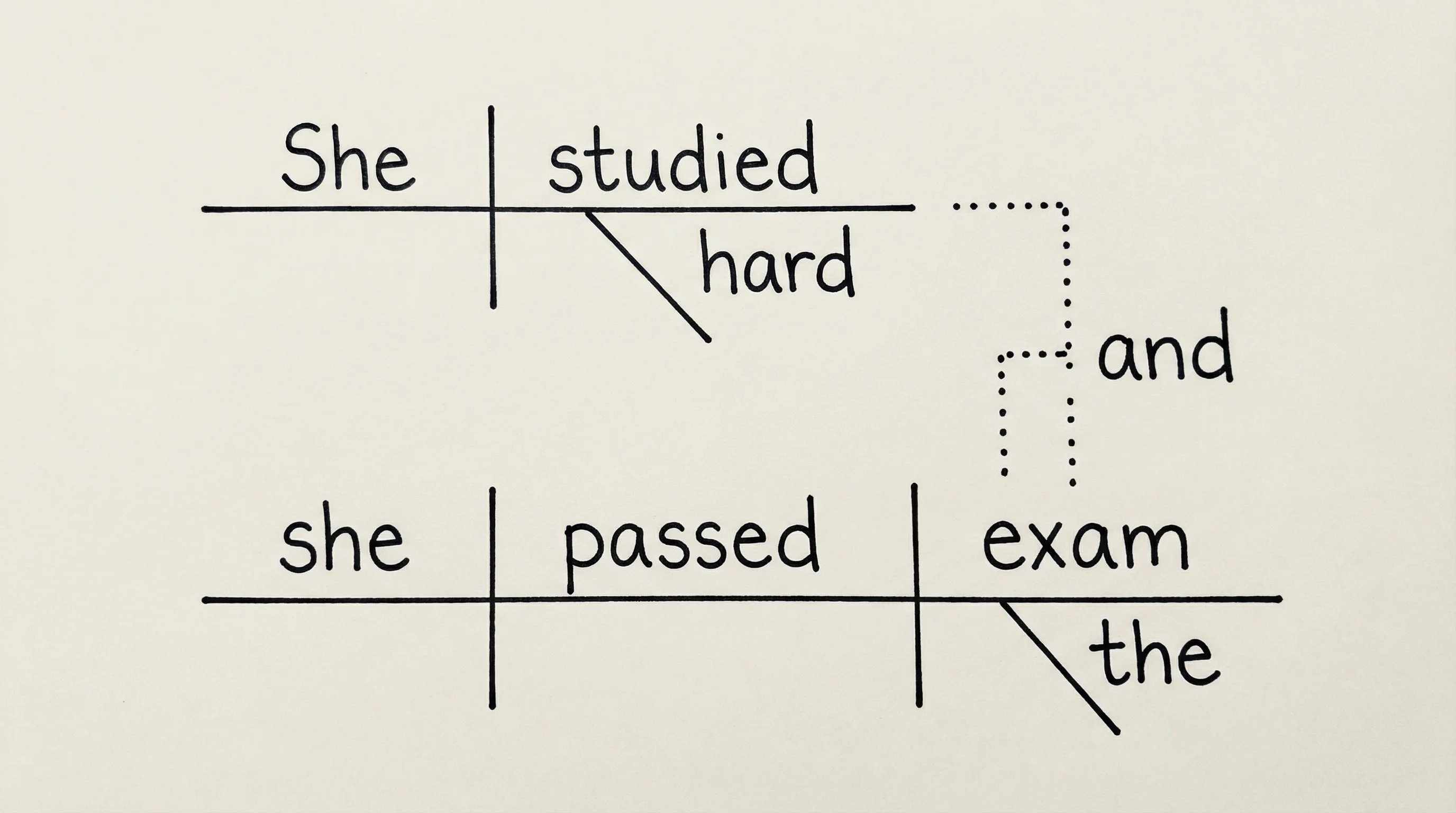
A compound sentence diagram: two independent clauses are stacked and connected by a dotted line with the conjunction
The key visual cue is the dotted vertical or stepped line linking the two baselines, with the conjunction written on or beside it.
Step 7: Handle Complex Sentences — Subordinate Clauses
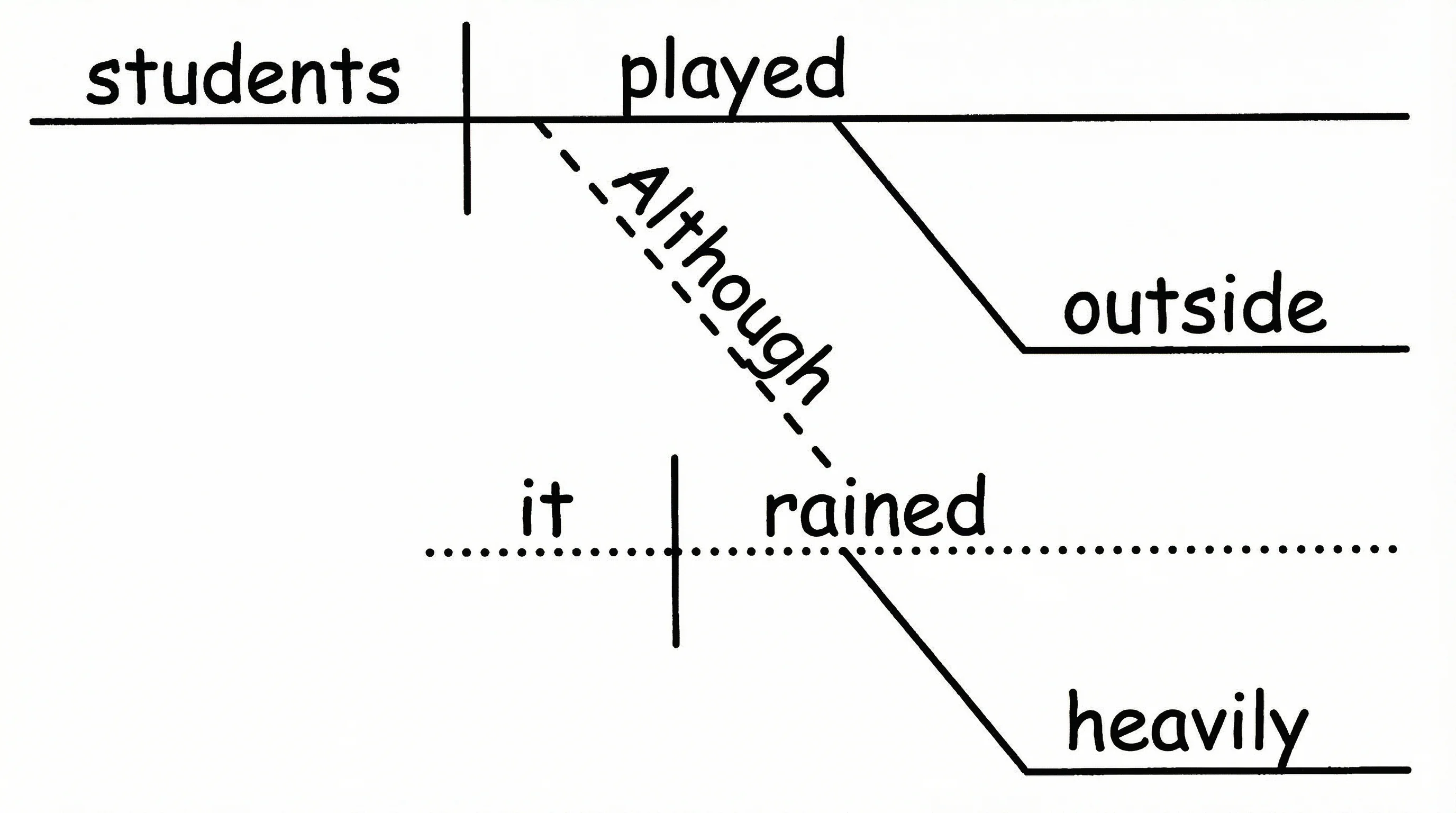
A complex sentence contains an independent clause and one or more dependent (subordinate) clauses. The dependent clause is diagrammed on its own baseline below the main clause. A dotted line connects the subordinate clause to the word it modifies in the main clause.
    Subject    |    Verb    |    Object
───────────────┼────────────┼────────────────
                                  :
                                  : (dotted)
                                  :
         Subject₂  |  Verb₂
         ──────────┼──────────
   subordinating
     conjunction
Example: I know that she left.
      I        |    know    |    that
───────────────┼────────────┼────────────────
                                  :
                                  :
              she      |    left
              ─────────┼──────────
Example with adverb clause: The dog barked because it heard a noise.
      dog      |    barked
───────────────┼───────────────
    /                 :
  The                 :
              it     |    heard   |   noise
              ───────┼────────────┼──────────
            because               /
                                 a
A complex sentence diagram: the subordinate clause sits below the main clause, connected by a dotted line
Sentence Diagram Examples by Type
Now that you understand the building blocks, let us look at a gallery of diagram examples that cover the most common sentence structures. For each example, we provide the sentence, a text representation of its diagram, and (where available) a visual image.
1. Simple Sentence
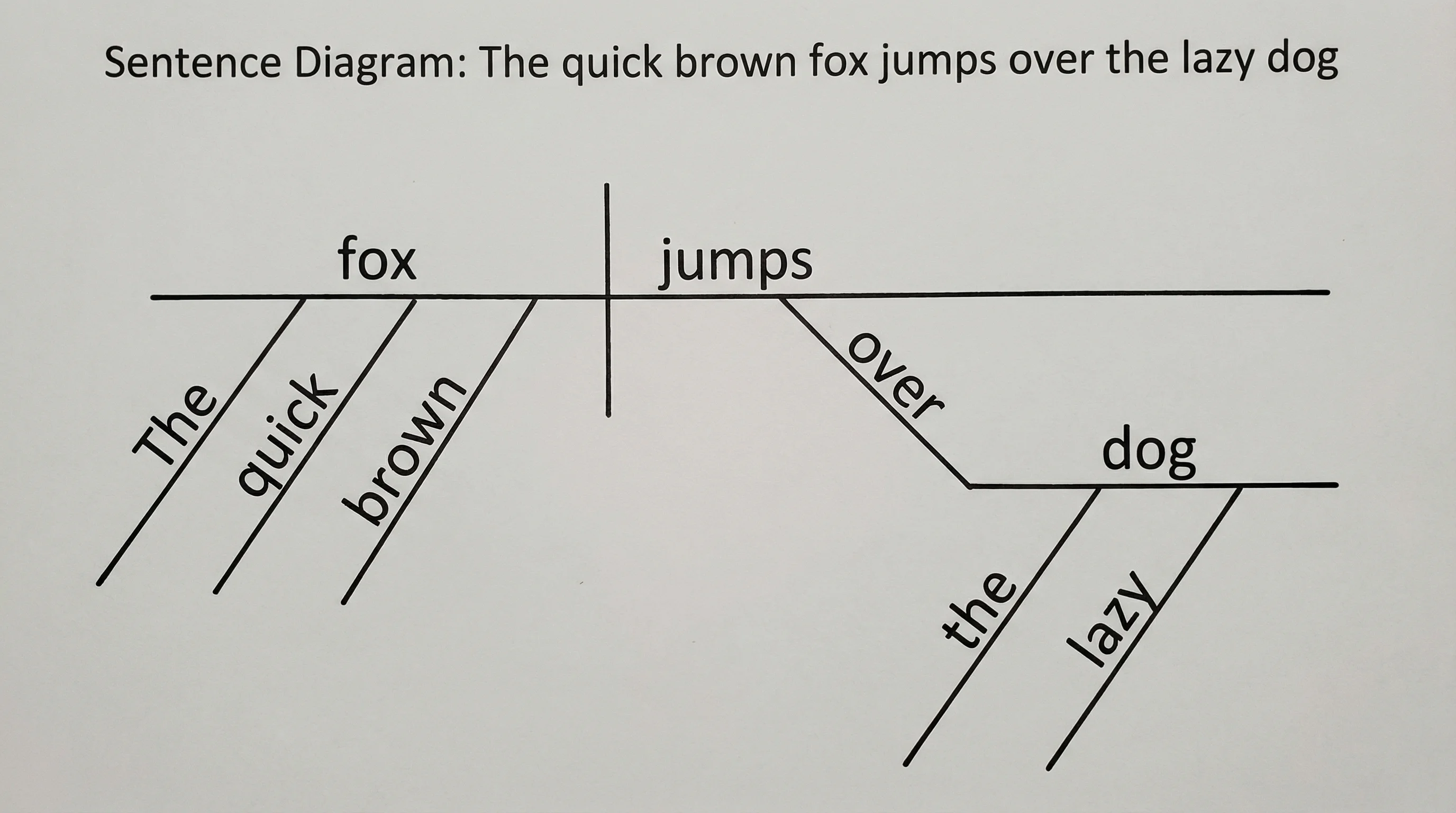
Sentence: The dog runs fast.
      dog      |    runs
───────────────┼───────────────
    /                \
  The               fast
This is the most basic diagram: subject and verb on the baseline, with modifiers on diagonal lines.
A simple sentence diagram: "The dog runs fast" with adjective and adverb modifiers on diagonal lines
2. Sentence with Direct Object
Sentence: She reads books.
    She        |    reads   |    books
───────────────┼────────────┼────────────────
The direct object "books" sits on the baseline after a short vertical line that rests on (but does not cross) the baseline.
3. Sentence with Indirect Object
Sentence: He gave her a gift.
    He         |    gave    |    gift
───────────────┼────────────┼────────────────
                     \            /
                      her        a
The indirect object "her" hangs below the verb on a preposition-style line, and the article "a" modifies "gift" on a diagonal.
4. Sentence with Predicate Nominative
Sentence: She is a teacher.
    She        |    is      \    teacher
───────────────┼─────────────\───────────────
                                  /
                                 a
Notice the line between the verb and the predicate nominative slants back toward the subject — this is a key Reed-Kellogg convention for linking verbs. The backward-slanting line distinguishes a predicate nominative from a direct object.
5. Sentence with Predicate Adjective
Sentence: The sky looks blue.
      sky      |    looks   \    blue
───────────────┼─────────────\───────────────
    /
  The
Like the predicate nominative, the predicate adjective follows a backward-slanting line after a linking verb.
6. Sentence with Prepositional Phrase
Sentence: The bird flew over the tall trees.
     bird      |    flew
───────────────┼───────────────
    /                \
  The               over
                      \──────────
                        trees
                       /    \
                     the    tall
Prepositional phrase diagram: "over the tall trees" branches below the verb it modifies
7. Compound Sentence
Sentence: The sun rose, and the birds sang.
      sun      |    rose
───────────────┼───────────────
    /       :
  The       :  and
            :
     birds     |    sang
───────────────┼───────────────
    /
  the
Compound sentence diagram: each clause has its own baseline, connected by the conjunction
8. Complex Sentence with Subordinate Clause
Sentence: The student passed because she studied every night.
    student    |    passed
───────────────┼───────────────
    /                 :
  The                 :
              she    |    studied
              ───────┼──────────────
            because        \
                           night
                          /    \
                       every   (adv)
Complex sentence diagram: the adverb clause "because she studied every night" sits below the main clause
9. Passive Voice
Sentence: The cake was eaten by the children.
     cake      |  was eaten
───────────────┼───────────────
    /                \
  The               by
                      \──────────
                       children
                         /
                       the
In passive voice, the subject receives the action. The "by" prepositional phrase (containing the agent) branches below the verb.
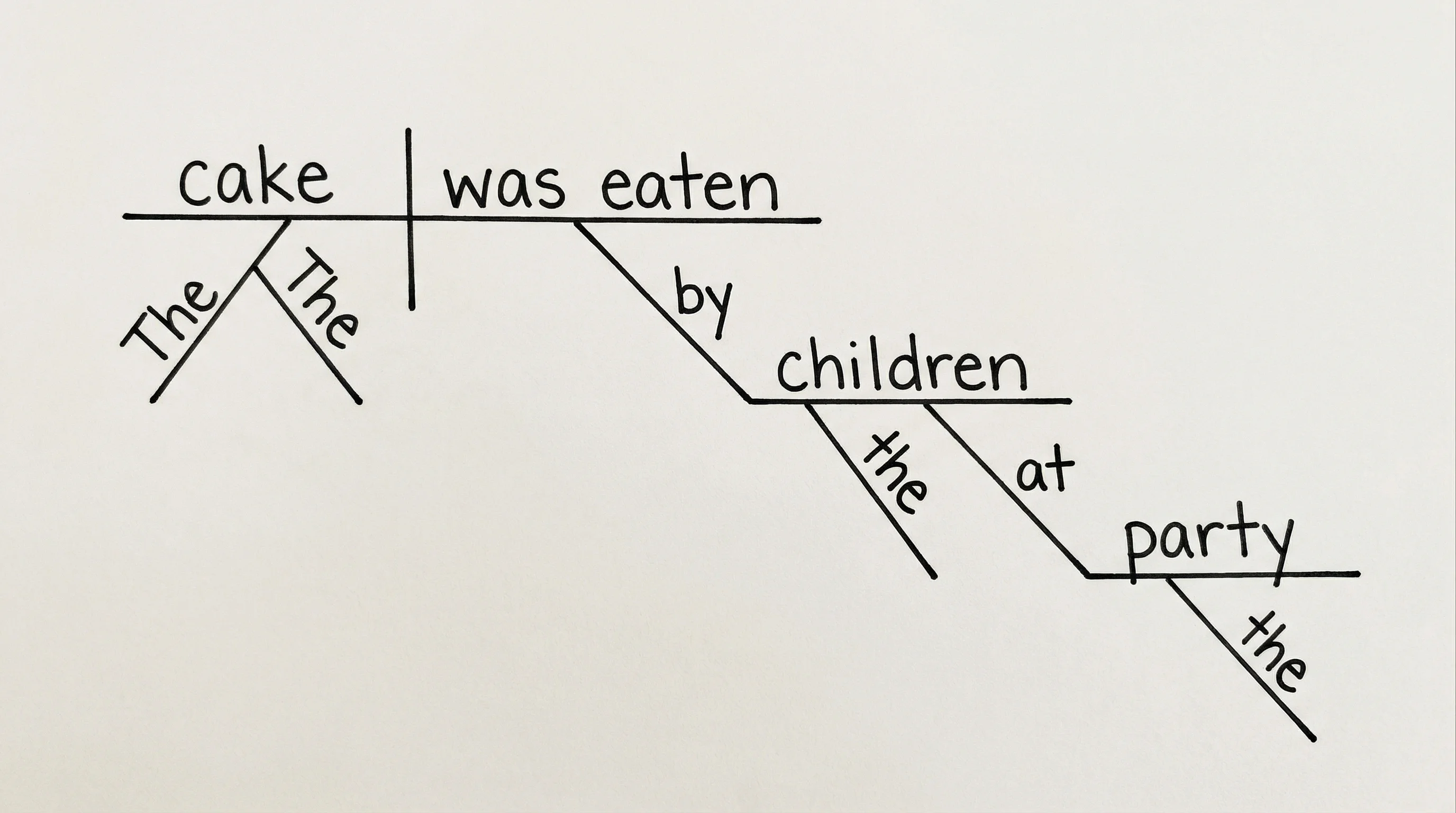
Passive voice diagram: the "by" phrase reveals who actually performed the action
10. Sentence with Relative Clause
Sentence: The book that I borrowed is interesting.
     book      |    is      \  interesting
───────────────┼─────────────\───────────────
    /                :
  The                :
              I     |  borrowed  |  that
              ──────┼────────────┼──────────
The relative pronoun "that" functions as the direct object of the subordinate clause and connects back to "book" in the main clause via a dotted line.
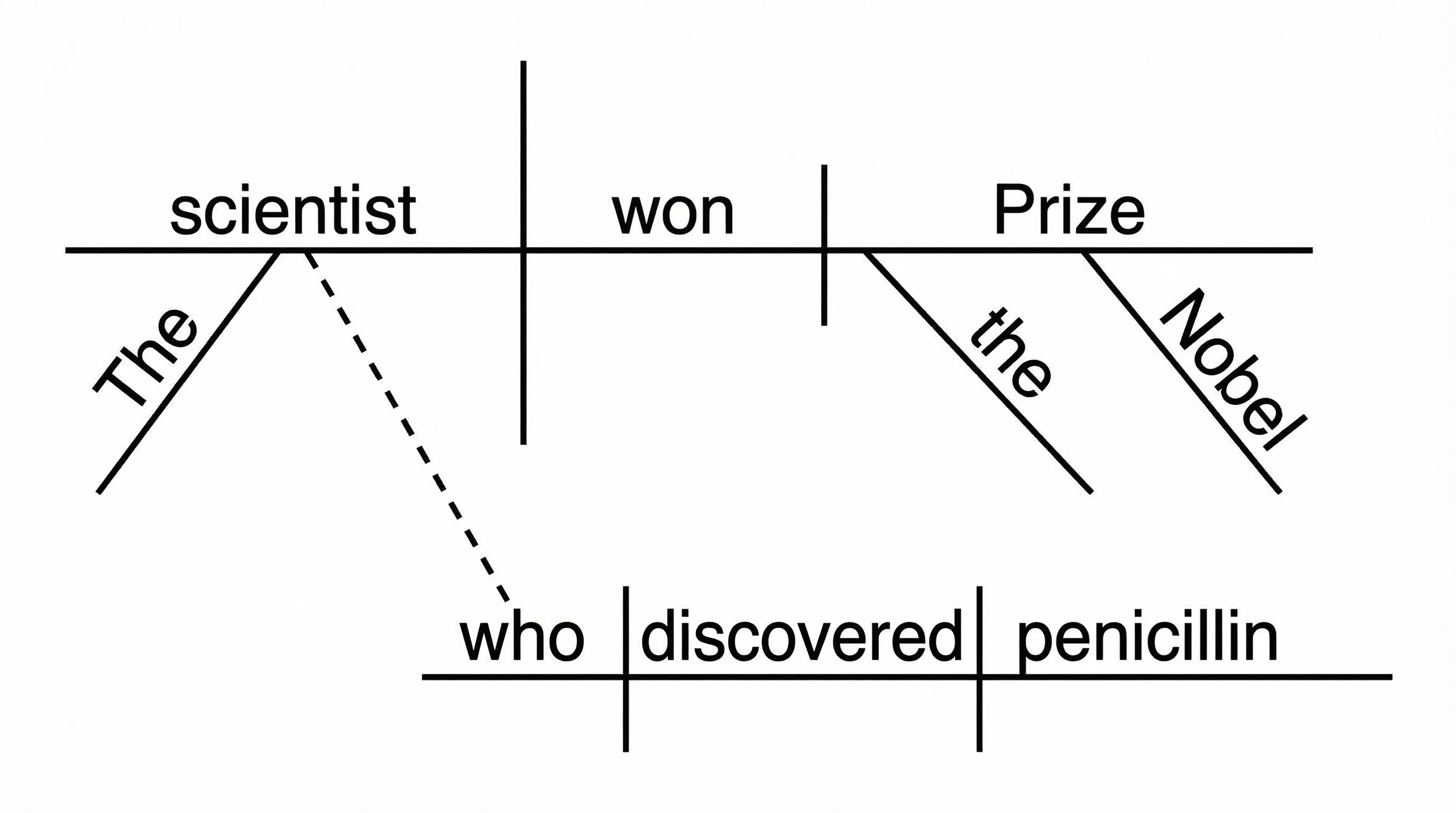
Relative clause diagram: the clause "that I borrowed" modifies "book" and sits below the main baseline
11. Sentence with Compound Subject
Sentence: Tom and Jerry play together.
    Tom
       \
        \──── and ────┤    play
       /              ┤───────────────
    Jerry                    \
                            together
Compound subjects are joined on forked lines that merge into the main baseline before the verb.
12. Sentence with Compound Verb
Sentence: She laughed and cried.
                  laughed
                /
    She    ───┤──── and
                \
                  cried
Compound verbs fork after the subject, with the conjunction in between.
Common Sentence Diagramming Mistakes
Even experienced diagrammers make errors. Here are the most frequent mistakes and how to avoid them.
1. Confusing Direct Objects with Predicate Nominatives
A direct object follows an action verb and receives the action. A predicate nominative follows a linking verb (is, was, seems, becomes) and renames the subject. In the diagram, the line after a linking verb slants backward (\), while the line after an action verb is vertical (|). Using the wrong line changes the meaning of the diagram entirely.
2. Placing Modifiers on the Wrong Word
Adjectives must connect to the noun they modify, and adverbs must connect to the verb (or adjective or adverb) they modify. A common error is attaching an adverb to a noun or an adjective to a verb. Always ask: "Which word does this modifier describe?"
3. Mishandling Prepositional Phrases
A prepositional phrase can modify a noun (adjectival) or a verb (adverbial). Connecting it to the wrong word changes the sentence's meaning. In "She saw the man with the telescope," the prepositional phrase "with the telescope" could modify "saw" (she used a telescope to see) or "man" (the man had a telescope). Your diagram should reflect the intended meaning.
4. Forgetting to Diagram Articles
Articles (a, an, the) are adjectives and must be diagrammed on diagonal lines below the noun they modify. Skipping them makes the diagram incomplete and technically incorrect.
5. Incorrectly Diagramming Compound Elements
When a sentence has compound subjects, compound verbs, or compound objects, they must be shown on forked lines with the conjunction connecting them. A common error is placing compound elements on separate baselines (as if they were independent clauses) instead of forking them from the same grammatical position.
6. Mixing Up Clause Types
Independent clauses and dependent clauses are diagrammed differently. Independent clauses in a compound sentence are connected by a dotted line with the conjunction. Dependent clauses sit below the main clause on their own baseline, connected by a dotted line to the word they modify. Confusing these two structures produces an incorrect diagram.
Why Sentence Diagramming Still Matters
In an age of grammar-checking software and AI writing assistants, some question whether sentence diagramming is still relevant. The answer is a resounding yes — and here is why.
Deeper Grammar Understanding
Spell-checkers and grammar tools can flag errors, but they cannot teach you why a construction is wrong. Diagramming forces you to identify every grammatical relationship in a sentence. This builds intuition that no automated tool can replicate. When you diagram regularly, you begin to "see" sentence structure in your head, which makes you a more confident and effective communicator.
Improved Writing Quality
Professional writers and editors often use diagramming (mentally or on paper) to untangle complex sentences. If you cannot diagram a sentence clearly, it is probably too convoluted for your reader. Diagramming highlights wordiness, ambiguous modifier placement, and unnecessarily complex constructions. For practical guidance on creating clear visual explanations, see our guide to making scientific diagrams for research papers.
ESL and EFL Learning
English word order follows strict rules that differ from many other languages. Sentence diagramming makes these rules visible. ESL learners can compare diagram structures of English sentences with those of their native language to understand key differences in syntax, such as subject-verb-object order, adjective placement, and preposition usage.
Standardized Test Preparation
Tests like the SAT, ACT, GRE, and GMAT include questions on sentence structure, parallelism, modifier placement, and clause relationships. Students who practice diagramming develop a strong internal model of sentence structure that helps them identify grammatical errors quickly and confidently.
A Foundation for Linguistics and Programming
Sentence diagrams are closely related to parse trees in computational linguistics and syntax trees in natural language processing (NLP). Understanding Reed-Kellogg diagrams provides a conceptual bridge to more advanced representations used in linguistics, computer science, and AI. If you work with diagram software or mapping diagrams, you will find that the analytical skills transfer directly.
Renewed Interest in Classical Education
The classical education movement (trivium-based curricula) has brought sentence diagramming back into thousands of schools and homeschool programs. Organizations like the Institute for Excellence in Writing, Classical Conversations, and Well-Trained Mind recommend diagramming as a core grammar skill. This renewed interest ensures that diagramming will remain a relevant and valued technique for years to come.
Frequently Asked Questions
Is sentence diagramming still taught in schools?
Yes. While sentence diagramming fell out of mainstream curricula in the 1970s, it has experienced a significant resurgence. Many classical education programs, homeschool curricula, and private schools teach Reed-Kellogg diagramming as a core grammar skill. Some public schools have also reintroduced it, particularly in language arts and AP English courses.
What is the Reed-Kellogg method?
The Reed-Kellogg method is a sentence diagramming system created by Alonzo Reed and Brainerd Kellogg in 1877. It uses horizontal baselines, vertical dividers, and diagonal lines to map out grammatical relationships. The subject and verb sit on a horizontal baseline separated by a vertical line, direct objects follow after a shorter vertical line, and modifiers branch downward on diagonal lines. It remains the most widely used sentence diagramming method in English-language education.
How do you diagram a question?
To diagram a question, first rearrange it into declarative (statement) form, then diagram the resulting statement. For example, 'Did she finish the project?' becomes 'She did finish the project.' Diagram 'She' as the subject, 'did finish' as the compound verb, and 'the project' as the direct object with 'the' on a diagonal modifier line. The question mark is not shown in the diagram.
Can AI diagram sentences automatically?
Yes. Modern AI-powered tools can parse a sentence and generate a Reed-Kellogg diagram automatically. ConceptViz's Sentence Diagram Generator lets you type any English sentence and instantly receive a visual Reed-Kellogg diagram. This is especially useful for checking your manual diagrams or quickly visualizing complex sentences.
What is the difference between a sentence diagram and a parse tree?
A sentence diagram (Reed-Kellogg) uses horizontal baselines with vertical and diagonal lines to show grammatical functions (subject, verb, object, modifier). A parse tree (used in linguistics and computer science) uses a branching tree structure to show hierarchical phrase structure (noun phrases, verb phrases, clauses). Both represent sentence structure, but they emphasize different aspects: Reed-Kellogg focuses on grammatical roles, while parse trees focus on constituent hierarchy.
How long does it take to learn sentence diagramming?
Most students can learn to diagram simple sentences (subject-verb-object with modifiers) within one to two hours of practice. Intermediate structures like prepositional phrases and compound sentences typically take a few additional practice sessions. Complex sentences with multiple subordinate clauses and relative clauses may require several weeks of regular practice to diagram confidently. Using an AI sentence diagram generator to check your work can accelerate the learning process significantly.
Start Diagramming Sentences Today
Sentence diagramming is a skill that rewards practice. Start with simple subject-verb sentences, then gradually add direct objects, modifiers, prepositional phrases, and clauses. Within a few weeks of regular practice, you will develop an intuitive understanding of English sentence structure that improves your writing, reading comprehension, and grammar skills.
If you want to skip the manual drawing and get instant results, try our free AI-powered tool:
Sentence Diagram Generator
Skip the manual drawing. Type any sentence and get an instant Reed-Kellogg diagram.
Categories
More Posts
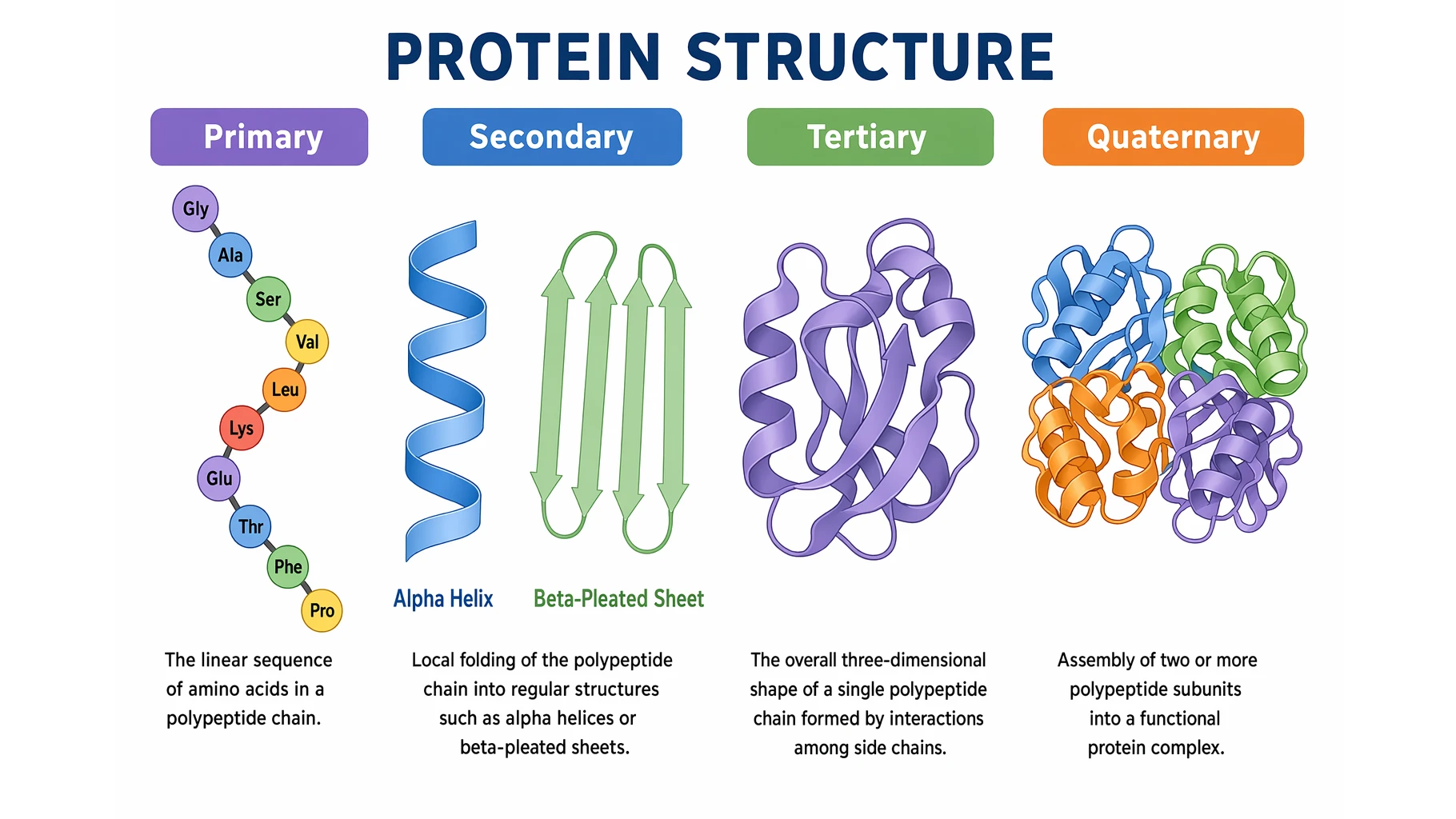
Protein Structure: The 4 Levels Explained Simply
Protein structure made simple: the four levels (primary, secondary, tertiary, quaternary), the bonds that stabilize each, and why structure decides function.

Definition of Terms in Research: Thesis Examples, Format & Chapter 1 Guide
What definition of terms means in research and thesis Chapter 1, with examples, format rules, alphabetical order guidance, and common mistakes.

Canva for Diagrams: Honest Review & Alternatives
An honest review of Canva's diagramming features in 2026. See where Canva excels, where it falls short, and which specialized alternatives work better.